




MCP Apps + CopilotKit
Build MCP-powered interactions directly into your agentic application.
MCP Apps were initially designed to run inside chat-based AI hosts such as ChatGPT and Claude.
CopilotKit and AG-UI now make MCP Apps usable inside real, user-facing applications.
What are MCP Apps?
MCP Apps are declared by MCP servers and represent distinct user interactions — not just function calls.
Each MCP App corresponds to a purpose-built interaction surface that a host can render and interact with. A single MCP server may expose multiple MCP Apps, each optimized for a different user task.
“MCP Apps are a game-changer. They join protocols like MCP, A2A, AG-UI and Generative UI specs to unlock unprecedented composability and UX. This is what we built CopilotKit for: connecting any app to any agentic backend. With MCP Apps, that vision just got supercharged.”

Atai Barkai
CEO and Co-Founder, CopilotKit
CopilotKit: Your App + MCP Apps
CopilotKit and AG-UI bring MCP apps into your application — where you control UX, permissions, workflows, and agent behavior — instead of confining them to first-party AI chat experiences.
Using MCP Apps through CopilotKit lets your app move beyond text-only copilots and become an interactive, agent-driven product where tools can ask users for input, confirmation, and decisions at the exact moment they matter.
Build Interactive Agents with Generative UI
Atai teaches MCP Apps inside CopilotKit + AG-UI as the open-ended end of the Generative UI Spectrum, in a hands-on short course on DeepLearning.AI.
Powered by MCP Apps and CopilotKit, your application delivers a unified experience where text, tools, UI, and user input work together seamlessly.
Tool-Native UI
Let agents open pickers, forms, and approvals instead of asking users to respond in text
Structured Input
Collect structured input that agents can reliably act on
In-Product User Retention
Keep users inside your product, rather than bouncing them to external chat tools
Workflow Integrated Actions
Blend agent actions directly into existing workflows and screens
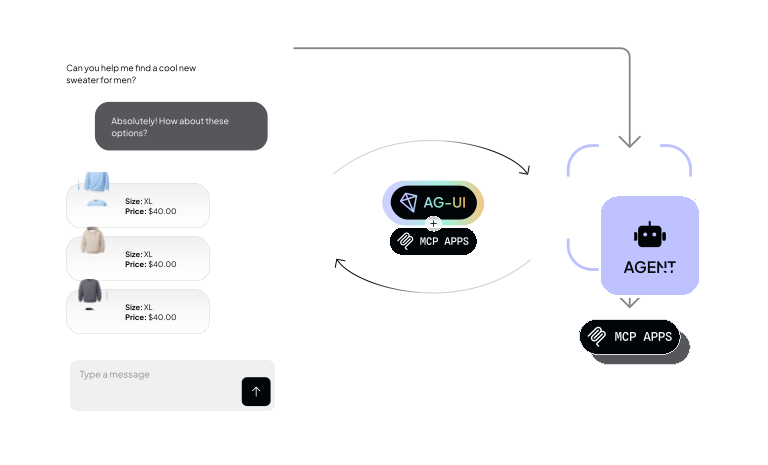
The Agentic App Stack using MCP Apps


Ready to Get Started?
Learn how to integrate MCP Apps into your application with CopilotKit and AG-UI.
