AI agents have become much better at reasoning and planning. The UI layer has mostly stayed the same, and it is holding back the experience.
Most agent experiences still rely on chat, even when the task clearly needs forms, previews, controls, or step-by-step feedback.
Generative UI is the idea that allows agents to influence the interface at runtime, so the UI can change as context changes. This is usually done through UI specs like A2UI, Open-JSON-UI, or MCP Apps.
Today, we will break down Generative UI, the three practical patterns, and how CopilotKit supports them (using AG-UI protocol under the hood).
Let's jump in.
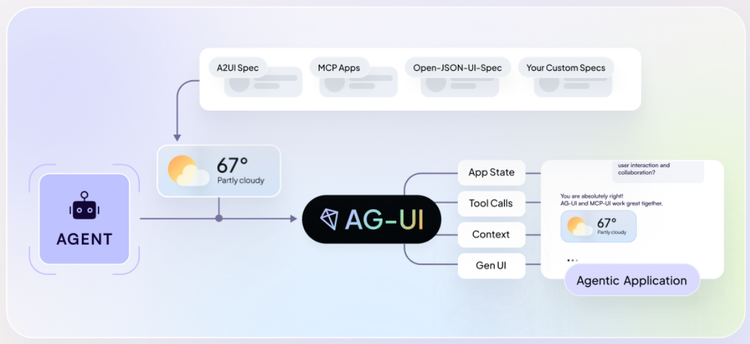
In summary, we will cover these topics in detail.
Here’s the GitHub Repo for the live playground that implements all three approaches.
Generative UI (sometimes called GenUI) is a pattern in which parts of the user interface are generated, selected, or controlled by an AI agent at runtime rather than being fully predefined by developers.
Instead of hardcoding every button, form, or panel upfront, the UI is created dynamically based on the user's needs and context. The agent can decide what UI to show, what inputs it needs from the user, and how the state should update as the task progresses.
Instead of only generating text, the agent can:
This turns the UI into an active part of the agent’s execution rather than a static wrapper around a chat box. The frontend no longer has to infer intent from text.
Generative UI = LLM output → live, interactive UI
Examples:
In the CopilotKit ecosystem, Generative UI is not a single abstraction. It is a set of patterns built on top of agentic UI specifications (such as A2UI and MCP Apps) that define how agents communicate UI updates to applications. You can read more on the website and refer to the docs.
Google describes Generative UI as a way to give models a rich, custom, and interactive user experience that adapts to any prompt. If you are interested in reading more, you can check out their research blog.
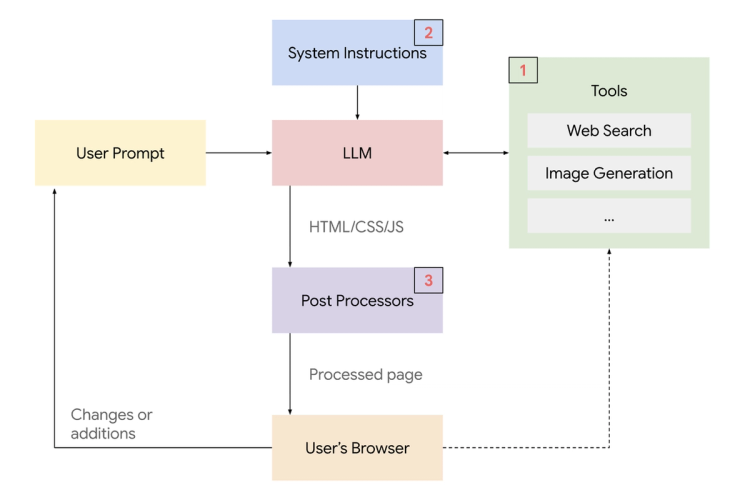
Most agent experiences today still look like chat apps. When agents move beyond chatting and start doing things, text alone becomes a bottleneck.
Common problems with text-only agents:
With Generative UI:
This makes agent systems easier to understand and guide. Instead of interacting with a black box, users interact with a system that exposes its state through UI.
Most Generative UI implementations fit into three patterns. What separates them is how much control stays in the frontend versus how much freedom is given to the agent.
Here are the three types (along with example specs):
1) Static Generative UI (high control, low freedom) - streamed via AG-UI
The frontend owns the UI. The agent only selects which predefined component to show and fills it with data.
2) Declarative Generative UI (shared control) - using A2UI, Open-JSON-UI
The agent returns a structured UI spec (cards, lists, forms). The frontend renders it with its own constraints and styling.
3) Open-ended Generative UI (low control, high freedom) - enabled by MCP Apps
The agent returns a full UI surface (often embedded or free-form). The frontend mainly hosts it, so you trade consistency and safety for flexibility.
The source playground demonstrates all three patterns side by side. Its hosted demo is being retired; you can run the code locally:
Here is a short demo!
You can check the docs and pick the integration you are using to see detailed implementation guides and examples.
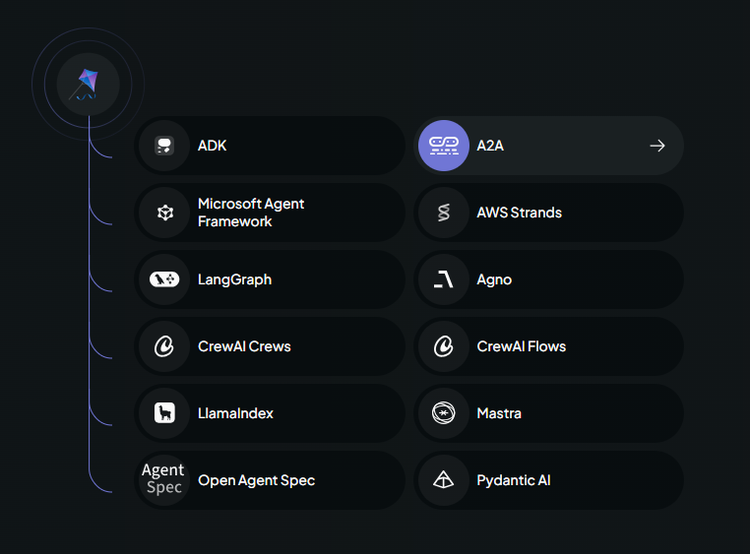
Now, let's cover each pattern in depth and see how to implement them.
Static Generative UI is the most constrained pattern.
Developers pre-build UI components, and the agent’s role is limited to deciding when a component appears and what data it receives. The layout and interactions are fully owned by the application.
In CopilotKit, this pattern is implemented using the useFrontendTool hook, which binds predefined UI components to an action’s execution lifecycle.
// Weather tool - callable tool that displays weather data in a styled card
useFrontendTool({
  name: "get_weather",
  description: "Get current weather information for a location",
  parameters: z.object({ location: z.string().describe("The city or location to get weather for") }),
  handler: async ({ location }) => {
    await new Promise((r) => setTimeout(r, 500));
    return getMockWeather(location);
  },
  render: ({ status, args, result }) => {
    if (status === "inProgress" || status === "executing") {
      return <WeatherLoadingState location={args?.location} />;
    }
    if (status === "complete" && result) {
      const data = JSON.parse(result) as WeatherData;
      return (
        <WeatherCard
          location={data.location}
          temperature={data.temperature}
          conditions={data.conditions}
          humidity={data.humidity}
          windSpeed={data.windSpeed}
        />
      );
    }
    return <></>;
  },
});
Here, the useFrontendTool hook lets the application register the get_weather tool and attach a predefined React render to each phase of its lifecycle.
Output:
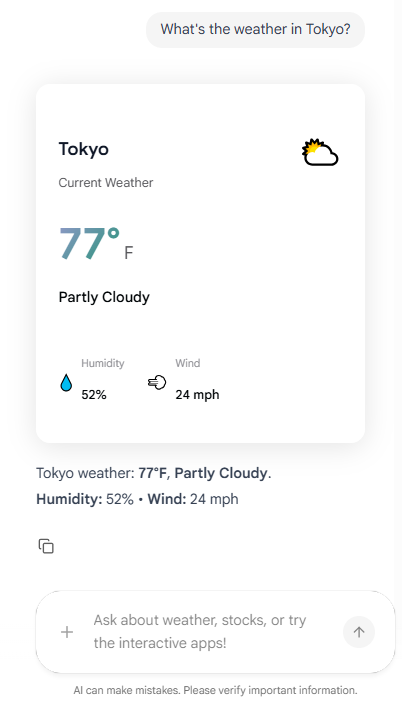
The agent can invoke the tool and stream arguments, but it never controls layout or invents UI.
You can check the complete implementation at github.com/CopilotKit/generative-ui-playground.
Declarative Generative UI sits between static and fully open-ended approaches.
Instead of selecting predefined components, the agent returns a structured UI description. This description defines things like cards, lists, forms, or widgets, and the frontend renders them.
Two common declarative specifications used here are:
1) A2UI → declarative Generative UI spec from Google, described as JSONL-based, and agents can use it to return UI widgets as part of their responses
2) Open‑JSON‑UI → open standardization of OpenAI’s internal declarative Generative UI schema
Both define structured, platform-agnostic ways for agents to describe UI in JSON.
Let's first understand the basic flow for implementing A2UI.
Instead of writing A2UI JSON by hand, you can use the A2UI Composer to generate the spec for you. Copy the output and paste it into your agent’s prompt as a reference template.
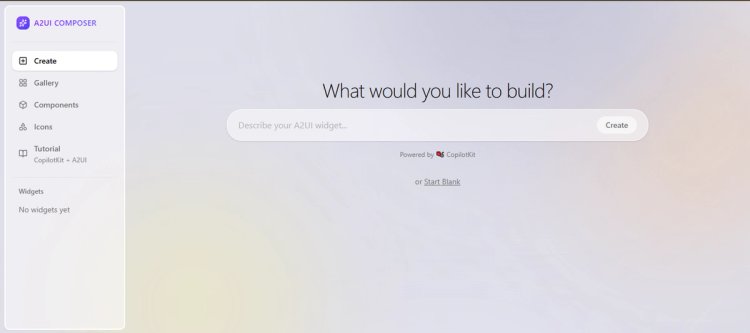
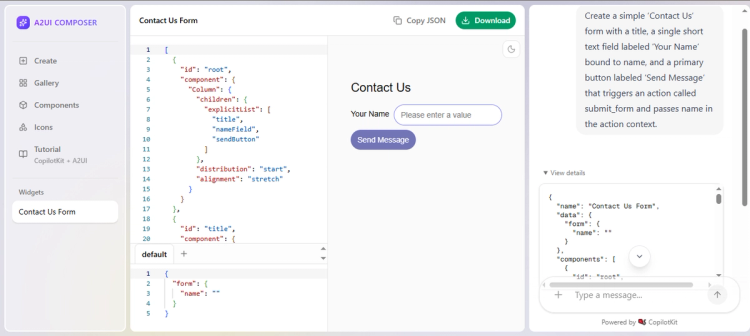
In your prompt_builder.py - choose one representative A2UI template (e.g., a simple form or list). This is what the agent learns to emit:
UI_EXAMPLES = """
---BEGIN FORM_EXAMPLE---
[
  { "beginRendering": { "surfaceId": "form-surface", "root": "form-column",
                        "styles": { "primaryColor": "#9B8AFF", "font": "Plus Jakarta Sans" } } },
  { "surfaceUpdate": {
      "surfaceId": "form-surface",
      "components": [
        { "id": "form-column", "component": { "Column": {
            "children": { "explicitList": ["form-title", "name-field", "submit-button"] }
        } } },
        { "id": "form-title", "component": { "Text": {
            "usageHint": "h2", "text": { "literalString": "Contact Us" }
        } } },
        { "id": "name-field", "component": { "TextField": {
            "label": { "literalString": "Your Name" },
            "text": { "path": "name" },
            "textFieldType": "shortText"
        } } },
        { "id": "submit-button", "component": { "Button": {
            "child": "submit-text", "primary": true,
            "action": { "name": "submit_form", "context": [
              { "key": "name", "value": { "path": "name" } }
            ] }
        } } },
        { "id": "submit-text", "component": { "Text": {
            "text": { "literalString": "Send Message" }
        } } }
      ]
    }
  },
  { "dataModelUpdate": {
      "surfaceId": "form-surface", "path": "/", "contents": [
        { "key": "name", "valueString": "" }
      ]
    }
  }
]
---END FORM_EXAMPLE---
"""
This single JSONL‑formatted block defines a “Contact Us” form in A2UI. You feed it to the agent so it learns the three message envelopes A2UI expects: surfaceUpdate (components), dataModelUpdate (state), then beginRendering (render signal).
Then add UI_EXAMPLES into the system prompt that the agent uses:
if use_ui:
    instruction = AGENT_INSTRUCTION + get_ui_prompt(self.base_url, UI_EXAMPLES)
else:
    instruction = get_text_prompt()

return LlmAgent(
    model=LiteLlm(model=LITELLM_MODEL),
    name="ui_generator_agent",
    description="Generates dynamic UI via A2UI declarative JSON.",
    instruction=instruction,
    tools=[],
)
By appending UI_EXAMPLES (and the A2UI schema) to your agent’s instruction, you ensure it streams back valid JSON based on your templates whenever the user asks for a UI.
The final step is using createA2UIMessageRenderer that takes the agent’s A2UI JSON and your theme, then renderActivityMessages tells CopilotKit to use it when rendering chat messages.
import { CopilotKitProvider, CopilotSidebar } from "@copilotkitnext/react";
import { createA2UIMessageRenderer } from "@copilotkit/a2ui-renderer";
import { a2uiTheme } from "../theme";

// Instantiate the A2UI renderer once with your theme
const A2UIRenderer = createA2UIMessageRenderer({ theme: a2uiTheme });

export function A2UIPage({ children }: { children: React.ReactNode }) {
  return (
    <CopilotKitProvider
      runtimeUrl="/api/copilotkit-a2ui"
      renderActivityMessages={[A2UIRenderer]}   // ← hook in the A2UI renderer
      showDevConsole={false}
    >
      {children}
      <CopilotSidebar defaultOpen labels={{ modalHeaderTitle: "A2UI Assistant" }} />
    </CopilotKitProvider>
  );
}
Output:
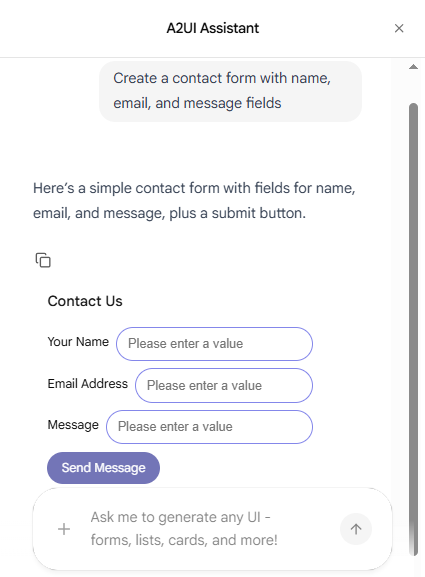
The playground repo is wired for A2UI, but the pattern is the same for Open‑JSON‑UI.
An agent can respond with a payload that describes a UI “card” in JSON, and the frontend renders it.
// Example: Agent returns Open-JSON-UI specification
{
  type: "open-json-ui",
  spec: {
    components: [
      {
        type: "card",
        properties: {
          title: "Data Visualization",
          content: {...}
        }
      }
    ]
  }
}
Output:
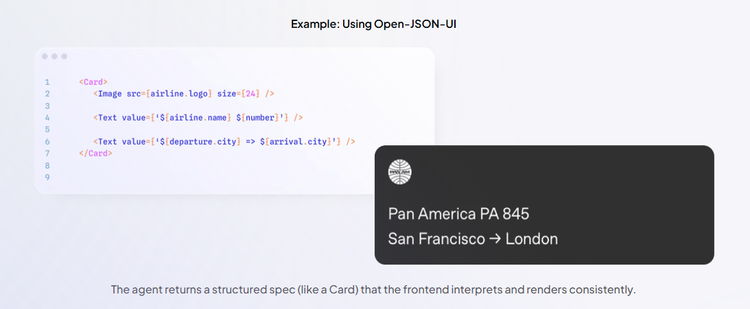
You can check the specs overview at docs.copilotkit.ai/learn/generative-ui/specs/open-json-ui to understand how CopilotKit's AG-UI protocol natively supports Open-JSON-UI.
This pattern is a good fit if you need more flexibility than static UI, while still keeping clear boundaries and predictable rendering.
Open-ended Generative UI is the most flexible and powerful.
In this pattern, the agent returns an entire UI surface. This can be HTML, an iframe, or other free-form content. The frontend mainly acts as a container that displays whatever the agent provides.
This approach is commonly used with MCP Apps, where external applications expose their own UI that can be embedded into an agent experience.
Traditional MCP tools return text, images, resources or structured data that the host displays as part of the conversation. MCP Apps extend this pattern by allowing tools to declare a reference to an interactive UI in their tool description that the host renders in place.
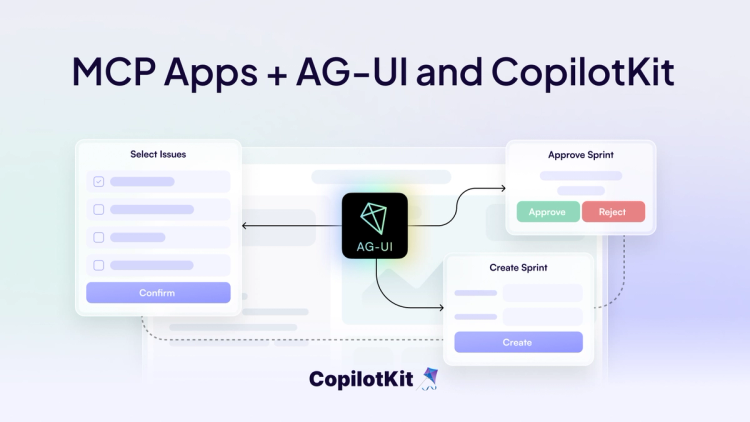
The trade-offs are real. Rendering arbitrary UI introduces security and performance concerns, inconsistent styling, and harder portability outside the web.
But for complex tools and rich applications, this pattern unlocks capabilities that are impossible with static or declarative UI alone.
In CopilotKit, MCP Apps support is enabled by attaching MCPAppsMiddleware to your agent, which allows the runtime to connect to one or more MCP Apps servers.
// app/api/copilotkit/route.ts
import {
  CopilotRuntime,
  ExperimentalEmptyAdapter,
  copilotRuntimeNextJSAppRouterEndpoint,
} from "@copilotkit/runtime";
import { BuiltInAgent } from "@copilotkit/runtime/v2";
import { NextRequest } from "next/server";
import { MCPAppsMiddleware } from "@ag-ui/mcp-apps-middleware";

// 1. Create your agent and add the MCP Apps middleware
const agent = new BuiltInAgent({
  model: "openai/gpt-4o",
  prompt: "You are a helpful assistant.",
}).use(
   new MCPAppsMiddleware({
    mcpServers: [
      {
        type: "http",
        url: "http://localhost:3108/mcp",
        serverId: "my-server" // Recommended: stable identifier
      },
    ],
  }),
)

// 2. Create a service adapter, empty if not relevant
const serviceAdapter = new ExperimentalEmptyAdapter();

// 3. Create the runtime and add the agent
const runtime = new CopilotRuntime({
  agents: {
    default: agent,
  },
});

// 4. Create the API route
export const POST = async (req: NextRequest) => {
  const { handleRequest } = copilotRuntimeNextJSAppRouterEndpoint({
    runtime,
    serviceAdapter,
    endpoint: "/api/copilotkit",
  });

  return handleRequest(req);
};
Here is the GitHub Repo for the complete code implementation, and you can check the complete integration flow in the blog.
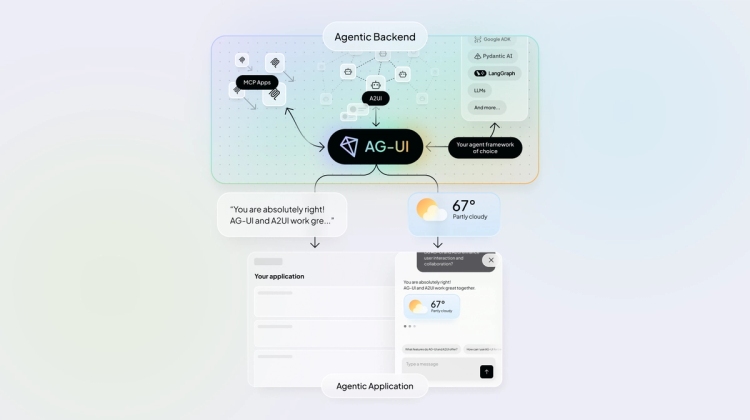
Across all three patterns, AG-UI (Agent-User Interaction Protocol) serves as the underlying runtime interaction layer in CopilotKit. It provides a bidirectional connection between the agent and the application that makes Generative UI work.
It is not a UI specification. It is an event/state protocol that defines how UI updates, agent state, and user interactions flow while the agent is working.
At a high level, AG-UI handles:
For instance, here is the role of AG-UI protocol across Generative UI patterns:
Because AG-UI sits below specs like A2UI, Open-JSON-UI, and MCP Apps, CopilotKit can support multiple Generative UI approaches without locking you into a single approach.
That's it!
In many cases, the real bottleneck is the interface that sits between the agent and the user.
Generative UI provides a practical way forward, and once you build one of these patterns yourself, it becomes clear which approach fits which problem.
I hope you learned something valuable. Have a great day!
Happy Building!
Subscribe to our blog and get updates on CopilotKit in your inbox.