Agent frameworks have become increasingly capable at reasoning, orchestration and tool execution.
Oracle’s Open Agent Specification (Agent Spec) makes that agent behavior portable by defining workflows and tool usage in a standard way. You can define an agent once and run it across compatible runtimes.
But returning JSON isn’t the same as shipping an experience. If the agent only returns structured data, every host application still has to build the UI and keep it in sync while tools run and state changes.
A2UI (by Google) gives agents a standard way to describe the UI they want (forms, tables) as structured JSONL, so the UI contract between the agent and the host app can be portable too.
Today, Oracle, Google, and CopilotKit jointly shipped transportless A2UI, with Open Agent Spec as the first adopter and AG-UI as the runtime interaction layer.
The result is a shared interaction model where agents, runtimes, and frontends can plug into each other with minimal friction.
Let’s break down how these layers fit together, the end-to-end integration flow and what this unlocks for agent builders.
You can refer to the docs and explore the starter repo to see the complete integration setup.
Oracle’s Open Agent Specification (Agent Spec) is a framework-agnostic way to describe AI agents, workflows and multi-agent patterns as a portable configuration.
Instead of coupling behavior to a specific runtime, Agent Spec allows you to define the agent once and run it across compatible runtimes without rewriting orchestration logic or tool wiring.
Agent Spec Tracing makes this practical. It provides a consistent way for agents to emit structured events: tool calls, progress updates and state changes, so other systems can reliably consume them, including frontends.
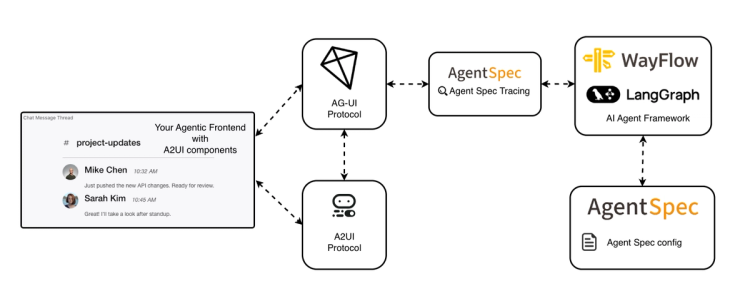
These events can also be streamed to AG‑UI‑compatible clients, which we will see in action in the integration flow section.
You can explore the complete spec at oracle.github.io/agent-spec.
Portability usually stops at the UI boundary. The agent logic can be moved, but when real interaction is needed, each host rebuilds its own UI.
If the agent only returns text or generic JSON, the app has to invent the interface and keep it updated while tools run and state changes.
To make UI portable too, you need a standard contract for “what to render” between agent and app. That’s the gap A2UI is designed to close.
A2UI (by Google) defines a declarative generative UI specification for agent interactions.
Instead of shipping only data, an agent can stream a UI description as JSONL and the host application renders it using native components within its own constraints and styling.
This enables guided interaction:
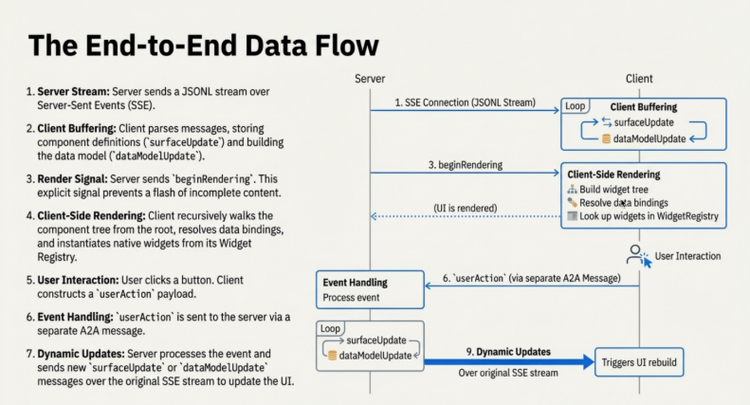
At runtime, the agent emits A2UI messages as part of the interaction stream. Here is a simplified example:
[
  { "beginRendering": { "surfaceId": "review-form", "root": "column" } },
  { "surfaceUpdate": {
      "surfaceId": "review-form",
      "components": [
        { "id": "title", "component": { "Text": {
            "usageHint": "h2",
            "text": { "literalString": "Review Draft" }
        }}}
      ]
  }}
]
This JSONL block describes what should be rendered. The application remains responsible for how it is rendered.
A2UI surfaces are designed to degrade gracefully. If a UI surface cannot be rendered due to validation errors or runtime issues, the client falls back to displaying a plain-text response so the user still receives a meaningful result. You can learn more about this design in the A2UI documentation on graceful degradation.
Credit: A2UI Website
CopilotKit then attaches an A2UI renderer to activity messages and renders those JSONL payloads as structured UI surfaces inside the application. We will see this in action in the integration flow section.
You can explore the full A2UI specification at a2ui.org.
A2UI gives you a declarative way to describe what the user should see. The hard part is making that UI behave correctly while the agent is still running: tools streaming, state evolving and the user clicking around mid‑execution.
AG-UI (Agent-User Interaction Protocol) is that missing layer: an event-based protocol that standardizes the live interaction stream between the agent and the application.
It keeps tool progress, state updates and user interactions synchronized while the agent is running. In practice, it covers:
Any AG‑UI‑compatible frontend can consume that same stream and render these interactions in real time. The protocol itself isn’t tied to a specific framework.
In this integration, AG-UI acts as the interaction stream between Agent Spec runtimes and client applications, carrying tool events, state updates, and A2UI surfaces.
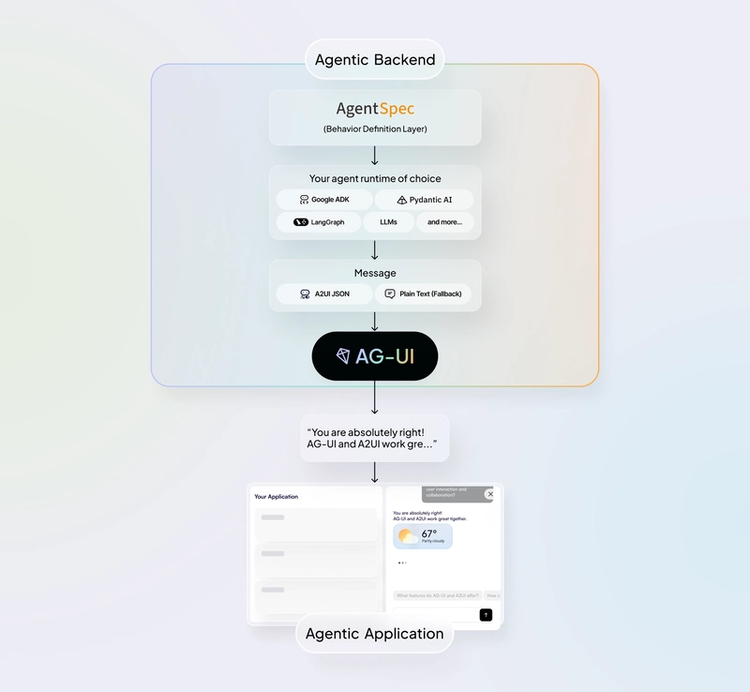
CopilotKit gives you an AG‑UI‑compatible client: it subscribes to an AG-UI event stream for a run defined using Agent Spec, forwards user actions back into that run and renders any A2UI (JSONL) messages as interactive UI inside your app.
So the wiring becomes straightforward:
At a high level, the full interaction loop looks like this:
Agent Spec (portable definition)
│
│ executed on a compatible runtime
│ emits tracing + tool activity
▼
Agent Spec Runtime
│
│ mapped to AG-UI events
▼
AG-UI (event + state stream)
agent ↔ application synchronization
│
│ carries interaction events plus UI payloads:
│ - A2UI surfaces as JSONL
│ - fallback text if surface fails to render
▼
CopilotKit (AG-UI client + A2UI renderer)
│
├─ renders A2UI surfaces (forms, tables, flows)
├─ renders tool lifecycle + progress
└─ forwards user actions → agent via AG-UI
▼
Application UI
This avoids building a custom interaction protocol and UI renderer for every agent project.
We have seen the conceptual flow. Now let’s look at what this actually means in code.
The example repo demonstrates a complete scheduling + email assistant where:
get_user_schedule and check_user_inbox, then serialized and executed via WayFlowsend_a2ui_json_to_client to emit structured surfaces - a calendar view with today's events or an editable email draft formcreateA2UIMessageRendererBelow is the core integration flow.
Start by defining the agent (a2ui_agentspec_agent.py). The system prompt embeds the full A2UI JSON schema and concrete surface examples (a calendar and an email form) so the model knows exactly what valid A2UI output looks like.
The agent needs two server tools (like get_user_schedule, check_user_inbox) for fetching real data and one client tool (send_a2ui_json_to_client) through which it emits UI surfaces to the frontend.
# a2ui_agentspec_agent.py (core pattern)
from pyagentspec.agent import Agent
from pyagentspec.tools import ServerTool, ClientTool
from pyagentspec.serialization import AgentSpecSerializer
from pyagentspec.llms import OpenAiCompatibleConfig, LlmGenerationConfig

send_a2ui_json_to_client_tool = ClientTool(
    name="send_a2ui_json_to_client",
    description="Send A2UI JSON to the client to render a UI surface.",
    parameters=[{"name": "a2ui_json", "type": "string"}],
)

check_user_inbox_tool = ServerTool(
    name="check_user_inbox",
    description="Search the user's inbox.",
    parameters=[{"name": "search_query", "type": "string"}],
)

get_user_schedule_tool = ServerTool(
    name="get_user_schedule",
    description="Retrieve today's schedule.",
    parameters=[],
)

agent = Agent(
    name="a2ui_chat_agent",
    system_prompt=A2UI_SYSTEM_PROMPT,  # schema + examples injected here
    llm_config=OpenAiCompatibleConfig(
        model_id=os.getenv("OPENAI_MODEL", "gpt-5.2"),
        url=os.getenv("OPENAI_BASE_URL", "https://api.openai.com/v1"),
        generation_config=LlmGenerationConfig(reasoning={"effort": "none"}),
    ),
    tools=[send_a2ui_json_to_client_tool, check_user_inbox_tool, get_user_schedule_tool],
)

a2ui_chat_json = AgentSpecSerializer().to_json(agent)
The agent is then serialized to JSON via AgentSpecSerializer, that's the spec the runtime executes.
The system prompt (A2UI_SYSTEM_PROMPT) is built from the A2UI protocol rules, JSON schema and surface examples in the a2ui_prompts/ directory.
Each A2UI emission follows a structured pattern:
surfaceUpdate : defines the component treedataModelUpdate : initializes or updates the bound statebeginRendering : starts the surface and tells the client to begin renderingOn first render, all three appear in a single send_a2ui_json_to_client call. For subsequent updates, only surfaceUpdate or dataModelUpdate is needed.
Next, wrap the spec with the Agent Spec runtime adapter and wire server tool names to their Python implementations. The runtime here is WayFlow.
# agent.py (core pattern)
from ag_ui_agentspec.agent import AgentSpecAgent
from a2ui_agentspec_agent import a2ui_chat_json, a2ui_demo_tool_registry

def build_a2ui_chat_agent(runtime: str = "wayflow") -> AgentSpecAgent:
    return AgentSpecAgent(
        agent_spec_config=a2ui_chat_json,
        runtime=runtime,
        tool_registry=a2ui_demo_tool_registry,
    )
Then expose the agent over FastAPI in main.py.
configure_logging() is called first so that AG-UI adapter and WayFlow runtime logs are visible (useful when debugging the A2UI event stream). The endpoint mounts at /.
# main.py (core pattern)
from fastapi import FastAPI
from ag_ui_agentspec.endpoint import add_agentspec_fastapi_endpoint
from logging_utils import configure_logging
from agent import build_a2ui_chat_agent
import uvicorn, os

def build_server():
    configure_logging()
    app = FastAPI(title="A2UI Agent Spec Server")
    agent = build_a2ui_chat_agent(runtime="wayflow")
    add_agentspec_fastapi_endpoint(app, agent, path="/")
    return app

app = build_server()

if __name__ == "__main__":
    uvicorn.run("main:app", host="0.0.0.0", port=int(os.getenv("PORT", "8000")),
                reload=True, log_level="info", log_config=None)
On the Next.js side, create an API route that uses the CopilotKit v2 runtime to connect the frontend chat to the Agent Spec backend. HttpAgent points to your backend URL.
A2UIMiddleware is what makes A2UI work here: it encodes A2UI tool calls as AG-UI activity messages and injects the send_a2ui_json_to_client tool on the agent side automatically.
// app/api/copilotkit/[[...slug]]/route.ts
import { CopilotRuntime, createCopilotEndpoint, InMemoryAgentRunner } from "@copilotkit/runtime/v2";
import { handle } from "hono/vercel";
import { HttpAgent } from "@ag-ui/client";
import { A2UIMiddleware } from "@ag-ui/a2ui-middleware";

const agent = new HttpAgent({
  url: process.env.AGENT_URL || process.env.NEXT_PUBLIC_AGENT_URL || "http://localhost:8000/",
});
agent.use(new A2UIMiddleware({ injectA2UITool: true }));

const runtime = new CopilotRuntime({
  agents: { my_a2ui_agent: agent },
  runner: new InMemoryAgentRunner(),
});

const app = createCopilotEndpoint({ runtime, basePath: "/api/copilotkit" });

export const GET = handle(app);
export const POST = handle(app);
Finally, wire up the frontend in page.tsx.
useFrontendTool hook registers send_a2ui_json_to_client on the client side. While the agent is still streaming A2UI JSON, it renders a "Building interface…" indicator.
Then, createA2UIMessageRenderer is passed to renderActivityMessages so CopilotKit knows how to render the completed surface.
// app/page.tsx (core pattern)
"use client";
import { CopilotChat, CopilotKitProvider, useFrontendTool, ToolCallStatus } from "@copilotkit/react-core/v2";
import { createA2UIMessageRenderer } from "@copilotkit/a2ui-renderer";
import { z } from "zod";
import { theme } from "./theme";

const A2UIMessageRenderer = createA2UIMessageRenderer({ theme });

function A2UILoadingIndicator({ status }: { status: ToolCallStatus }) {
  if (status === ToolCallStatus.Complete) return null;
  return <div className="a2ui-loading">Building interface…</div>;
}

function Chat() {
  useFrontendTool({
    name: "send_a2ui_json_to_client",
    description: "Render an A2UI surface in the chat.",
    parameters: z.object({ a2ui_json: z.string() }) as any,
    render: ({ status }) => <A2UILoadingIndicator status={status} />,
  }, []);

  return <CopilotChat className="flex-1 min-h-0 overflow-hidden" agentId="my_a2ui_agent" />;
}

export default function Page() {
  return (
    <CopilotKitProvider
      runtimeUrl="/api/copilotkit"
      showDevConsole="auto"
      renderActivityMessages={[A2UIMessageRenderer]}
    >
      <div className="a2ui-chat-container flex h-full min-h-0 flex-col overflow-hidden">
        <Chat />
      </div>
    </CopilotKitProvider>
  );
}
One thing to keep in mind: agentId="my_a2ui_agent" in CopilotChat must match the key in the runtime's agents map exactly - that's what routes the session to the right backend agent.
This collaboration standardizes three previously disconnected layers:
As a result, agent developers can now:
✅ Define the agent once (Agent Spec) and describe its UI contract (A2UI), then run and render it across compatible runtimes and applications without redesigning orchestration logic.
✅ Expose a standardized interaction stream that any AG-UI-compatible client can consume, without building custom WebSocket or polling layers.
✅ Keep runs observable end-to-end: the same structured events that power the UI can also feed logging, evaluation and monitoring systems.
✅ Connect compatible runtimes and frontends through a shared interaction contract, enabling true plug-and-play interoperability.
By aligning Agent Spec, AG-UI, and A2UI across organizations, this launch establishes a shared contract between agent definition, execution and user interface - reducing integration friction across the ecosystem.
Let's consider a simple example where an employee asks: “Draft an email reply to my manager and schedule a follow‑up meeting.”
1) The agent (defined using Agent Spec) starts a run, plans the steps and calls email + calendar tools to retrieve recent messages and check availability.
2) As tools execute, tracing events stream over AG-UI to the frontend, so the UI reflects progress in real time.
3) Using that context, the agent drafts the reply and proposes meeting time options, then emits an A2UI surface that contains:
4) CopilotKit renders that surface inside your app. If the user edits the draft or confirms, the interaction goes back over AG‑UI into the same run and the agent completes the task.
There is no manual JSON parsing or custom UI wiring per tool. The workflow stays consistent from backend logic to frontend experience.
You can start building with this integration today.
👉 Explore the Agent Spec documentation: oracle.github.io/agent-spec
👉 Explore the A2UI spec: a2ui.org/specification/v0.8-a2ui
👉 Check out the CopilotKit / Agent Spec docs to get started
👉 Check out our example repo for end-to-end integration setup (A2UI, Agent Spec, AG-UI)
👉 Try the interactive AG-UI Agent Spec demo in the Dojo playground
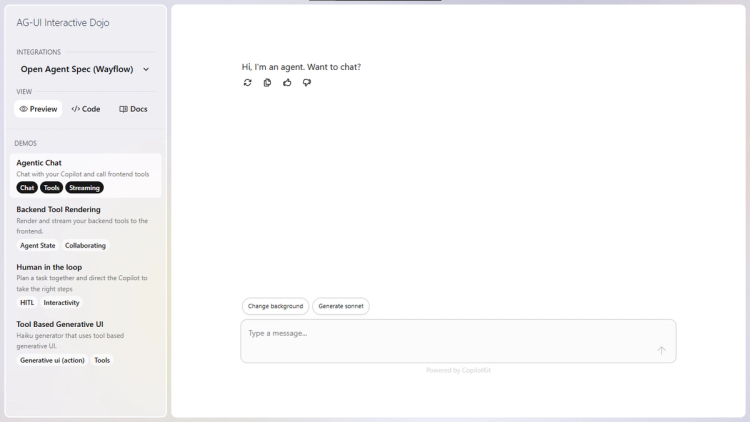
This is not a new framework. It’s a shared contract between agent definition (Agent Spec), runtime interaction (AG-UI), and Generative UI rendering (A2UI).
By aligning these layers across vendors, agent builders get interoperability without lock-in.
Over the next few weeks, expect more reference implementations, clearer integration patterns and production-grade examples that show how these layers work together in real applications.
If you want to follow along (or help shape what ships next), join the CopilotKit or AG-UI communities.
Subscribe to our blog and get updates on CopilotKit in your inbox.