Developers building in the AWS ecosystem have been asking for AG-UI support that fits natively into their stack. We have been working with the AWS team to make that easier and today we are releasing two things we built together.
The first is a dedicated AG-UI endpoint in Amazon Bedrock AgentCore Runtime. Deploy your agent in a container, set one protocol flag, and AgentCore handles auth, session isolation, auto-scaling, and observability. No infrastructure to write.
The second is a new pattern in the Fullstack AgentCore Solution Template (FAST) that wires CopilotKit, AG-UI, and LangGraph together into a full-stack application. It ships with Generative UI out of the box, human-in-the-loop flows, and MCP Apps support. Clone, configure, and deploy in under 10 minutes.
We started collaborating with AWS earlier this year to make Strands AG-UI compatible. Today's announcements make it significantly easier to build agentic frontends in the AWS ecosystem, from a managed runtime endpoint to a full production template.
AgentCore handles the runtime. CopilotKit handles the frontend interaction layer. AG-UI is what connects them.
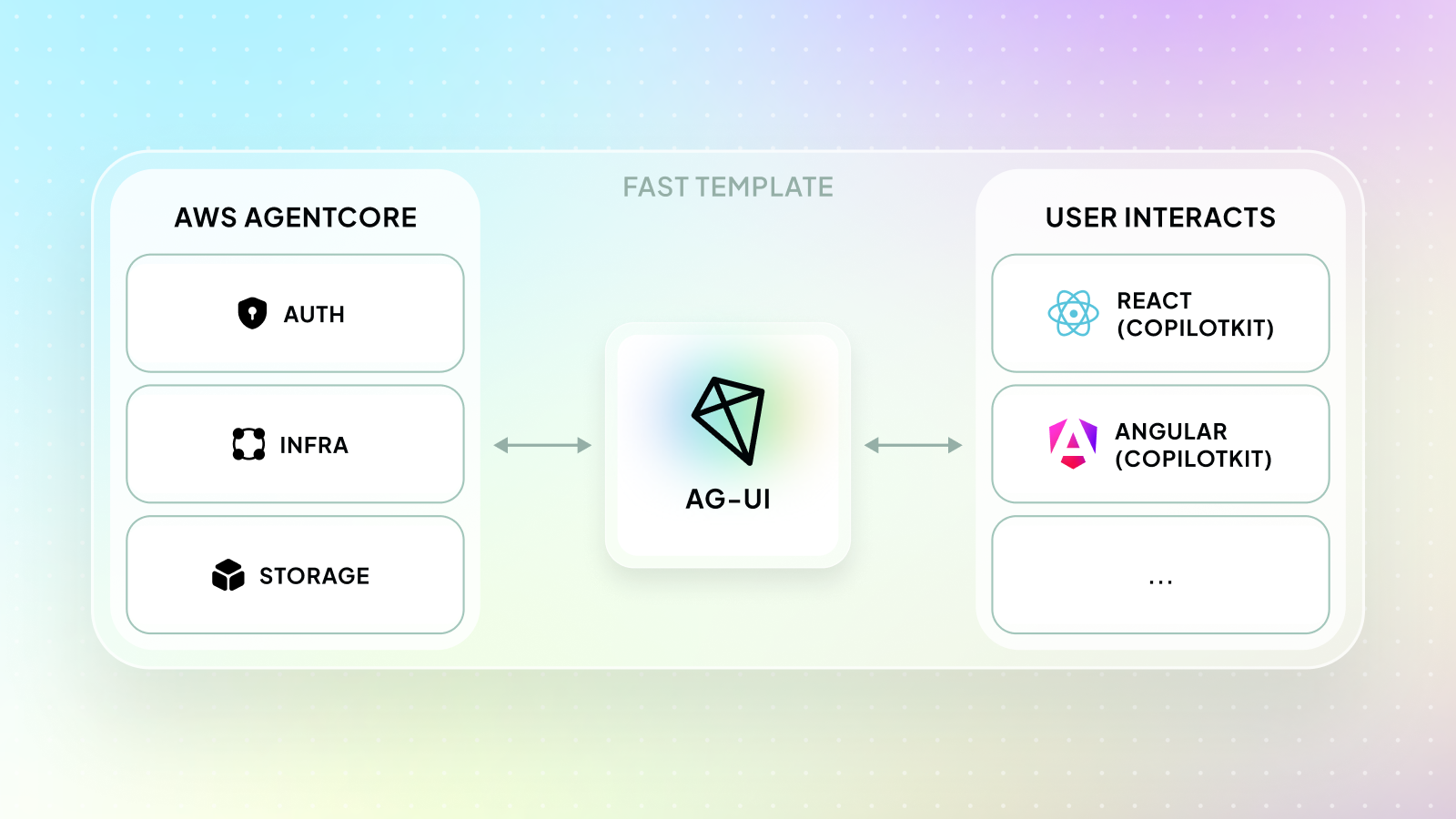
AG-UI is the interaction protocol between agent backends and user-facing frontends. It defines a shared event stream covering streaming text, tool call lifecycle, state updates, and user interactions mid-execution.
Any AG-UI-compatible frontend, including CopilotKit, can consume this stream and connect to any agent backend.
The problem is what comes before that. Deploying an AG-UI agent to production has meant manually configuring SSE endpoints, writing auth middleware, managing session isolation across users, and setting up auto-scaling for traffic spikes. All of this infrastructure has to be built and maintained before any user can talk to your agent.
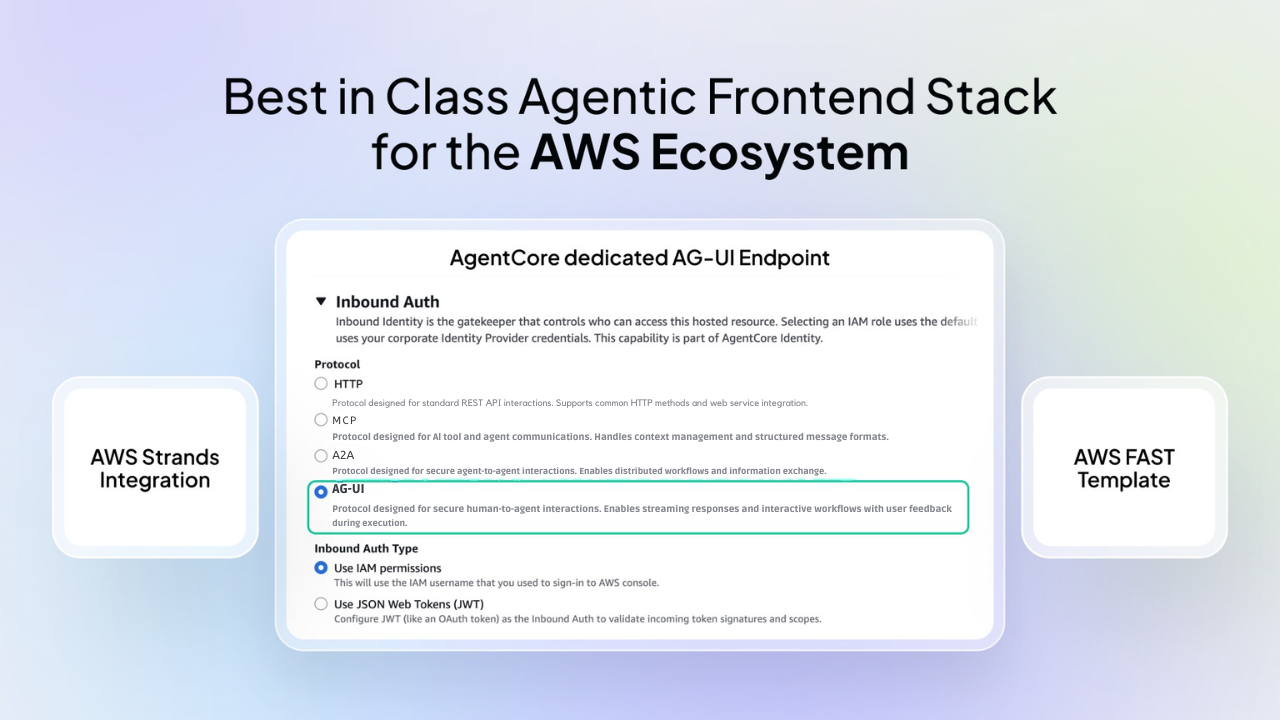
Amazon Bedrock AgentCore Runtime is a fully managed hosting environment that handles all of this. You bring your agent code in a container, set one protocol flag --protocol AGUI during configuration, and AgentCore handles auth via Cognito OAuth 2.0, session isolation, auto-scaling, and CloudWatch observability.
With this release, AgentCore now has a dedicated AG-UI endpoint, available today across 14 AWS regions.
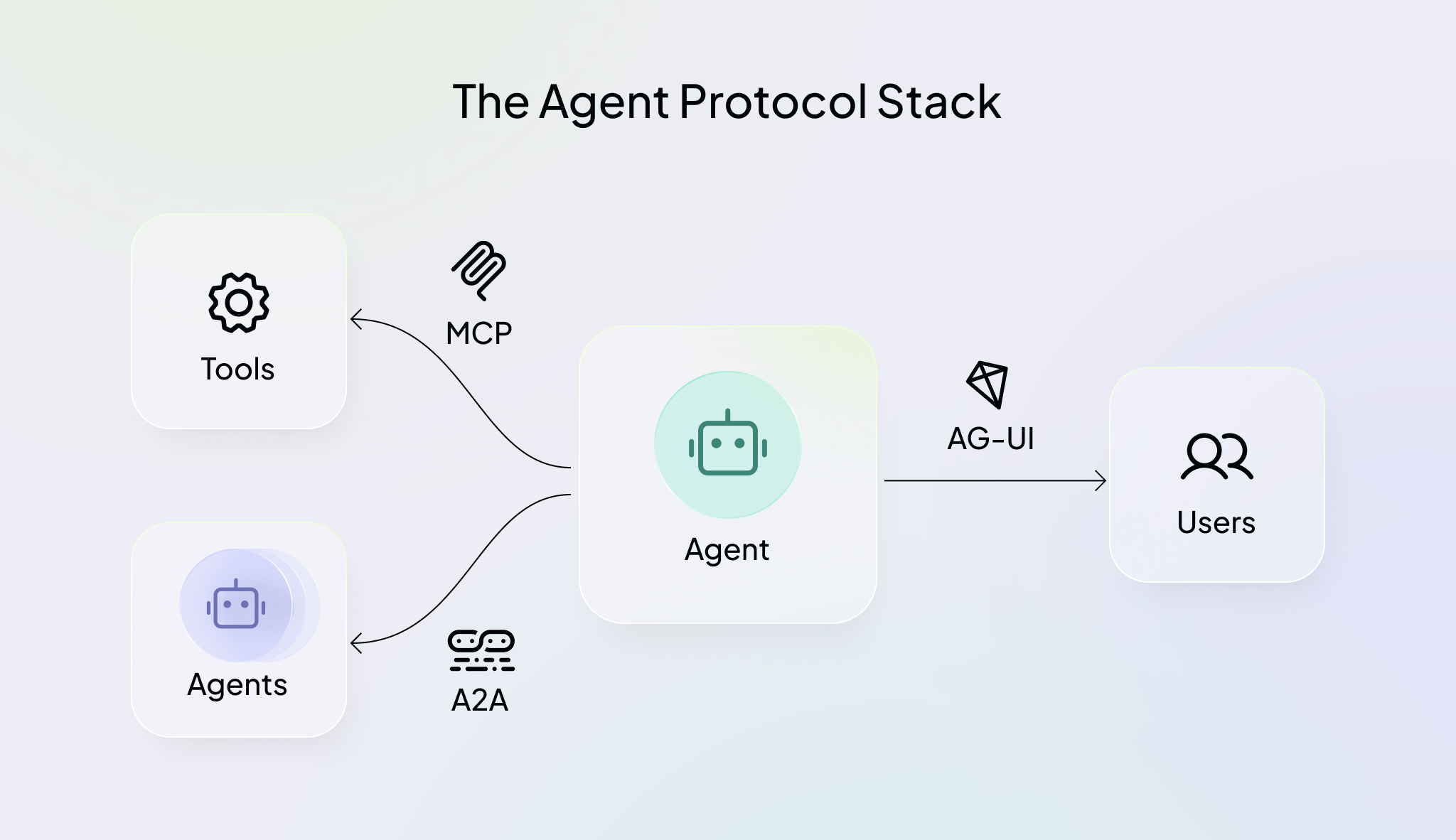
Under the hood, AgentCore acts as a transparent proxy between the client and your container. Requests from the InvokeAgentRuntime API are passed through to your container without modification.
Your container exposes POST /invocations for HTTP/SSE and GET /ping for health checks on port 8080. AgentCore handles auth (SigV4 or OAuth 2.0) and scaling around it. For the full protocol contract, see the AgentCore AG-UI protocol reference.
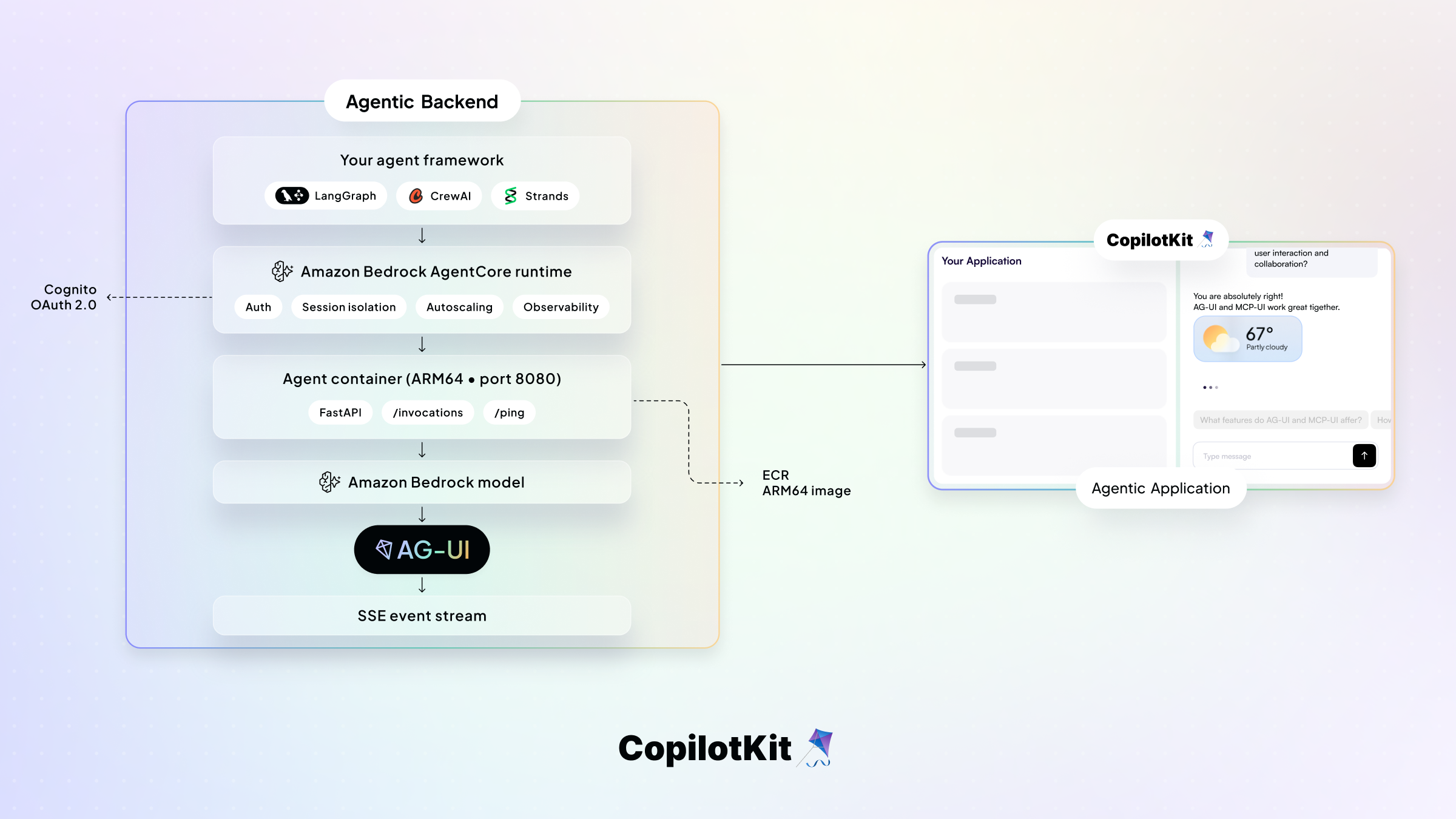
AgentCore is also framework-agnostic. Your agent can be built with Strands, LangGraph, CrewAI, or any of the AG-UI-compatible frameworks and deployed to AgentCore without any changes to the protocol layer.
Deploy AGUI servers in AgentCore Runtime Docs
The AgentCore starter toolkit handles the entire deployment process for you. It builds an ARM64 container image, pushes it to Amazon ECR, and creates the AgentCore runtime with the AG-UI protocol flag. You don't write a Dockerfile or manually configure any infrastructure.
pip install bedrock-agentcore-starter-toolkitYou will need an AWS account, Docker, and a Cognito user pool for OAuth authentication (setup guide).
Start by creating your AG-UI server using Strands. StrandsAgent wraps your agent and handles all AG-UI event encoding so you don't write any protocol logic yourself. AgentCore requires three things from your container:
POST /invocations to handle AG-UI requestsGET /ping for health checks, must return HTTP 2008080 - required, do not changeapp = FastAPI()
@app.post("/invocations")
async def invocations(input_data: dict, request: Request):
accept_header = request.headers.get("accept")
encoder = EventEncoder(accept=accept_header)
async def event_generator():
run_input = RunAgentInput(**input_data)
async for event in agui_agent.run(run_input):
yield encoder.encode(event)
return StreamingResponse(
event_generator(),
media_type=encoder.get_content_type()
)See the full server code in the AgentCore AG-UI docs. You can also test it locally to verify the SSE stream before deploying.
Create a requirements.txt for the container:
fastapi
uvicorn
ag_ui_strands
Configure with the AG-UI protocol flag and deploy.
# Configure with AG-UI protocol + OAuth authentication
agentcore configure -e my_agui_server.py --protocol AGUI

# Deploy to AWS
agentcore deploy
After a successful deploy, you receive an agent runtime ARN. Point HttpAgent from @ag-ui/client at the AgentCore invocation URL and your CopilotKit frontend is connected.
arn:aws:bedrock-agentcore:us-west-2:ACCOUNT_ID:runtime/my_agui_server-xyz123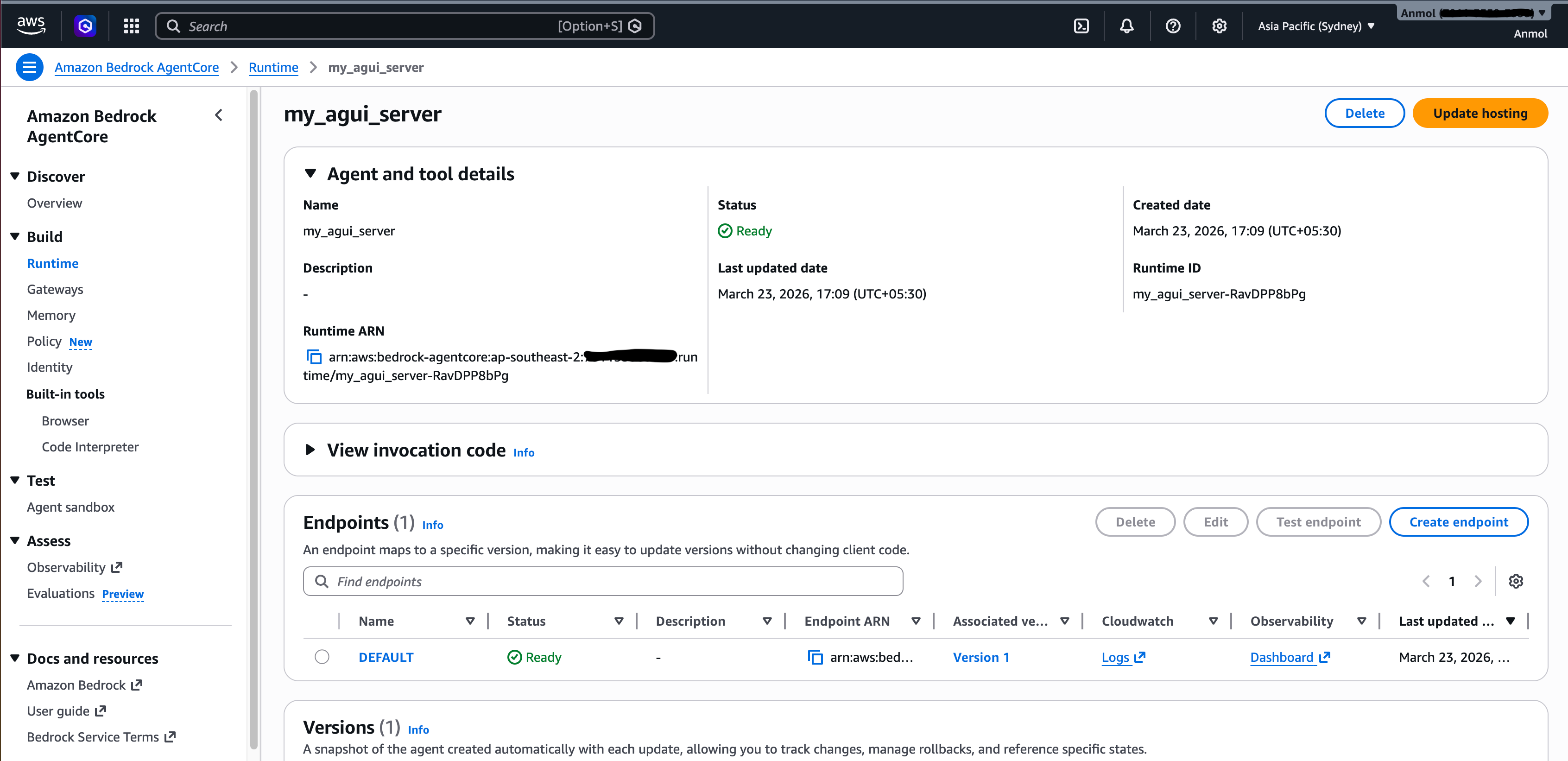
For the full deployment walkthrough, see the AgentCore AG-UI docs.
FAST is AWS's official full-stack starter template for building production-ready agentic applications on Amazon Bedrock AgentCore. It ships with a secure React frontend, AgentCore backend, Cognito auth, CloudWatch observability, and all infrastructure defined as code via AWS Cloud Development Kit (CDK) (plus a Terraform option).
The CDK stack (infra-cdk/) handles everything: Cognito User Pool, ECR, AgentCore Runtime, and Amplify hosting - deployed in a single command with no manual AWS console work.
FAST previously shipped with basic chat patterns for Strands and LangGraph. This release integrates CopilotKit with both the LangGraph single-agent pattern and the Strands single-agent pattern to enable Generative UI, frontend tool calls, and human-in-the-loop interactions.
The integration adds a CopilotKit runtime Lambda that connects to both the LangGraph and Strands AG-UI endpoints via HttpAgent and routes requests from the React frontend.
Each agent also gets MCPAppsMiddleware attached. The pattern shows how you can plug any MCP server into the CopilotKit runtime layer.
// infra-cdk/lambdas/copilotkit-runtime/src/index.ts
const agentUrls = {
  "langgraph-single-agent": process.env.LANGGRAPH_AGENTCORE_AG_UI_URL,
  "strands-single-agent": process.env.STRANDS_AGENTCORE_AG_UI_URL,
}

for (const [name, url] of Object.entries(agentUrls)) {
  if (url) {
    const agent = new HttpAgent({ url })
    agent.use(
      new MCPAppsMiddleware({
        mcpServers: [{ type: "http", url: mcpServerUrl, serverId: "example_mcp_app" }],
      })
    )
    configuredAgents[name] = agent
  }
}

const runtime = new CopilotRuntime({
  agents: { ...agents, default: defaultAgent },
  runner: new AgentCoreRunner(),
})The LangGraph agent uses CopilotKitMiddleware, which keeps the frontend in sync with the agent as it runs and LangGraphAGUIAgent to expose the agent over AG-UI. AgentCore memory is handled via AgentCoreMemorySaver:
# patterns/langgraph-single-agent/langgraph_agent.py
from copilotkit import CopilotKitMiddleware, LangGraphAGUIAgent

async def create_langgraph_agent(tools: list):
    return create_agent(
        model=_build_model(streaming=True),
        tools=[*tools, query_data],
        checkpointer=_build_checkpointer(),
        middleware=[CopilotKitMiddleware()],
        system_prompt=SYSTEM_PROMPT,
        state_schema=AgentState,
    )
The tools themselves are straightforward. query_data fetches financial data before rendering any charts:
# patterns/langgraph-single-agent/tools/query_data.py
import csv
from pathlib import Path

from langchain.tools import tool

_csv_path = Path(__file__).parent / "db.csv"
try:
    with open(_csv_path) as _f:
        _cached_data = list(csv.DictReader(_f))
except (FileNotFoundError, OSError) as e:
    raise RuntimeError(f"query_data: cannot load sample data from {_csv_path}") from e


@tool
def query_data(query: str) -> list[dict]:
    """
    Query the database. Accepts natural language.
    Always call this tool before displaying a chart or graph.
    """
return _cached_dataThe pattern demonstrates how to implement Generative UI and ships with example components that the agent renders directly in the chat instead of plain text.
There are charts for data visualization, a meeting scheduler that pauses the agent and waits for user input before continuing, and an inline tool for reasoning. These are registered via useCopilotExamples:
// frontend/src/hooks/useCopilotExamples.tsx
useComponent({
  name: "pieChart",
  description: "Controlled Generative UI that displays data as a pie chart.",
  parameters: PieChartPropsSchema,
  render: PieChart,
})

// same pattern for barChart

useDefaultRenderTool({
  render: ({ name, status, parameters }) => (
    <ToolReasoning name={name} status={status} args={parameters} />
  ),
})

useHumanInTheLoop({
  name: "scheduleTime",
  description: "Use human-in-the-loop to schedule a meeting with the user.",
  parameters: z.object({
    reasonForScheduling: z.string(),
    meetingDuration: z.number(),
  }),
  render: ({ respond, status, args }) => (
    <MeetingTimePicker status={status} respond={respond} {...args} />
  ),
})
The AWS infra stays exactly the same across all patterns. You switch between them in agentcore/config.yaml.
You get a fully working agentic application with a CopilotKit frontend connected to a LangGraph or Strands agent running on AgentCore, with no infrastructure code to write.
You can start building right away.
👉 CopilotKit AG-UI LangGraph and Strands FAST Template
The AWS ecosystem has had strong support for agent backends, tools, and memory. What was missing was a production-ready frontend layer: generative UI, and human-in-the-loop flows that work natively with AgentCore. That's what CopilotKit brings to FAST.
AG-UI has been adopted across LangGraph, CrewAI, Strands, Google ADK, Mastra, and more. But teams still had to configure the infrastructure manually to run these agents in production. That's what the dedicated AgentCore endpoint adds.
This partnership also lays the groundwork for deeper integrations. Persistent memory across sessions, tool connectivity via MCP Gateway, and production observability are all available in AgentCore today, and we plan to make these easier to use with CopilotKit over time.
If you are building with AG-UI and AWS and want support from our engineers, reach out through our forward deployed program.
Join the CopilotKit or AG-UI communities to follow along or help shape what ships next.

Subscribe to our blog and get updates on CopilotKit in your inbox.