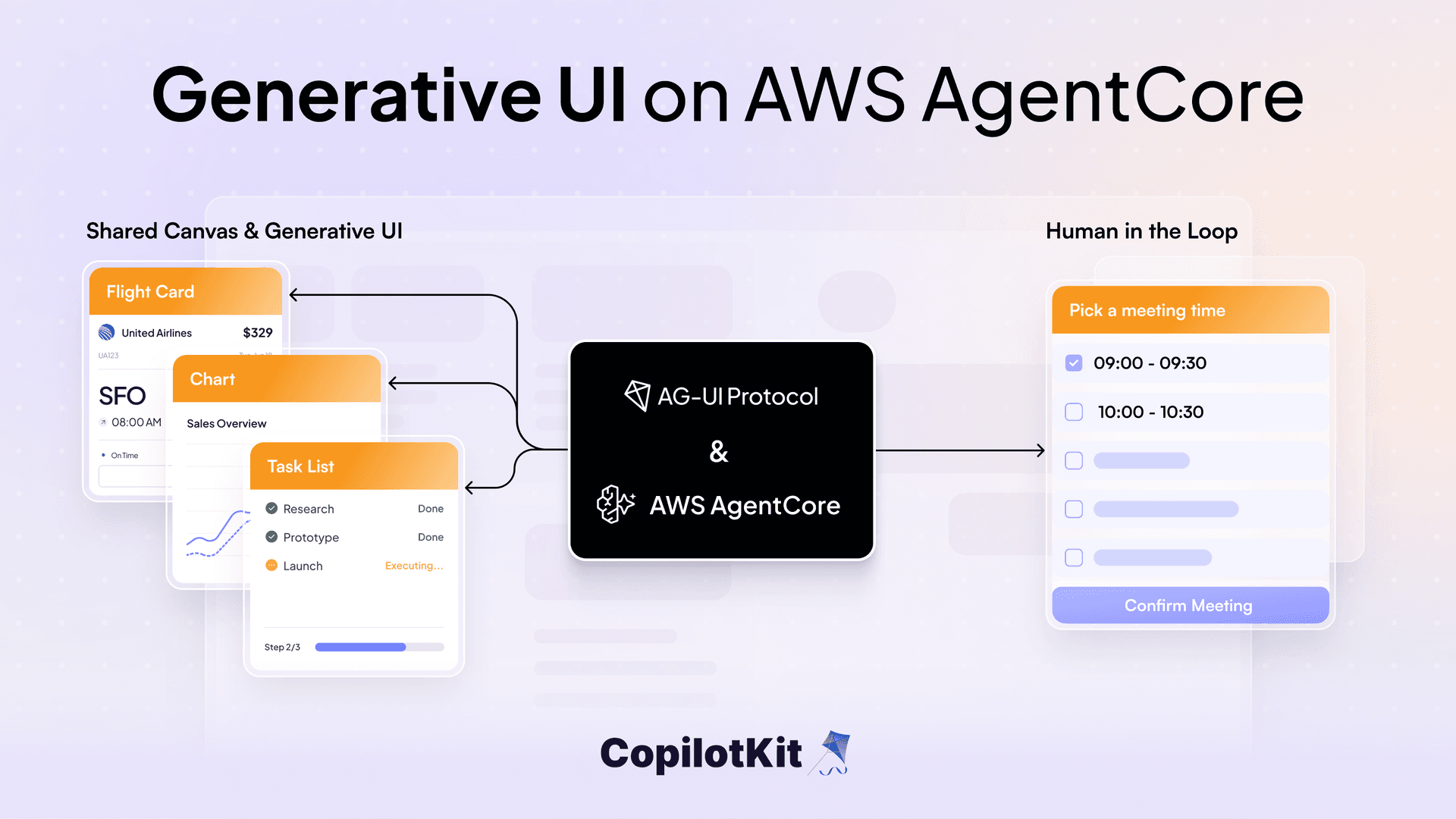
Amazon Bedrock AgentCore now runs AG-UI agents natively. You deploy an agent container with one protocol flag, and AgentCore handles auth, scaling, and session isolation in front of it.
That is what makes rich agent interfaces practical in production. Once an agent speaks AG-UI Protocol, it can render a chart inline, keep a canvas in sync as it works, or pause to wait for your approval, and the frontend stays fully decoupled from the backend.
We will build exactly that. A single agent on AgentCore with a CopilotKit React frontend that does three things: generative UI, shared state, and human-in-the-loop. It is based on AWS's FAST sample, and runs on Strands or LangGraph with the same frontend.
In this post we go through the stack, how FAST (Fullstack Solution Template for AgentCore) makes a Strands or LangGraph agent speak AG-UI, the runtime bridge between the browser and AgentCore, the three things CopilotKit renders, and how to deploy it.
By the end you have a deployed agent that does three things, all from the chat:
All three work the same way: the agent emits AG-UI events, and the frontend turns them into UI. What differs is which events it sends and what the frontend builds from them.
It runs on AgentCore with Cognito auth, AgentCore Memory, and Gateway tools. You pick the Strands or the LangGraph backend at deploy time.
Four pieces come together here, each with one job:
Here is how the four fit together.
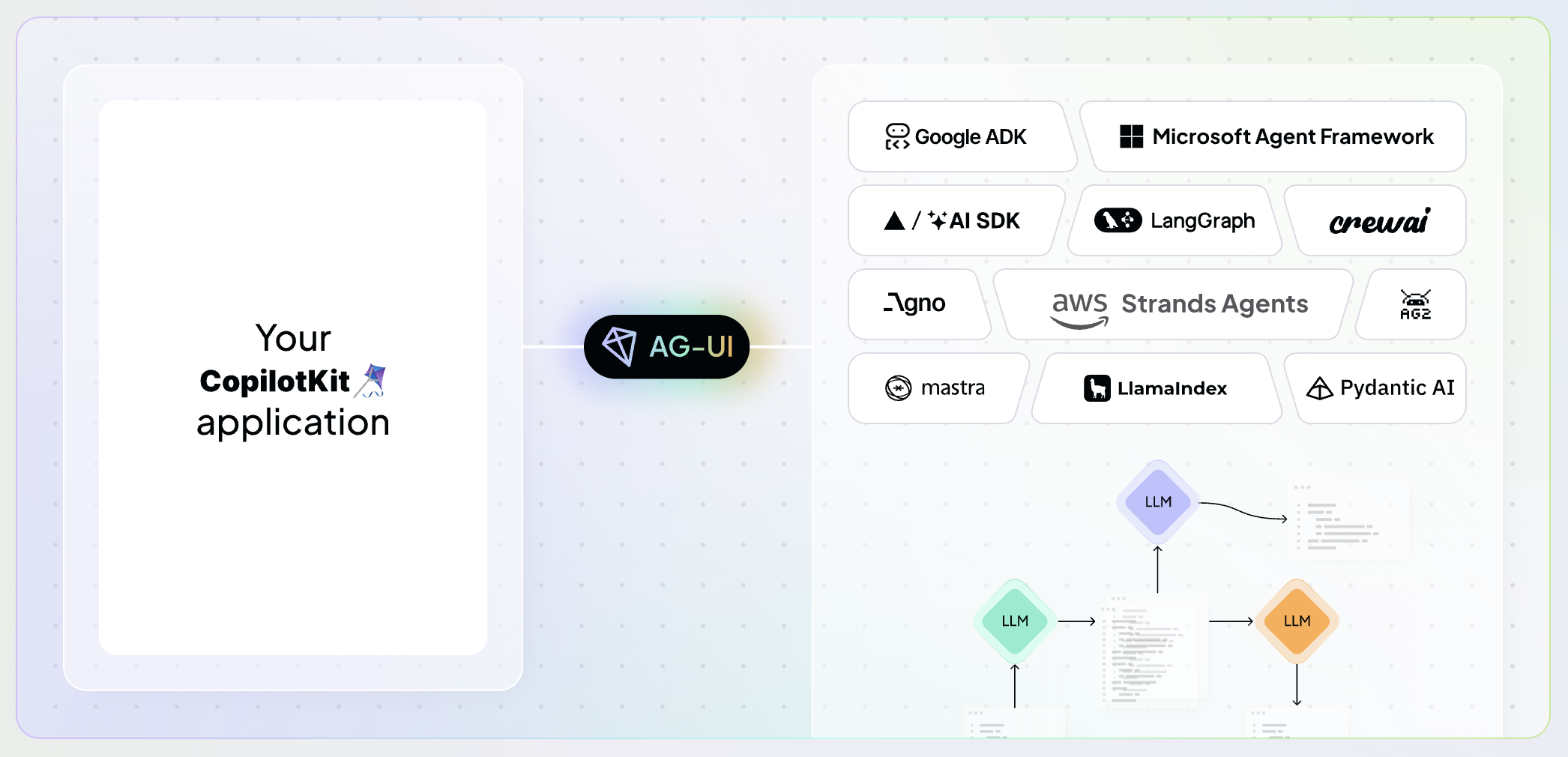
AgentCore Runtime supports a few agent protocols. MCP connects agents to tools, A2A connects agents to other agents, and AG-UI connects agents to users.
AG-UI Protocol defines a typed event stream over Server-Sent Events. A single agent run is a sequence of events:
data: {"type": "RUN_STARTED", "threadId": "t1", "runId": "r1"}
data: {"type": "TEXT_MESSAGE_START", "messageId": "m1", "role": "assistant"}
data: {"type": "TEXT_MESSAGE_CONTENT", "messageId": "m1", "delta": "Let me pull "}
data: {"type": "TEXT_MESSAGE_CONTENT", "messageId": "m1", "delta": "that data."}
data: {"type": "TEXT_MESSAGE_END", "messageId": "m1"}
data: {"type": "TOOL_CALL_START", "toolCallId": "tc1", "toolCallName": "query_data"}
data: {"type": "TOOL_CALL_ARGS", "toolCallId": "tc1", "delta": "{\"source\": \"sales.csv\"}"}
data: {"type": "TOOL_CALL_END", "toolCallId": "tc1"}
data: {"type": "TOOL_CALL_RESULT", "toolCallId": "tc1", "content": "{...}"}
data: {"type": "RUN_FINISHED", "threadId": "t1", "runId": "r1"}
AG-UI sorts everything an agent does in a run into a handful of event categories by purpose: lifecycle (a run starting, finishing, or erroring), text (the reply streaming in token by token), tool calls (a tool firing and its result), and state (a shared object the agent and UI both read and write). You can read about all of them in the AG-UI docs.
Two of these carry the whole post: text and tool calls drive generative UI and human-in-the-loop, and state events are what shared state is built on.
CopilotKit has a live playground at copilotkit.ai/ag-ui where you can try all the patterns.
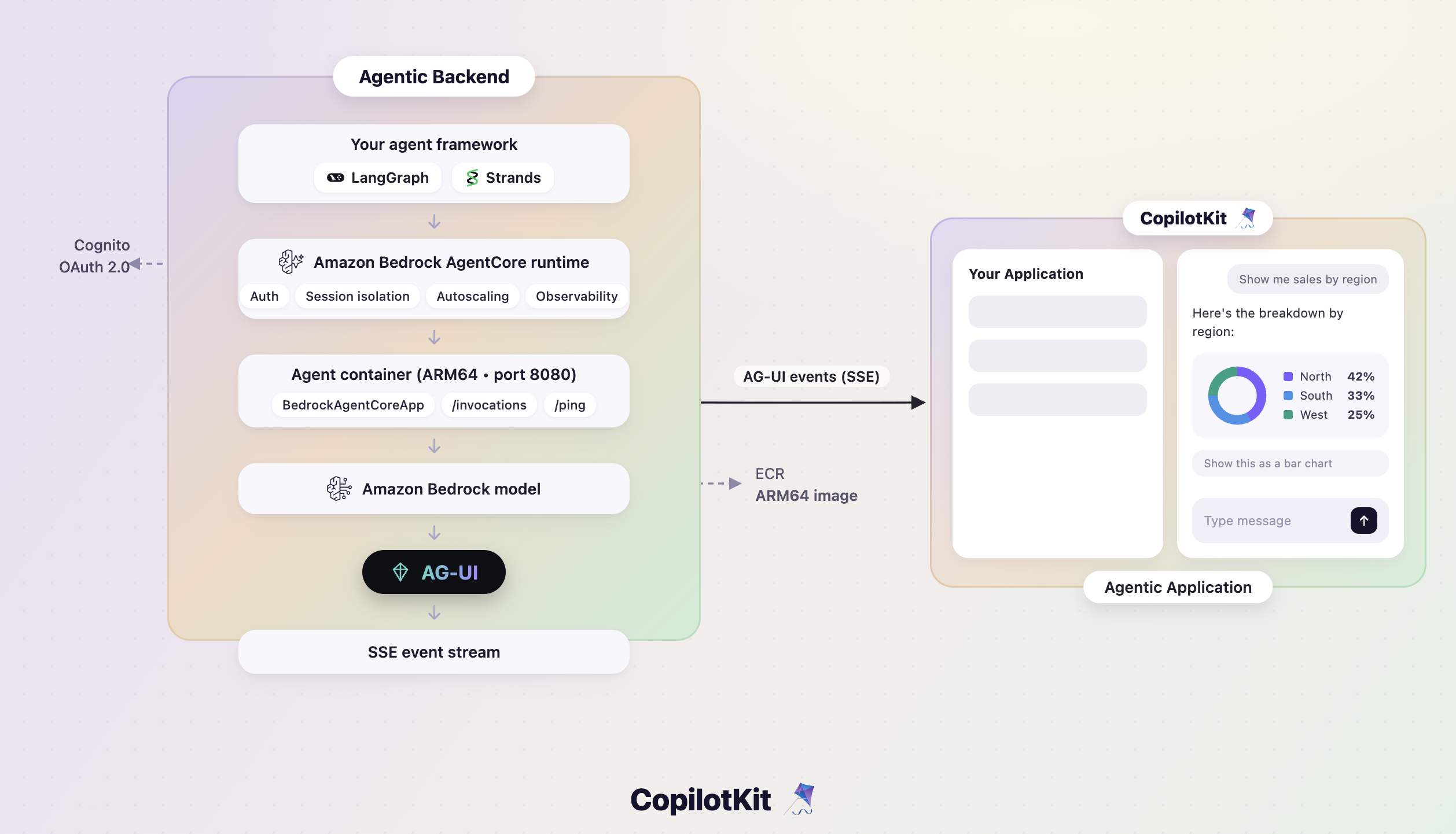
Deploying an AG-UI agent to production has meant manually configuring SSE endpoints, writing auth middleware, managing session isolation across users, and setting up auto-scaling for traffic spikes. All of this has to be built and maintained before any user can talk to your agent.
Amazon Bedrock AgentCore Runtime is a fully managed, framework-agnostic hosting environment. AG-UI is one of four protocols it speaks, alongside HTTP, MCP, and A2A.
You ship your agent in a container and select AG-UI with one flag, and AgentCore handles auth, session isolation, auto-scaling, and observability in front of it. You write none of that code. It sits in front as a transparent proxy and passes the event stream through unchanged.
Your container exposes two endpoints, one for AG-UI traffic and one for health checks, on port 8080. The full contract is in the AgentCore AG-UI docs.
FAST (Fullstack Solution Template for AgentCore) is AWS's official full-stack starter template for building production-ready agentic applications on Amazon Bedrock AgentCore.
FAST ships agent patterns for several frameworks. Two of them speak AG-UI, one wrapping Strands and one wrapping LangGraph, and they share a single frontend parser.
A parser reads the incoming stream and turns each event into something the UI can act on. Because both backends emit identical events, one parser (agui.ts) handles both:
export const parseAguiChunk: ChunkParser = (line, callback) => {
  if (!line.startsWith("data: ")) return;
  const json = JSON.parse(line.substring(6).trim());
  switch (json.type) {
    case "TEXT_MESSAGE_CONTENT":
      callback({ type: "text", content: json.delta ?? "" });
      break;
    case "TOOL_CALL_START":
      callback({ type: "tool_use_start", toolUseId: json.toolCallId, name: json.toolCallName });
      break;
    case "TOOL_CALL_RESULT":
      callback({ type: "tool_result", toolUseId: json.toolCallId, result: json.content ?? "" });
      break;
    case "RUN_FINISHED":
      callback({ type: "result", stopReason: "end_turn" });
      break;
  }
};
Before AG-UI, FAST carried a separate parser for each backend. Now it is one file, and swapping Strands for LangGraph in your config changes nothing on the frontend.
We just looked at the frontend parser. Here are the two patterns feeding it: agui-strands-agent wraps Strands and agui-langgraph-agent wraps LangGraph. Each turns its framework's events into AG-UI, and you pick one at deploy time.
The Strands pattern wraps a Strands Agent in StrandsAgent from the ag-ui-strands library. A fresh agent is built per request, and Memory is supplied per thread through a provider that returns None when MEMORY_ID is unset, so Memory stays opt-in:
# patterns/agui-strands-agent/agent.py (excerpt)
@app.entrypoint
async def invocations(payload: dict, context: RequestContext):
    input_data = RunAgentInput.model_validate(payload)
    actor_id = extract_user_id_from_context(context)

    agent = Agent(
        model=MODEL,
        system_prompt=SYSTEM_PROMPT,
        tools=[create_gateway_mcp_client(actor_id), CODE_INTERPRETER],
    )
    agui_agent = StrandsAgent(
        agent=agent,
        name="agui_strands_agent",
        config=StrandsAgentConfig(
            session_manager_provider=_make_session_manager_provider(actor_id),
            replay_history_into_strands=False,
        ),
    )

    async for event in agui_agent.run(input_data):
        if event is not None:
            yield event.model_dump(mode="json", by_alias=True, exclude_none=True)
The LangGraph pattern uses LangGraphAGUIAgent from the copilotkit library. It builds the compiled graph fresh on every request, so each call gets MCP tools scoped to the caller. Memory is opt-in here too, through a checkpointer that is None when MEMORY_ID is unset:
# patterns/agui-langgraph-agent/agent.py (excerpt)
async def build_graph(actor_id: str):
    mcp_client = await create_gateway_mcp_client(actor_id)
    tools = await mcp_client.get_tools()
    tools.append(CODE_INTERPRETER)
    return create_agent(
        model=MODEL,
        tools=tools,
        checkpointer=get_memory_saver(),
        middleware=[CopilotKitMiddleware()],
        system_prompt=SYSTEM_PROMPT,
    )

@app.entrypoint
async def invocations(payload: dict, context: RequestContext):
    input_data = RunAgentInput.model_validate(payload)
    actor_id = extract_user_id_from_context(context)

    graph = await build_graph(actor_id)
    agui_agent = LangGraphAGUIAgent(
        name="agui_langgraph_agent",
        graph=graph,
        config={"configurable": {"actor_id": actor_id}},
    )

    async for event in agui_agent.run(input_data):
        if event is not None:
            yield event.model_dump(mode="json", by_alias=True, exclude_none=True)
Both patterns emit the same AG-UI events, which is why the single parser from the last section handles both. The older HTTP patterns each needed their own parser for Strands, LangGraph, and the Claude Agent SDK. AG-UI collapses those into one.
Deploying this baseline is optional. It is the quickest way to see a pattern working with the fewest moving parts.
Set the pattern in infra-cdk/config.yaml and deploy:
# infra-cdk/config.yaml
backend:
  pattern: agui-strands-agent    # or agui-langgraph-agent
  deployment_type: docker
cd infra-cdk
cdk deploy --require-approval never
python3 ../scripts/deploy-frontend.pyThis gives you a working chat interface on AgentCore. It is plain chat, no charts or canvas yet. If you only want the full app, skip to the CopilotKit sample below which swaps that frontend for the three richer patterns.
The base FAST frontend is a chat interface. The CopilotKit sample replaces it with CopilotKit and adds the three patterns on top of AgentCore:
The sample adds one piece the base template does not have: a small server between the browser and AgentCore, the CopilotKit Runtime, deployed as a Lambda.
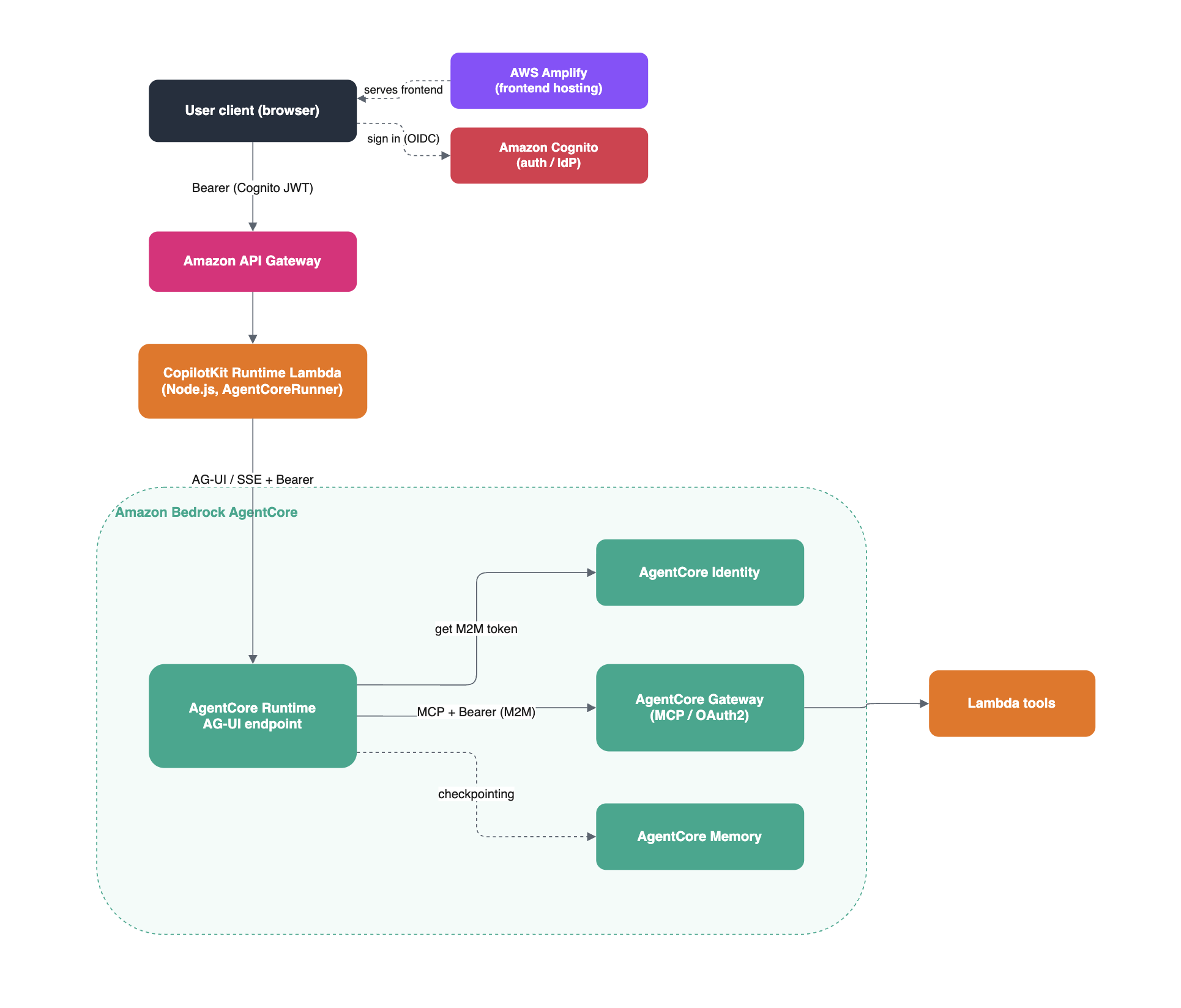
AWS Amplify serves the frontend, and the user signs in through Amazon Cognito (OIDC), which issues the JWT. From there the CopilotKit Runtime Lambda is the server-side bridge between the browser and AgentCore Runtime.
Dashed arrows are the steps off the main request path: signing in, serving the frontend, and checkpointing to Memory.
Here is the ASCII diagram of the same path.
Browser
│
│  Bearer (Cognito JWT)
▼
Amazon API Gateway
│
▼
CopilotKit Runtime Lambda  [Node.js · AgentCoreRunner]
│  AG-UI / SSE + Bearer
▼
AgentCore Runtime  [auth · session isolation · scaling]
│
▼
Agent container  [Strands or LangGraph · port 8080]
│  MCP (OAuth2 M2M)
▼
AgentCore Gateway  →  Lambda tools
The Runtime (runtime.ts) is a CopilotKit server the browser calls. It forwards the user's Cognito token to the AgentCore AG-UI endpoint and relays the event stream back. Running it server-side means the browser only ever talks to this Lambda, never to AgentCore directly.
It also fixes a reconnect problem that only shows up in production. AgentCore keeps its own copy of the conversation history, so when a user refreshes, it replays that history in one batch and two things break. A brand-new conversation has no history, so the default behavior errors. And the replay lists the agent's tool calls but drops their results, which CopilotKit needs to rebuild the chat.
The fix is a custom runner. It returns an empty history for unseen conversations, and synthesizes the missing tool-call results before the snapshot:
export class AgentCoreRunner extends InMemoryAgentRunner {
  private readonly knownThreadIds = new Set<string>();

  override run(request) {
    if (request.threadId) this.knownThreadIds.add(request.threadId);
    return super.run(request);
  }

  override connect(request) {
    // Unknown conversation: return an empty history instead of erroring
    if (!request.threadId || !this.knownThreadIds.has(request.threadId)) {
      const runId = randomUUID();
      return of(
        { type: EventType.RUN_STARTED, threadId: request.threadId ?? randomUUID(), runId },
        { type: EventType.MESSAGES_SNAPSHOT, messages: [] },
        { type: EventType.RUN_FINISHED, threadId: request.threadId ?? randomUUID(), runId },
      );
    }

    // Known conversation: fill in the missing tool results before the snapshot
    return super.connect(request).pipe(
      concatMap((event) => {
        if (event.type !== EventType.MESSAGES_SNAPSHOT) return of(event);
        const replayedResults = event.messages.flatMap((m) =>
          m.role === "assistant" && m.toolCalls?.length
            ? m.toolCalls.map((tc) => ({
                type: EventType.TOOL_CALL_RESULT,
                toolCallId: tc.id,
                messageId: `${tc.id}-result`,
                content: "",
                role: "tool",
              }))
            : [],
        );
        return of(...replayedResults, event);
      }),
    );
  }
}
One more detail on the agent side: the Gateway tool client fetches a fresh token on every reconnection instead of capturing one once. AgentCore reopens those connections over time, so a token grabbed once would go stale. Fetching it per reconnect keeps the tools working.
With the Runtime in place, every pattern below works the same way: register a component or tool on the frontend, handle the matching tool on the agent, and let AG-UI events carry the rest. Two of the three are just tool calls, rendered differently on the frontend.
Generative UI means the agent answers with real, interactive UI instead of text. It can be a single chart built from your data, or an entire flow the agent assembles on the fly, like a multi-step booking experience.
Generative UI is a whole spectrum of approaches, broadly three. This sample uses the controlled end: the frontend owns a set of prebuilt components, registers each as a tool, and the agent only chooses which one to render and supplies its data.
You register a component as a named tool with the useComponent hook:
// Register a pie chart the agent can render
useComponent({
  name: "pieChart",
  description: "Displays data as a pie chart.",
  parameters: PieChartPropsSchema,
  render: PieChart,
});
parameters is a schema, so the model's arguments arrive as typed props. When the agent calls pieChart, CopilotKit reads the TOOL_CALL_START and TOOL_CALL_ARGS events and renders the component inline, with no round-trip to a backend tool.
The agent fetches the data first. A query_data tool reads a small CSV, and the system prompt tells the agent to call it before any chart tool. So "chart revenue by region" becomes one flow: fetch the data, call pieChart with the result, render it inline. The user sees a chart, not JSON.
Generative UI is one-way: the agent renders a component for you to see. Shared state is two-way. The agent and the UI share one object, and either side can change it.
On the frontend, the useAgent hook gives you live access to that object. The canvas reads the todos from it and writes back when you edit one by hand:
const { agent } = useAgent();

<TodoList
  todos={(agent.state as { todos?: Todo[] })?.todos ?? []}
  onUpdate={updatedTodos => agent.setState({ todos: updatedTodos })}
  isAgentRunning={agent.isRunning}
/>
The agent writing to the screen is the easy direction. The harder one is the agent noticing the edits you make by hand. The sample handles it by injecting the live todos into the prompt each turn, so there is no separate read tool:
def state_context_builder(state: dict) -> str:
    todos = state.get("todos", [])
    if todos:
        return f"\nCurrent todos:\n{json.dumps(todos, indent=2)}"
    return ""
There is a timing problem too. When you ask the agent to change the list, the todos should appear the moment the agent decides on them, not after the tool call returns. Otherwise the screen lags a step behind the agent.
The sample fixes that with a predictive state update. In strands_agent.py, it maps the tool's arguments straight to a state snapshot, and a PredictStateMapping points that snapshot at the todos key:
async def todos_state_from_args(ctx: ToolCallContext) -> dict:
    todos = (ctx.tool_input or {}).get("todos", [])
    return {"todos": todos}

config = StrandsAgentConfig(
    tool_behaviors={
        "manage_todos": ToolBehavior(
            state_from_args=todos_state_from_args,
            predict_state=[
                PredictStateMapping(
                    state_key="todos",
                    tool="manage_todos",
                    tool_argument="todos",
                )
            ],
        ),
    },
    state_context_builder=state_context_builder,
)
So the canvas fills in as the agent streams the list, instead of waiting for the tool to finish.
Sometimes the agent should stop and ask. Human-in-the-loop lets it make a tool call that renders a component, waits for your answer, then continues with that answer.
The meeting scheduler registers with the useHumanInTheLoop hook:
useHumanInTheLoop({
  name: "scheduleTime",
  description: "Schedule a meeting with the user.",
  parameters: z.object({
    reasonForScheduling: z.string(),
    meetingDuration: z.number(),
  }),
  render: ({ respond, status, args }) => (
    <MeetingTimePicker status={status} respond={respond} {...args} />
  ),
});
The flow is the same tool-call mechanics as before:
TOOL_CALL_START for scheduleTime.respond callback.respond.TOOL_CALL_RESULT, and the agent continues with the time you picked.The reason and duration come from the model and pre-fill the picker. To the agent, it called a tool and got a result back. It never knows a human was in the middle.
Now the full app. You will need an AWS account with Bedrock and AgentCore access, Docker running, and the usual AWS CLI, CDK, Node, and Python toolchain.
Clone the sample, set two values, and deploy:
git clone https://github.com/aws-samples/sample-FAST-applications.git
cd sample-FAST-applications/samples/copilotkit-generative-ui

cp config.yaml.example config.yaml
# Edit config.yaml: set stack_name_base and admin_user_email

./deploy-strands.sh    # or ./deploy-langgraph.sh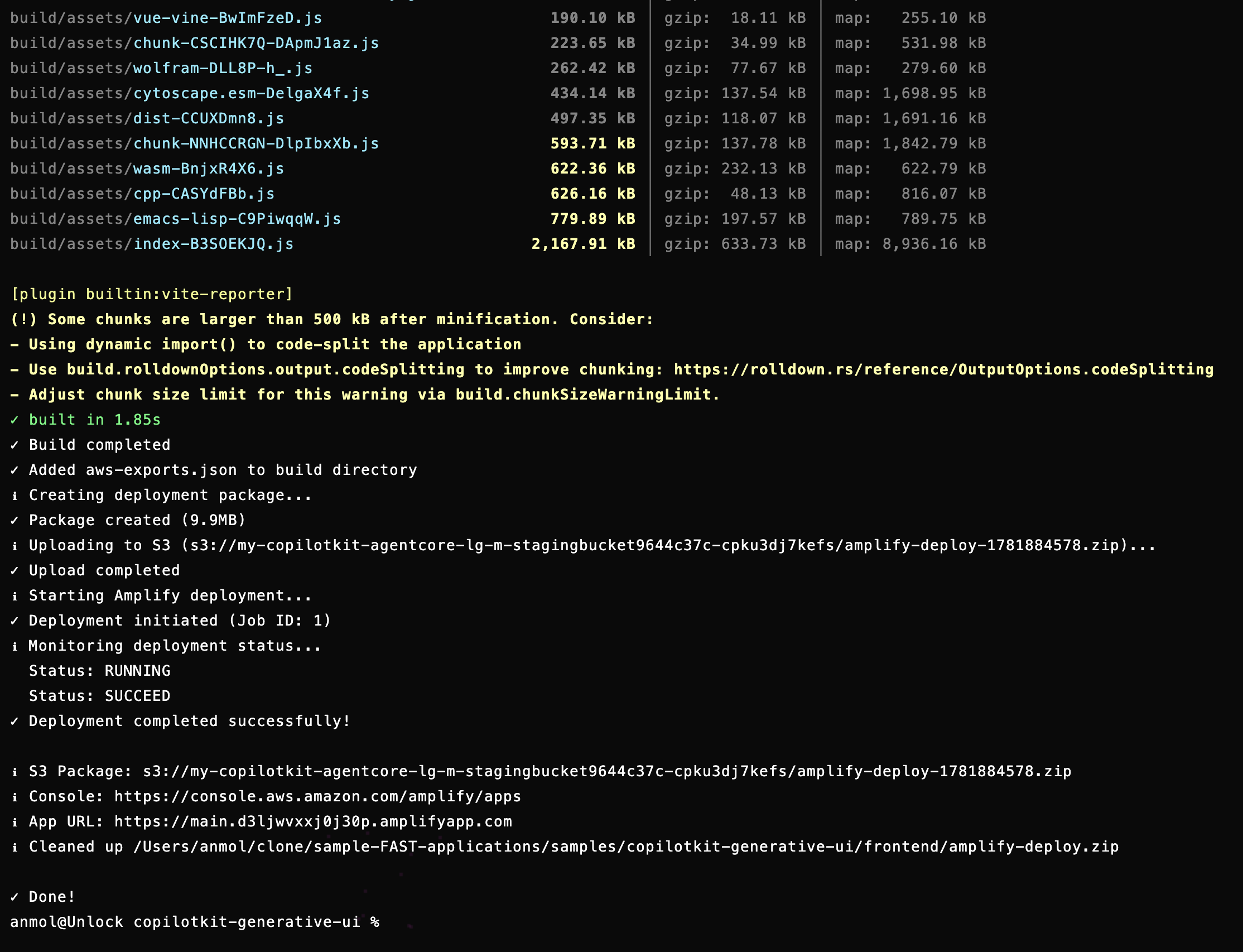
The script provisions the full stack: a Cognito user pool, AgentCore Runtime, Gateway, and Memory, the CopilotKit Runtime Lambda, and Amplify hosting. Open the Amplify URL it prints, sign in, and run three quick checks:
For local development, the sample ships a Docker Compose setup with the agent, the bridge, and the frontend, with hot reload on Python changes:
cd docker
cp .env.example .env
# Fill in STACK_NAME, MEMORY_ID, and AWS credentials
./up.sh --build
# Open http://localhost:3000Once it is running, here is the full path a single request takes, from the prompt to the chart on screen:
User: "chart Q3 revenue by region"
│
▼
CopilotKit frontend  [registered components]
│  POST /copilotkit  (Cognito token)
▼
Amazon API Gateway
│
▼
CopilotKit Runtime Lambda  [AgentCoreRunner]
│  AG-UI / SSE
▼
AgentCore Runtime  [auth · session isolation · scaling]
│  POST /invocations
▼
Strands agent container  [port 8080]
│  query_data  →  reads the local CSV
│  pieChart    →  emits a frontend tool call
│
│  AG-UI events stream back
│  →  AgentCore Runtime  →  Runtime Lambda  →  frontend
▼
Frontend matches "pieChart" and renders the chart inline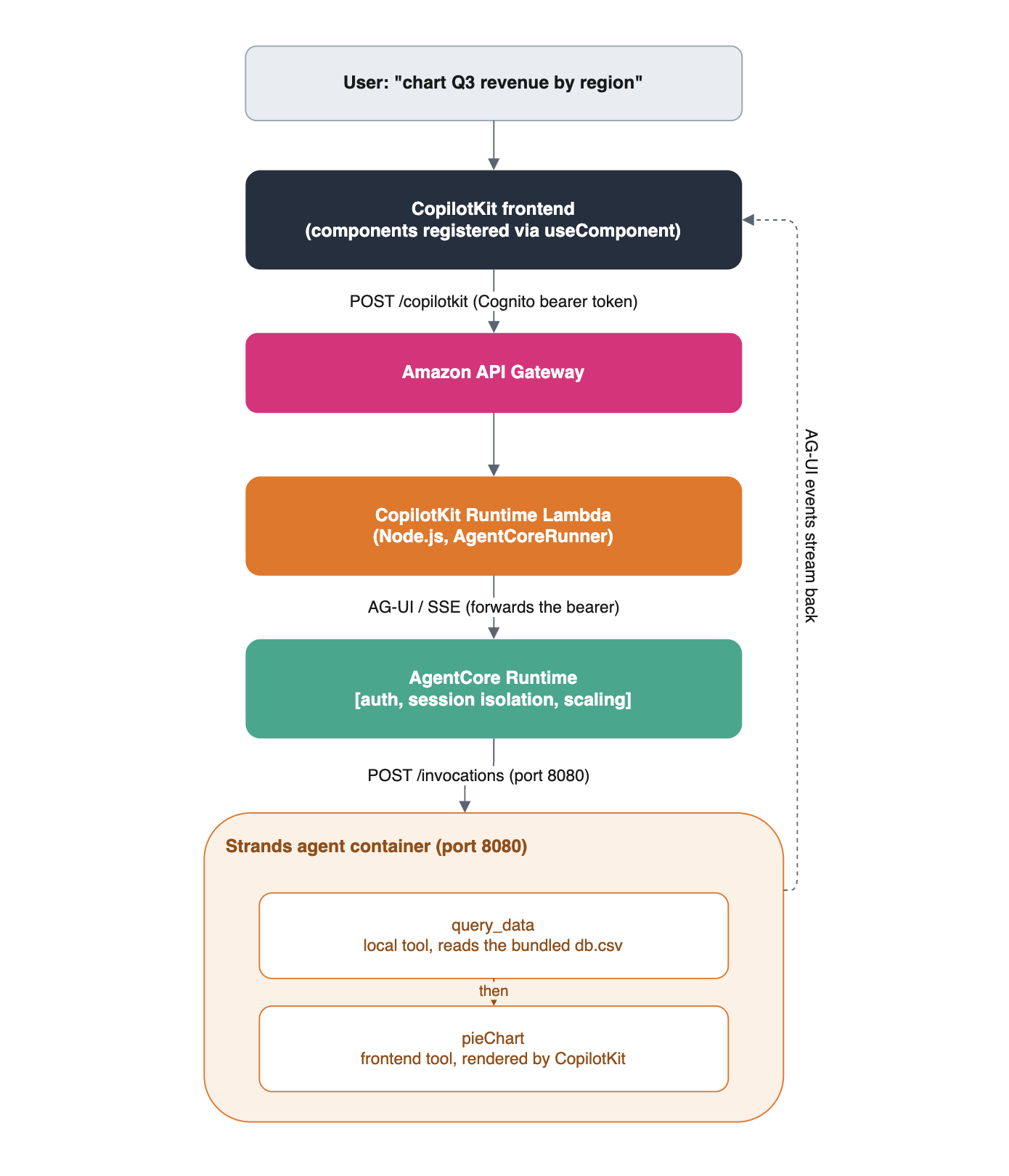
Shared state and human-in-the-loop ride the same path. The todo tool emits state events that keep the canvas in sync, and the scheduler emits a tool call that renders the picker and waits. One protocol, three patterns, all on managed infrastructure.
The walkthrough deploys two separate stacks. Tear down whichever you deployed so they stop incurring charges.
The FAST baseline:
cd infra-cdk
npx cdk destroy --all
The CopilotKit sample:
cd sample-FAST-applications/samples/copilotkit-generative-ui/infra-cdk
npx cdk destroy --all
If an ECR repository still holds container images, delete it by hand, since some CDK configurations keep repositories in place.
You now have a single agent on Amazon Bedrock AgentCore with a CopilotKit frontend. It renders charts inline, keeps a canvas in sync both ways, and pauses for human input.
Swap the deploy script to LangGraph and the same frontend runs against it unchanged. That is the point of AG-UI: the backend framework becomes a detail, and the interaction patterns are yours to compose.
A managed AG-UI endpoint is the piece that was missing. With it handled, the rest is already in AgentCore: persistent memory, tool connectivity through Gateway over MCP, and observability.
If you want to build with AG-UI on AWS, the fastest way in is the sample above. Follow CopilotKit on Twitter. If you get stuck, reach out to us in the CopilotKit or AG-UI communities.
Want to bring CopilotKit into your stack? Book a call with our engineers.
Happy building!

Subscribe to our blog and get updates on CopilotKit in your inbox.