

Act in context
Investigate an issue, call a tool, or move work forward with the conversation still in view.
Build native, stateful experiences for your agents in Slack, Microsoft Teams, and more. Let teams ask, review, and act in the conversations where work already happens.
Write shared Channels JSX once. Render native Block Kit in Slack and Adaptive Cards in Microsoft Teams. Discord, WhatsApp, Telegram, and more are on their way.
# release-ops
Release decisions and deployment status
Priya 10:42 AM
Alex 10:42 AM
Support APP
Your deployed agent is initialized for each channel thread.
npm install @copilotkit/channels @copilotkit/runtimeimport { createChannel, HttpAgent } from "@copilotkit/channels"
export const support = createChannel({
name: "support",
agent: new HttpAgent({ url: process.env.AGENT_URL! }),
})Copy this prompt and your coding agent builds your first Slack or Microsoft Teams channel with you, on any supported agent framework.
Prefer to do it yourself?Read the Channels docsorclone OpenTag on GitHubfor a complete working example.
Expand your agent into the places work happens without rebuilding its tools, behavior, or business logic.
Your agent can read the moment, surface the next action, and return the outcome to the same conversation.
Investigate an issue, call a tool, or move work forward with the conversation still in view.
Route decisions through Block Kit and Adaptive Cards instead of sending people to another dashboard.
Return streamed responses, tool results, and decisions to the same channel conversation.
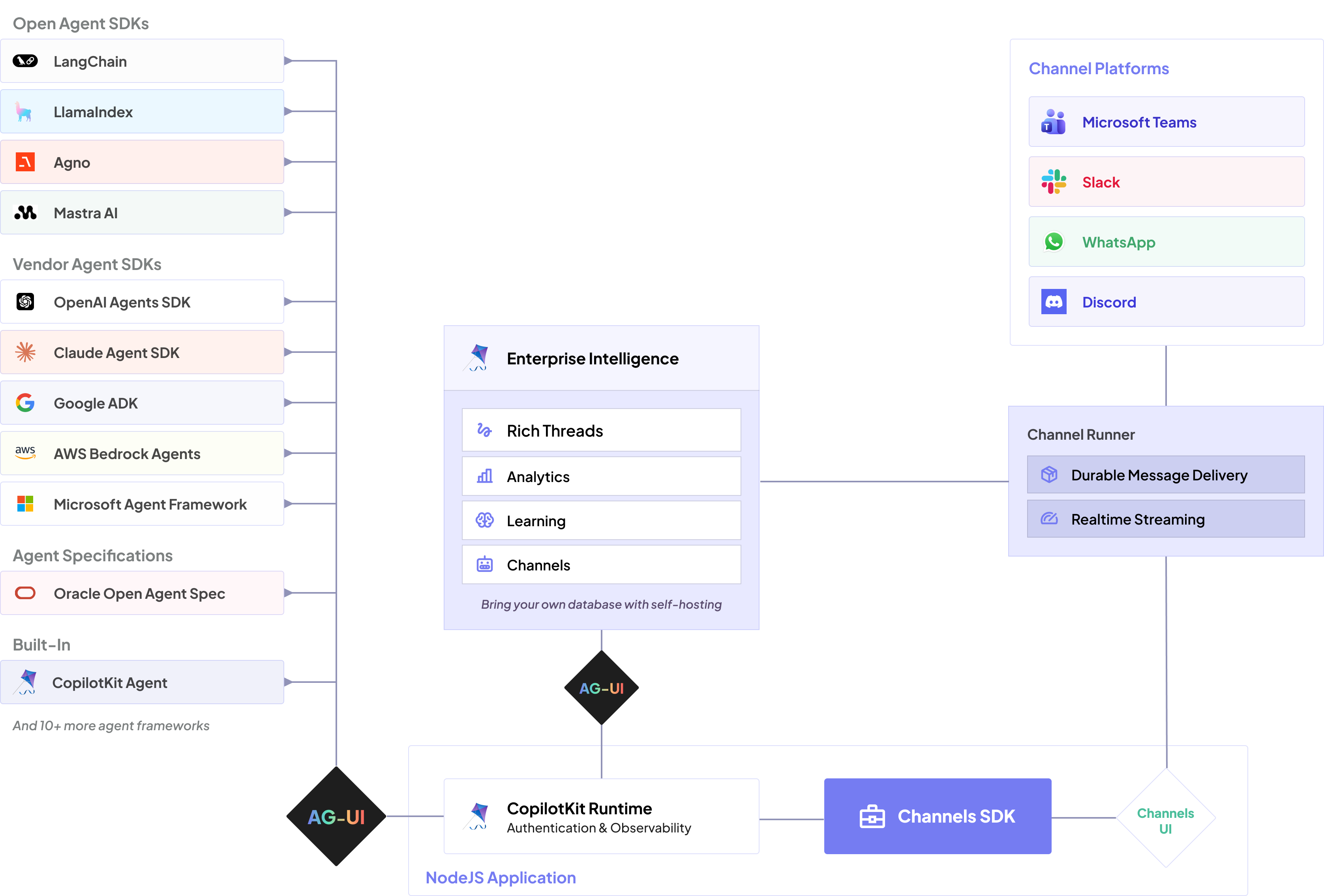
You bring and deploy your agent. CopilotRuntime connects it to Channels; CopilotKit Intelligence provides Slack and Teams infrastructure.
You deploy
Bring a LangGraph, CrewAI, Microsoft Agent Framework, or custom AG-UI agent.
Your application
Channels SDK defines the experience. CopilotRuntime connects the agent, Channels configuration, identity, and Intelligence.
CopilotKit operates
Intelligence operates provider connectivity, channel transport, delivery, retries, durable channel state, and production operations.
Your team uses
Your agent reaches teams through native collaboration workflows on both generally available platforms.
CopilotKit Intelligence provides the Slack and Teams infrastructure around your agent. Your agent stays deployed in the backend you control.
Connect a workspace in minutes
Bring Slack and Microsoft Teams online without rebuilding provider plumbing, credentials, callbacks, and installation flows.
Talk to an engineer about taking the Channels SDK from prototype to production.
