MCP Apps: Bring MCP Apps to your users!

Introducing the AG-UI Protocol CLI
By Nathan Tarbert
September 4, 2025

Building agentic applications just got a whole lot easier.

We’re excited to release the AG-UI protocol CLI flow- the quickest and easiest way to get started with AG-UI in under two minutes.

Why this matters

Most developers want to test ideas fast without spending hours wiring up configs and boilerplate. The CLI flow solves that by giving you a zero-friction way to:
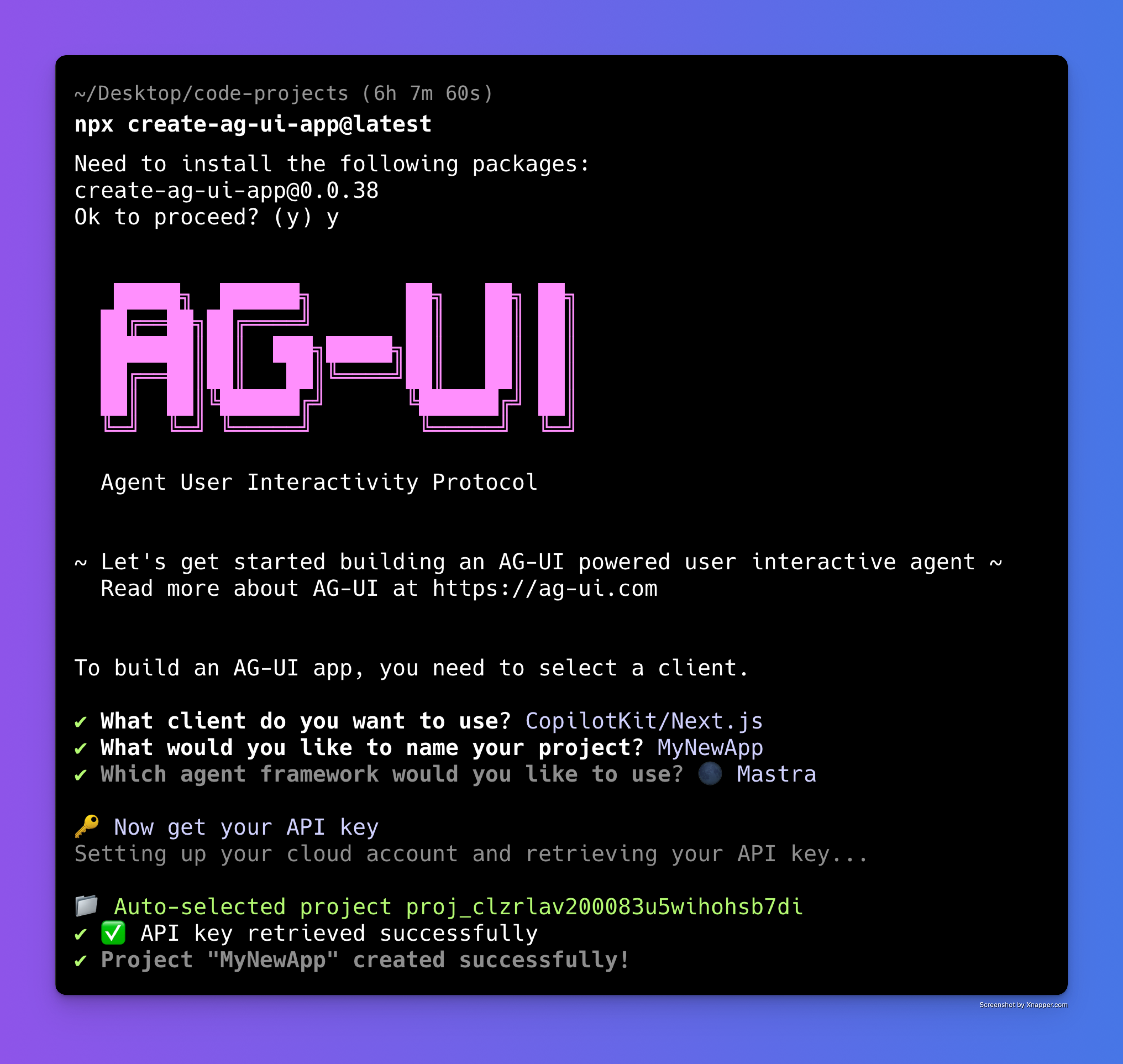
  • Spin up a new project from scratch
  • Plug into all major frameworks out of the box
  • Or run with our standalone terminal client if you prefer a lightweight setup and are curious about creating your own client integration.
__wf_reserved_inherit

In other words, you can go from nothing to a running agentic application without touching a line of setup code.

How it works

  1. Install the CLI → one command to set everything up npx create-ag-ui-app@latest.
  2. Choose your framework → React, Next.js, Vite, or go terminal-only.
  3. Start coding → you’re instantly connected to the AG-UI protocol, ready to build interactive, agent-powered experiences.

The CLI flow generates the right project structure, wires in AG-UI events, and leaves you with clean, production-ready scaffolding you can actually build on.
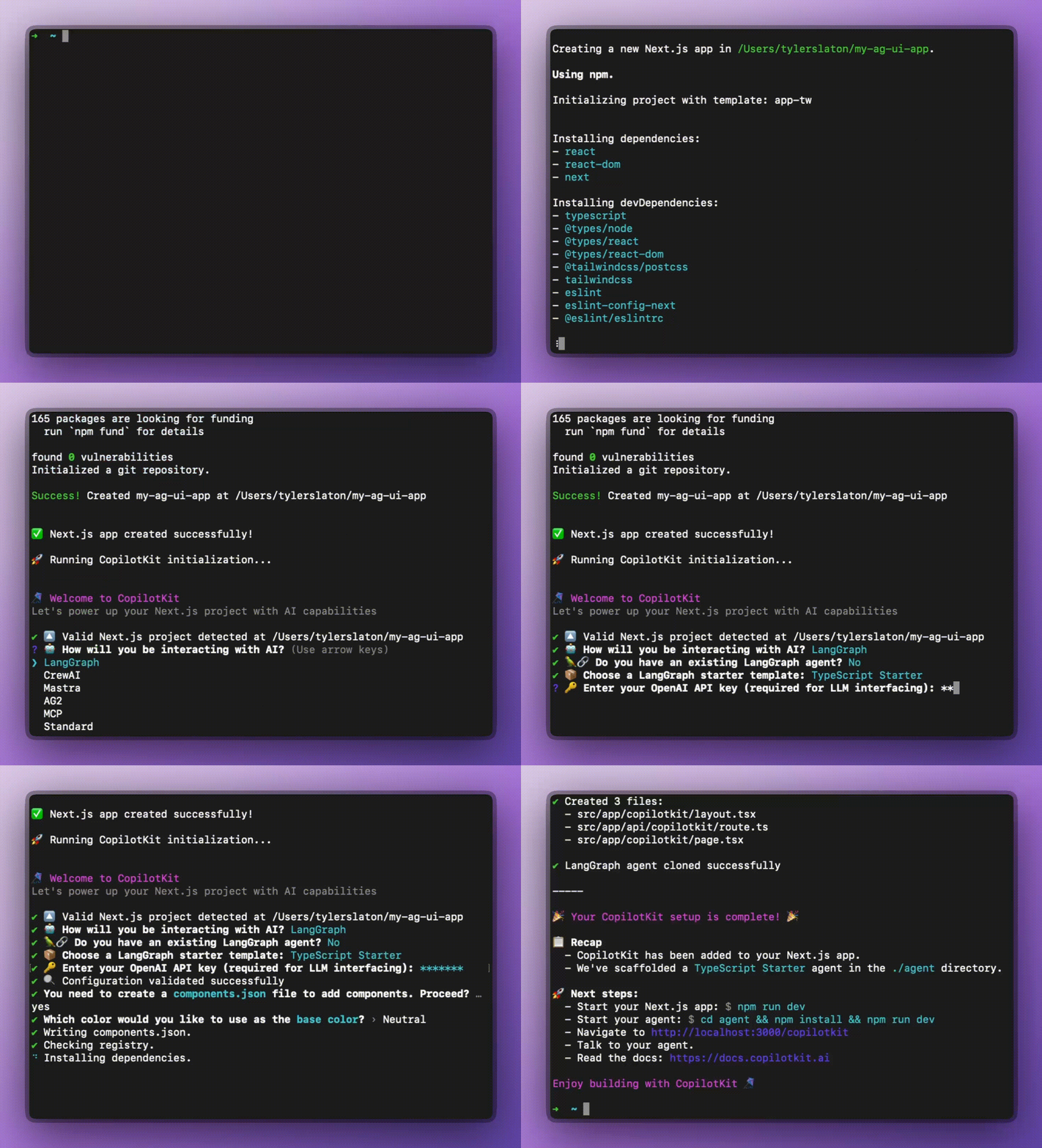
Demo GIF

Why developers love it

  • Speed → Get to “Hello Agent” in under 2 minutes.
  • Flexibility → Works across agentic frameworks and terminal environments.
  • Extensibility → everything you scaffold is ready for customization.

Try it today

If you’ve been curious about AG-UI but didn’t want to agonize over setup, I invite you to check it out. The CLI flow is the fastest way to experience the AG-UI protocol and start building agentic apps from scratch.

👉 Check out the AG-UI Protocol on GitHub

👉 Join the growing community of developers building agentic apps
Top posts

See All
The Developer's Guide to Generative UI in 2026
Anmol Baranwal and Nathan TarbertJanuary 29, 2026
The Developer's Guide to Generative UI in 2026AI agents have become much better at reasoning and planning. The UI layer has mostly stayed the same, and it is holding back the experience. Most agent experiences still rely on chat, even when the task clearly needs forms, previews, controls, or step-by-step feedback. Generative UI is the idea that allows agents to influence the interface at runtime, so the UI can change as context changes. This is usually done through UI specs like A2UI, Open-JSON-UI, or MCP Apps. We'll break down Generative UI, the three practical patterns, and how CopilotKit supports them (using AG-UI protocol under the hood).
Bring MCP Apps into your OWN app with CopilotKit & AG-UI
Anmol Baranwal and Nathan TarbertJanuary 22, 2026
Bring MCP Apps into your OWN app with CopilotKit & AG-UIToday, we are excited to announce CopilotKit’s support for MCP Apps. Now, MCP servers can finally ship an interactive UI that works out of the box in real agent applications.
How to build a Frontend for LangChain Deep Agents with CopilotKit!
Anmol Baranwal and Nathan TarbertJanuary 20, 2026
How to build a Frontend for LangChain Deep Agents with CopilotKit!LangChain recently introduced Deep Agents: a new way to build structured, multi-agent systems that can plan, delegate, and reason across multiple steps. It comes with built-in planning, a filesystem for context, and subagent spawning. But connecting that agent to a real frontend is still surprisingly hard. Today, we will build a Deep Agents powered job search assistant and connect it to a live Next.js UI with CopilotKit, so the frontend stays in sync with the agent in real time.
Are you ready?

Stay in the know

Subscribe to our blog and get updates on CopilotKit in your inbox.