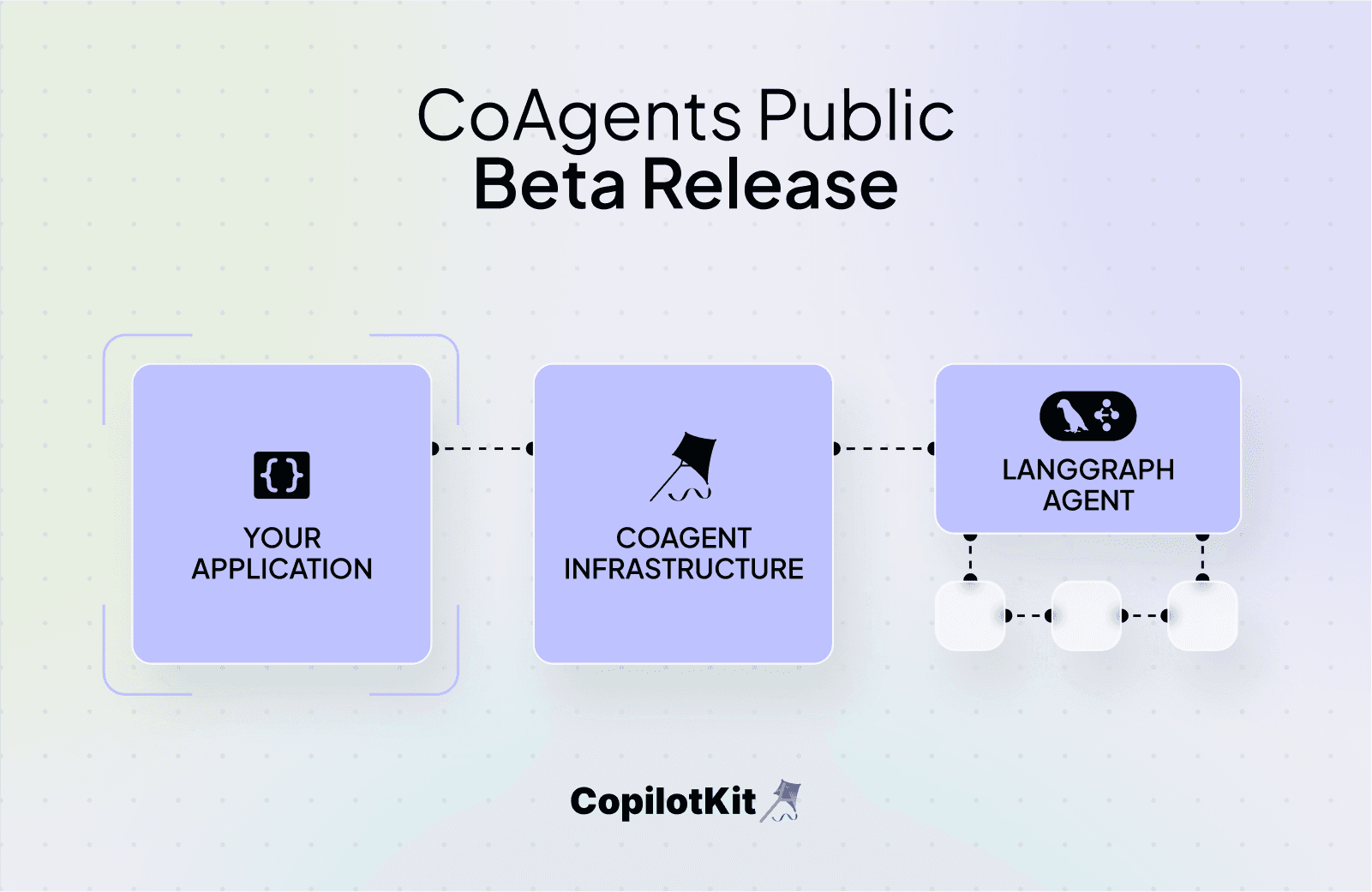
The building blocks for the next generation of AI-native apps.
Over the past few months, we’ve seen the emergence of a new type of Agent-Native application, featuring unique UX and AI agents that actually work.
Apps like Replit’s AI Agent and OpenAI’s Canvas combine specialized AI agents, tailored to their specific workflows, with agent-optimized UX to produce the next generation of AI-powered apps.
With LangGraph + CoAgents, any developer can quickly build these types of applications for any vertical. Simply build a LangGraph agent attuned to your workflow, then use CoAgents to deploy it into your application.
Check out our quick tutorial video that demonstrates how to build an agent-native app in just five minutes. This step-by-step guide is perfect for those looking to dive into the world of agent-native applications quickly and effectively.
More details below.
CopilotKit is a framework that enables developers to build best-in-class AI copilots into their products. The framework provides React components for AI chat, generative UI, and AI autocomplete, along with a powerful runtime that surfaces context, tools, and skills to an AI agent based on the user’s behavior in the application. It also connects the agent’s output back to the application layer.
Today, we are releasing CoAgents in public beta, containing everything you need to embed specialized AI agents (powered by LangGraph) into your applications, including:
↔ Application) with support for intermediate state streamingLeveraging the LangGraph SDK within CopilotKit, developers can build an agent tailored to a specific use case and then use CoAgents to integrate custom actions and generative UI experiences—all within a clean framework to manage agents inside your application. Let’s walk through each feature set and how it drives action in your AI Agent.
Let’s walk through each feature set below and how it drives action in your AI Agent.
CoAgents is powered by CopilotKit and LangGraph. Use LangGraph to build an agent tailored to your use case, then use CoAgents to integrate it into your application.
For example, a research agent can search for sources, download them, and then use an LLM to determine how to incorporate them into a draft.
LangGraph allows us to easily build an agent with steps and capabilities customized to our use case while providing a clean framework for managing agents inside the application.

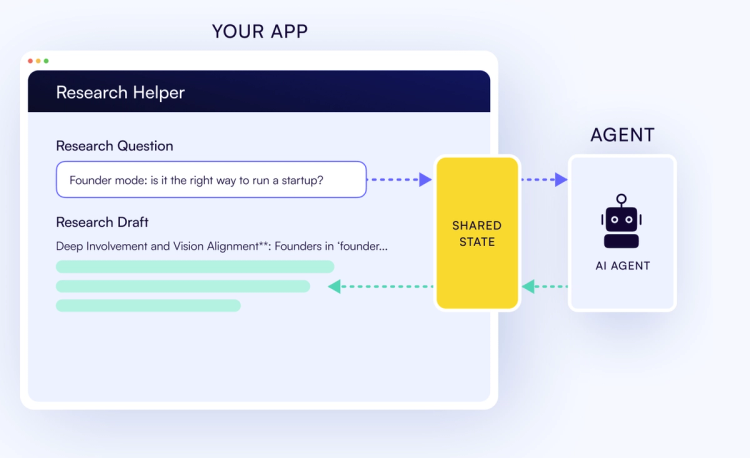
↔ app)With just a single line of code, your application can see everything the agent is doing, and the agent can observe everything happening inside the application.
This shared state automatically supports intermediate agent state streaming, meaning you can display the agent’s current state to the user, even while it’s in the middle of its process. This is crucial for agent performance and for UX that matches user expectations.
const { state, setState } = useCoAgent("the agent name - you can have several!")
With a few lines of code, CoAgents braids together both the state shared between LangGraph nodes and the continuous data streamed from inside those nodes. This data stream is braided into a single continuously updating state object, shared efficiently over the wire. The state object is made available to React applications through a custom hook (useCoAgent).
State sharing works in the other direction as well, streaming application state changes back to the agent using a custom setState hook variable.
Interested in how this works under the hood? Read more in the CoAgents documentation.
Render the agent’s real-time state in the chat UI so the user can see what the agent is doing.
Unlike traditional generative UI, agentic generative UI is based on the agent’s state, rather than on a tool-calling abstraction. This is critical for in-app agents as it provides users with visibility into what the agent is doing which not only prevents them from staring at a blank loading screen while the agent is executing — but also builds trust that the agent is on the right track. (with agent steering, users can bring the agent back on track if they see it’s veered off).
useCoAgentStateRender({
  name: "research_agent",
  node: "download_progress",
  render: ({ state, nodeName, status }) => {
    return <Progress logs={state.logs} />;
  },
});
Human-in-the-Loop allows you to specify breakpoints in the agent process at which Human input/approval is required. This allows for greater safety as well as better agent performance.
Ensure risky actions get cannot be executed without explicit human approval, and allow the human to assist the agent with its planning and execution steps.
useCopilotAction({
  name: "ApprovePlan",
  parameters: [{ name: "planSteps", type: "string[]" }],
  renderAndWait: ({ args, handler }) => (
    <ConfirmPlan
      planSteps={args.planSteps}
      onApprove={(approvedSteps) => handler({ approved_steps: approvedSteps })}
      onDeny={() => handler({ approved_steps: [] })}
    />
  ),
});
CoAgents will provide your agent with the frontend & backend actions available currently, based on user context and what the user is currently doing in the application.
These tool calls are automatically propagated to the frontend/backend as needed, with support for generative UI. The action results are then propagated back to the agent.
Agent steering will allow developers to use LangGraph’s breakpoints, to specify points in the agents process where agent state is saved. CoAgent’s agent steering will allow users to rewind and correct an agent mid-process.
Get Started:
Star our GitHub repo to support CopilotKit and stay updated with upcoming CoAgents features! ✨
Subscribe to our blog and get updates on CopilotKit in your inbox.