Meta's Muse is a personal AI agent you use from your phone or the web. It works on its own cloud computer with a browser, finishes tasks for you and checks with you before sensitive actions, like sending an email or making a purchase.
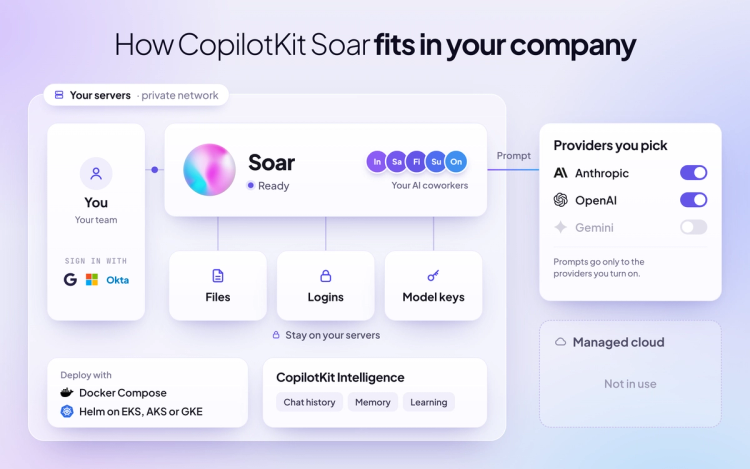
CopilotKit Soar gives your company self-hosted AI coworkers that run on your own servers and connect to the tools you already use. It's fully customizable, works with any agent harness and any model, and keeps learning from how your teams work. Our engineers set it up under your brand.
For a business, the difference comes down to who the AI coworkers are built for, where they run, who can reach your data, and whether you can bring your own agents and models.
Muse is Meta's personal AI agent, available on iOS, Android and the web in the US and Canada. It runs on Muse Secure VM, a cloud computer with its own browser that Meta operates, and it's powered by Meta's Muse Spark model. A separate Sentinel agent approves anything Muse sends to the internet.
With Muse for Small Business, owners give Muse a goal and connect it to tools like Instagram, Shopify, Stripe, QuickBooks and Slack, all inside the same app. Each user gets their own Muse and VM.
Over the past few months, we open-sourced our own versions of the big AI coworker products, including OpenMuse for Meta Muse. CopilotKit Soar turns that core into one business-ready product for companies that want AI coworkers on their own terms.
Your teams share AI coworkers that use your apps, finish real work and get better the more they're used. Each coworker can get its own computer and follows the rules your IT team writes. Coworkers show up in the Soar app on web, desktop and mobile, and in Slack and Microsoft Teams.
Our forward deployed engineers:
Both give you AI coworkers with a computer of their own that finish work and ask before sensitive actions. The differences show up in who they're built for, where they run and how much of the stack you control.
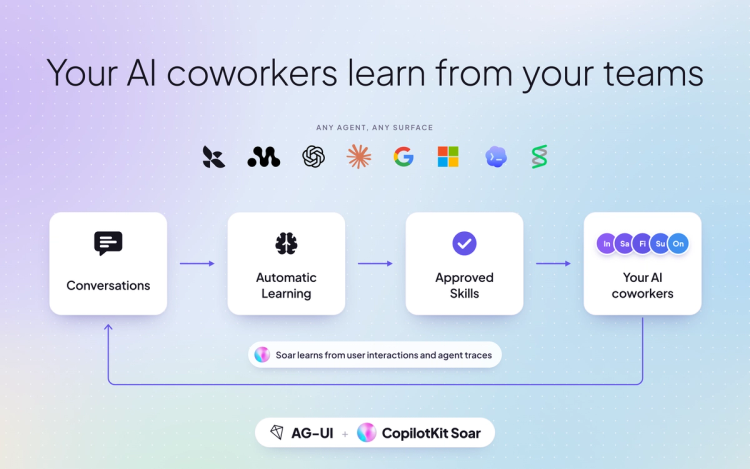
SKILL.md file you can download with the CLIMuse learns from what each person shares, and each user decides what it forgets. In Soar, everything a coworker learns is visible and reviewable, and your company decides what sticks. All of it runs on CopilotKit Intelligence, which you can self-host or use in our cloud.
With User Memories, each coworker keeps your people's preferences and project context across conversations, for one user or shared across a project. Your team can list, update or remove any memory.
With CLiF, your team can show a coworker a task once in the browser, and Soar learns and repeats it. Admins manage learning centrally, and each coworker learns in its own container.
With Automatic Learning, Soar also reads your coworkers' finished threads, finds the patterns and proposes each insight as a skill. Every skill is a SKILL.md your team reviews, and it reaches your coworkers only after a person approves it.
Muse fits individuals and small business owners in the US and Canada who want a capable personal agent of their own.
CopilotKit Soar fits companies that:
1. What's the difference between CopilotKit Soar and Meta Muse?
Meta's Muse is a personal AI agent that runs on a cloud computer Meta operates, one per user. CopilotKit Soar gives teams shared AI coworkers on your own servers, works with any agent and model, and is set up by our engineers under your brand.
2. Can CopilotKit Soar be self-hosted?
Yes. Soar runs on a single machine with Docker, or on Kubernetes with Helm on EKS, AKS, GKE or your own cluster. Muse runs on Muse Secure VM, a cloud computer Meta operates.
3. Is there an open source version of Meta Muse?
Yes. OpenMuse is CopilotKit's open-source version of Meta Muse, a template developers build on. CopilotKit Soar is the version companies run, with setup on your servers, your branding and support from our engineers.
4. Does CopilotKit Soar have SSO and an admin console?
Yes. Soar includes Google, Microsoft, Okta, SAML and OIDC sign-in, SCIM 2.0, central admin and an audit trail that streams to your SIEM. In Muse, each user manages their own settings.
5. Who can access data in CopilotKit Soar?
Your company. Soar runs on your servers, files and stored credentials stay there, and you choose which model providers see your prompts. For Muse, Meta says its setup "does not prevent Meta from accessing data when necessary to support, secure or operate the service."
6. How do I get CopilotKit Soar?
Soar is in early access. Book a meeting at copilotkit.ai/soar and our engineers will build your first AI coworker with you.
CopilotKit Soar brings self-hosted AI coworkers to every team, on your servers and under your rules. To see everything it can do, refer to the CopilotKit Soar product page.
To learn more:
Read more of our comparison blogs on CopilotKit Soar and other AI coworker products:
If you want to see Soar in action, we suggest booking a demo. Our engineering team will build your first AI coworker with you and provide dedicated support as your team grows.
Stop renting your AI. Own it.
Follow CopilotKit on Twitter for updates. If you get stuck, reach out in the CopilotKit or AG-UI communities.
Subscribe to our blog and get updates on CopilotKit in your inbox.