OpenClaw is an open-source AI assistant that runs on your own computer or server. It connects Slack, Microsoft Teams, WhatsApp, Discord and 20+ other chat apps to the models and agents you pick, and keeps its state, memory and credentials on your hardware.
CopilotKit Soar gives your company self-hosted AI coworkers that run on your own servers and connect to the tools you already use. It's fully customizable, works with any agent harness and any model, and keeps learning from how your teams work. Our engineers set it up under your brand.
Both run on your own infrastructure. For a business, the difference comes down to how your people sign in and get access, how every action is checked and recorded, and who sets it up and supports it.
OpenClaw is MIT licensed and run by the OpenClaw Foundation, an independent nonprofit, with no paid tier and no hosted service. One Gateway runs as a personal assistant on a laptop or as a shared team deployment. Memory is plain Markdown files on disk, and single commands back up or uninstall everything.
For companies, the Foundation also offers OpenClaw Enterprise, a free, open-source control plane for managing agents, built with Red Hat and NVIDIA. It adds OIDC sign-in with Okta, Microsoft Entra ID, Keycloak and Auth0. It's ready for internal pilot workloads, with 1.0 planned later this year.
Over the past few months, we open-sourced our own versions of the big AI coworker products: OpenBot (Grok Bot), OpenMuse (Meta Muse), OpenDots (OpenAI dots) and OpenTag (Claude Tag). CopilotKit Soar turns that core into one business-ready product for companies that want AI coworkers on their own terms.
Your teams share AI coworkers that use your apps, finish real work and get better the more they're used. Each coworker can get its own computer and follows the rules your IT team writes. Coworkers show up in the Soar app on web, desktop and mobile, and in Slack and Microsoft Teams.
Our forward deployed engineers:
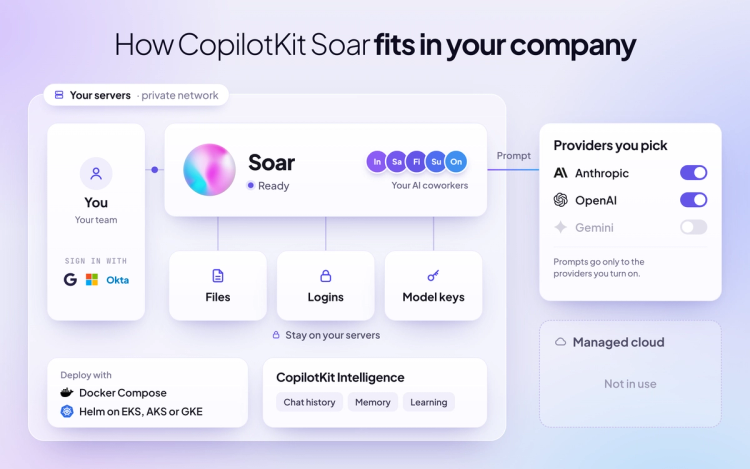
Both run on your own servers, reach your team in Slack and Microsoft Teams, and let you pick your models. The differences show up in sign-in, how every action is checked and recorded, and who sets it up.
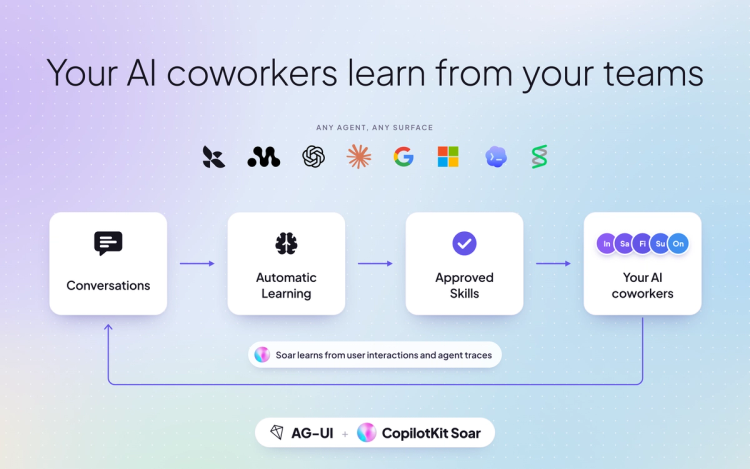
SKILL.md file you can download with the CLIOpenClaw writes what it learns into Markdown files on the machine it runs on, so on a laptop, that learning stays on the laptop. Soar's coworkers learn from the work your teams do, everything they learn is visible and reviewable, and your company decides what sticks. All of it runs on CopilotKit Intelligence, which you can self-host or use in our cloud.
With User Memories, each coworker keeps your people's preferences and project context across conversations, for one user or shared across a project. Your team can list, update or remove any memory.
With CLiF, your team can show a coworker a task once in the browser, and Soar learns and repeats it. Admins manage learning centrally, and each coworker learns in its own container.
With Automatic Learning, Soar also reads your coworkers' finished threads, finds the patterns and proposes each insight as a skill. Every skill is a SKILL.md your team reviews, and it reaches your coworkers only after a person approves it.
OpenClaw fits developers and teams who want a free, open-source assistant they set up and run themselves, across many chat apps.
CopilotKit Soar fits companies that:
1. What's the difference between CopilotKit Soar and OpenClaw?
Both run on your own infrastructure. OpenClaw is a free, open-source assistant you set up and run yourself. CopilotKit Soar adds company sign-in with SCIM, one gateway that checks and records every action, and setup by our engineers under your brand.
2. Is CopilotKit Soar open source?
Soar runs on OpenBot, our open-source engine under the MIT license. CopilotKit Intelligence, which powers threads and learning, is a separate product you can self-host or use in our cloud.
3. Does CopilotKit Soar support SSO and SCIM?
Yes. Soar includes Google, Microsoft, Okta, SAML and OIDC sign-in, plus SCIM 2.0. OpenClaw handles team sign-in through Cloudflare Access, an identity-aware proxy or Tailscale, and OpenClaw Enterprise adds OIDC sign-in.
4. Can several teams share CopilotKit Soar?
Yes. Soar's AI coworkers belong to the company, one gateway checks every action, and each coworker can get its own computer. OpenClaw recommends separate Gateways for teams that don't trust each other.
5. Can I use my own agents and models with CopilotKit Soar?
Yes. Any agent that speaks AG-UI joins Soar as a coworker, and you pick OpenAI, Anthropic, Google or any OpenAI-compatible model.
6. How do I get CopilotKit Soar?
Soar is in early access. Book a meeting at copilotkit.ai/soar and our engineers will build your first AI coworker with you.
CopilotKit Soar brings self-hosted AI coworkers to every team, on your servers and under your rules. To see everything it can do, refer to the CopilotKit Soar product page.
To learn more:
Read more of our comparison blogs on CopilotKit Soar and other AI coworker products:
If you want to see Soar in action, we suggest booking a demo. Our engineering team will build your first AI coworker with you and provide dedicated support as your team grows.
Stop renting your AI. Own it.
Follow CopilotKit on Twitter for updates. If you get stuck, reach out in the CopilotKit or AG-UI communities.
Subscribe to our blog and get updates on CopilotKit in your inbox.