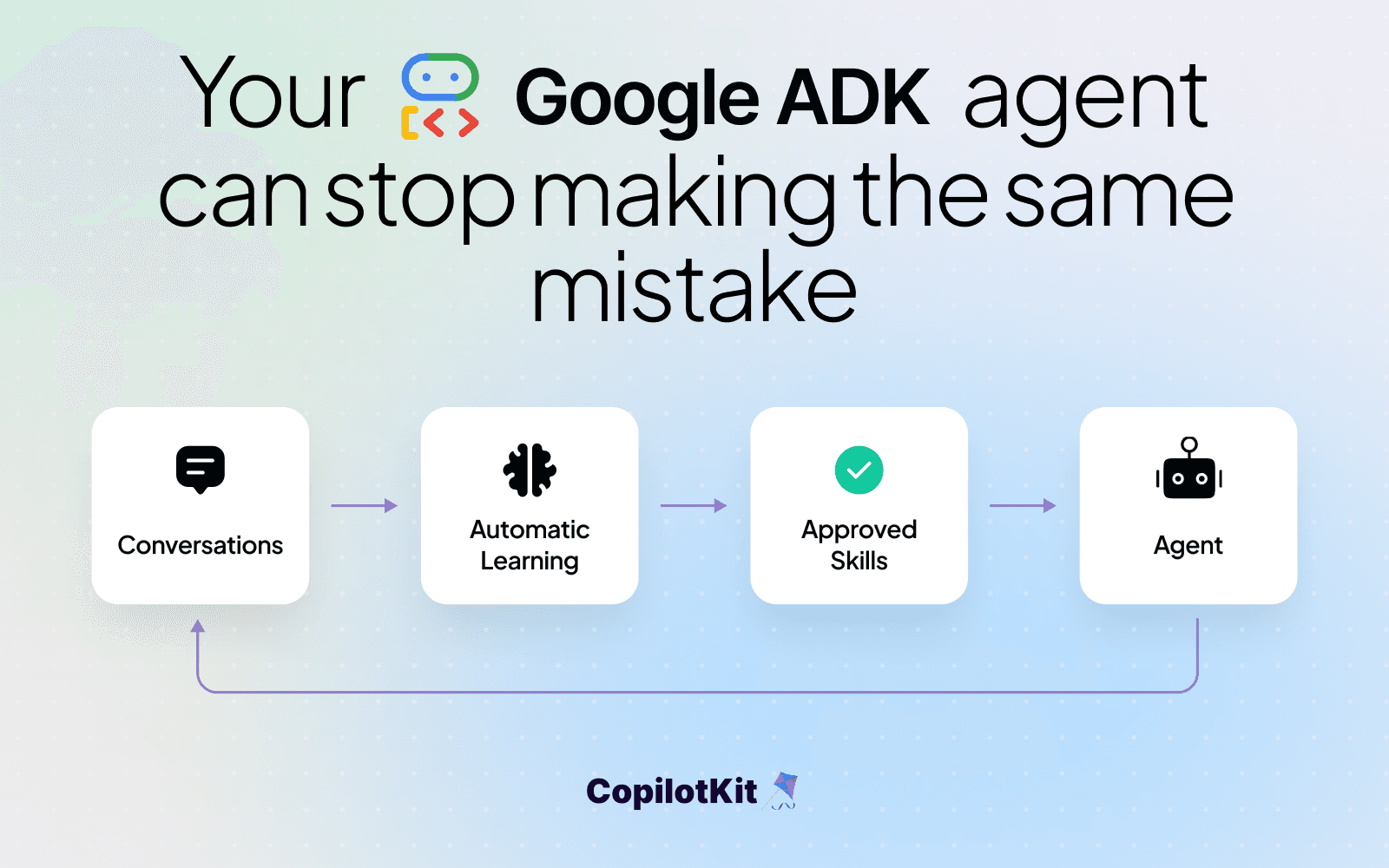
Add Automatic Learning to your existing Google ADK app: turn conversations into Product Insights and deliver approved Skills automatically.
To make your existing Google ADK agent self-improving, connect it to CopilotKit Intelligence, import its conversation history, start the first learning run, and configure Skill delivery. Review and approve the proposed Skills so your agent can use what it learns in future conversations.
Imagine your Google ADK research agent compares vendors for your team. It returns a useful summary, but someone asks, “Where did those numbers come from, and how current are they?” The agent adds the source links and dates. Next week, a different comparison ends with the same follow-up.
Your agent has enough information to help. It's missing a useful habit: include the source and date alongside each finding. Those follow-up questions are sitting in your session history, waiting for someone to notice the pattern and improve the instructions.
With CopilotKit Intelligence, you can put that history to work. Product Insights surfaces recurring requests and friction. Automatic Learning proposes reusable Skills from the evidence. You review the instructions, publish the ones that fit, and make them available to your existing ADK agent.
This tutorial walks through that loop for an existing Python ADK application. The research example makes the process concrete; choose a workflow your own app already handles. Your coding agent will help connect the application, import saved sessions, and attach the Skill delivery adapter. You'll use the Intelligence web app to select conversations and review what the agent should learn.
You start the first learning run manually and set up Skill delivery once. After that, Automatic Learning analyzes the space nightly when it has at least 15 eligible threads. You can configure the time of the nightly run. You review and approve proposed Skills, and approved Skills are delivered to your agent automatically.
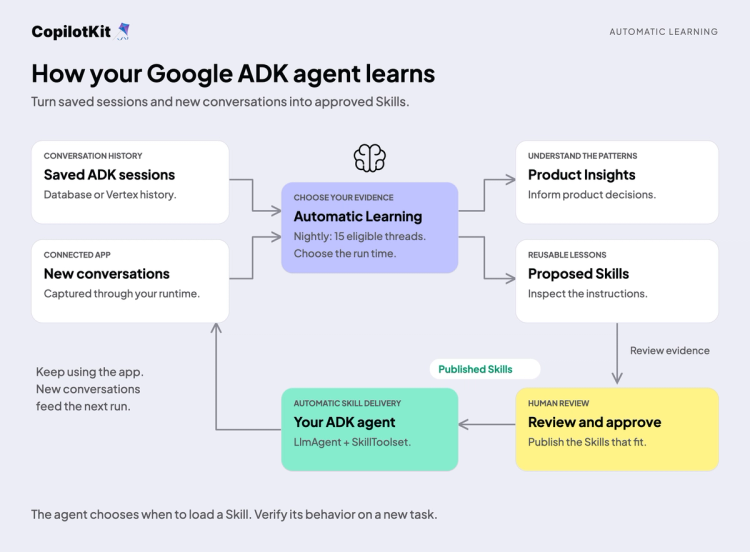
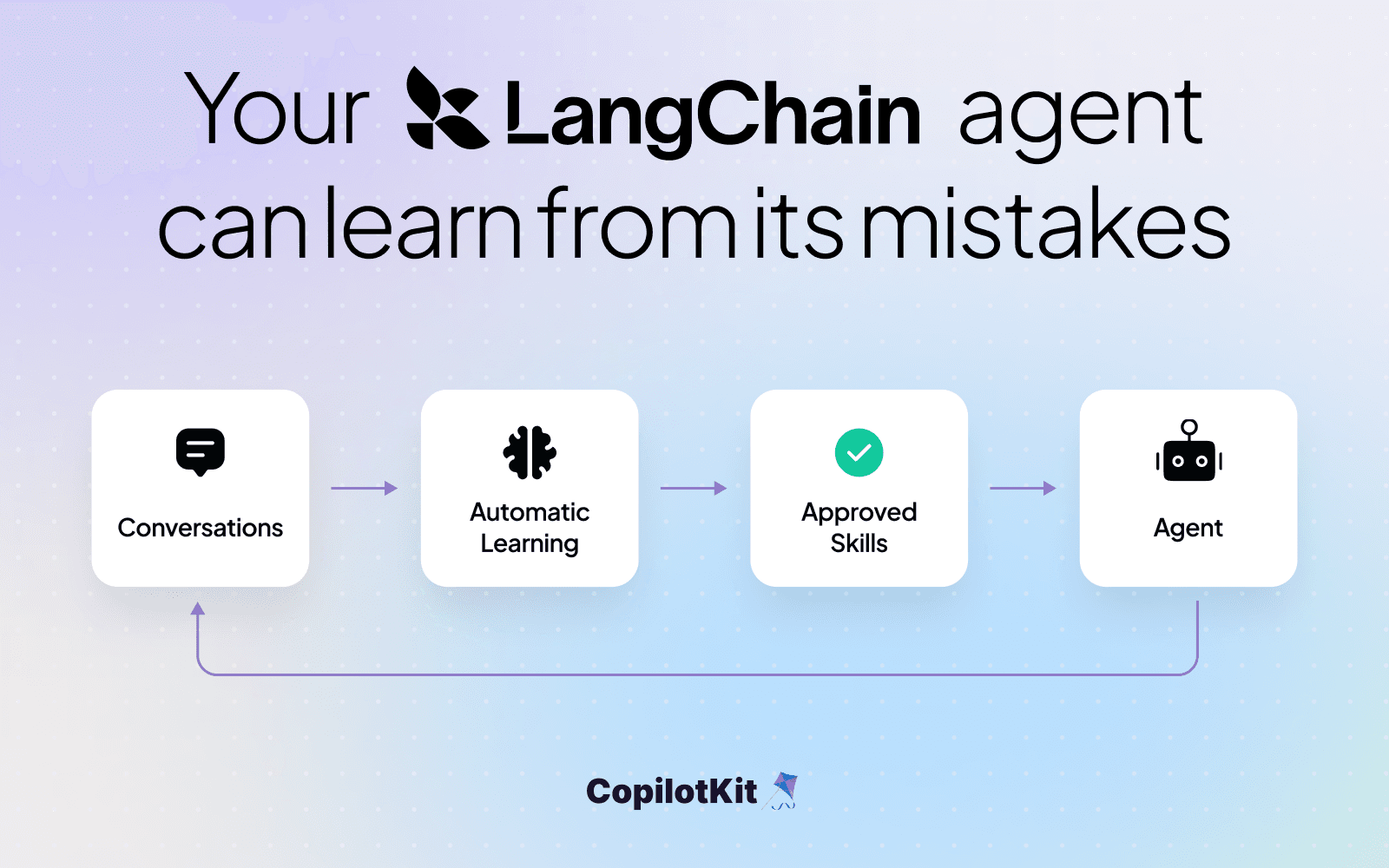
Saved sessions and new conversations feed Automatic Learning. Review the proposed Skills and deliver the ones you approve to your ADK agent.
This walkthrough follows the process from connecting your app to reviewing and delivering a Skill. Then we’ll apply it to your existing Google ADK application.
Open your coding agent in your project and paste:
Read https://www.copilotkit.ai/onboarding-prompts and help me get set up.The onboarding flow inspects your project and guides you through connecting your agent and application to CopilotKit Intelligence. Sign in, select the destination project, and have your coding agent preserve the existing ADK model, tools, authentication, and session service.
For this tutorial, use Python 3.11 or later and a standard ADK LlmAgent on google-adk>=1.17,<2, the version range supported by the Skill delivery adapter. Have your coding agent check the installed versions before changing dependencies.
Create a Learning space for one workflow. The CLI and SDK also call this a learning container; it's the same thing. Give it a stable ID, such as research-quality, and configure the connected runtime to assign relevant new conversations to it. Automatic Learning needs to be available for your organization.
Send a message through your application and find the resulting thread in Intelligence. Check your existing ADK session persistence as part of the integration, including how CopilotKit threads map to native sessions. Already connected to Intelligence? Start with the setup prompt in the Automatic Learning guide.
ADK organizes a conversation as a session associated with an application and a user. The importer uses those identities to bring saved conversations into Intelligence. It supports database session stores and Vertex AI / Agent Engine history. Sessions that only lived in memory aren't available to import. Google's session guide explains the storage options.
Ask your coding agent:
Help me import saved ADK sessions into the Intelligence project we
just connected. Identify the durable session backend, application
names, and user IDs. Start with one workflow's history.

Configure a dry run using the existing source credentials. Map each
ADK app_name to the CopilotKit agentId that handles its live traffic.
Reuse our server-side Intelligence endpoint and project key without
printing credentials. Show me the scope before importing, then
report imported, skipped, and failed counts.
For a database source, provide ADK_DATABASE_CONNECTION_STRING through your environment configuration, then set the backend and scope. Replace research below with your actual ADK application name:
export ADK_SOURCE_BACKEND="database"
export ADK_IMPORT_SCOPES="research:*"
npx copilotkit@latest import --source adk --dry-run
The scope selects all saved users for that application. Use research:user-123 to start with one specific user instead. The dry run discovers source applications and sessions without uploading them.
Create agent-map.json using the real names from your application:
{
  "research": "research-agent"
}
The left side is ADK's app_name; the right side is the agent ID registered in your CopilotKit runtime. Matching the live agent ID keeps historical sessions and new conversations grouped together in Intelligence.
For the real import, make INTELLIGENCE_API_URL and CPK_INTELLIGENCE_API_KEY available in the command's environment. The importer doesn't automatically load .env or the CLI's project configuration file, so have your coding agent use your normal environment loader.
npx copilotkit@latest import \
  --source adk \
  --agent-map ./agent-map.json
User attribution comes from the session's user ID. Conversations without a recoverable user are skipped by default; inspect the report before assuming all sessions arrived. Open an imported thread and verify its messages and attribution. Subsequent imports skip sessions already imported from the same source.
For Vertex / Agent Engine, use ADK_SOURCE_BACKEND="vertex" with ADK_VERTEX_PROJECT_ID, ADK_VERTEX_LOCATION, and ADK_VERTEX_AGENT_ENGINE_ID, plus your Google credentials. The ADK import guide covers that configuration and migration requirements for legacy pickle stores.
Once connected, future conversations that run through CopilotKit reach Intelligence automatically. Keep your durable ADK session service wired up to retain native history too, with stable thread-to-session mapping. The importer brings in past conversations; it doesn't continuously replicate the ADK database.
Open your project and Learning space in the Intelligence web app. Choose Import threads, filter by the agent you mapped, and preview the conversations. Select related examples, choose Review selection, and import them into the space.
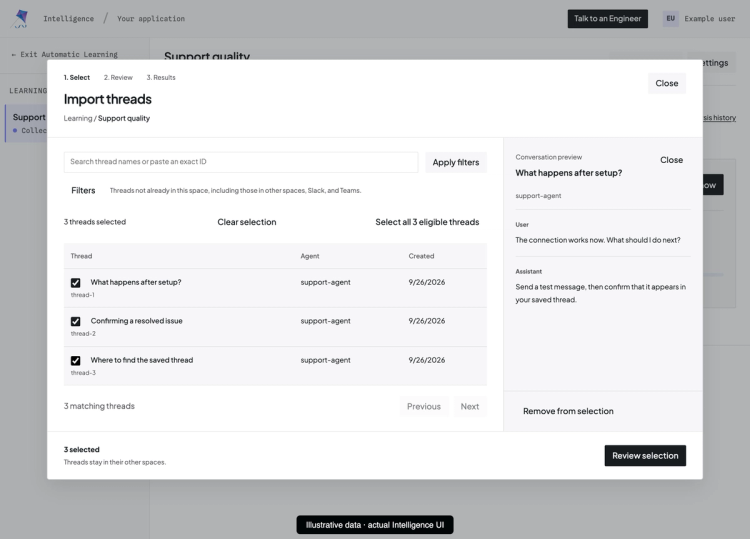
Filter conversations by agent, preview their messages, and select threads to add to the Learning space.
For the research example, choose conversations where the user asked for source links or dates, along with the revised findings that answered those questions. Include enough context to understand the task and outcome. A single vague complaint is harder to turn into a useful instruction than several complete exchanges about the same problem.
Your saved ADK sessions can show which instructions your agent is missing.
The CLI import made the history available in the project. Adding threads to a space selects the evidence to analyze together. Wait for preparation to finish and review the import results before starting Learning.
For your first learning run, choose Start manual run now and follow progress under Analysis results. Once the run finishes, open the Product Insights and follow their evidence back to the original conversations.
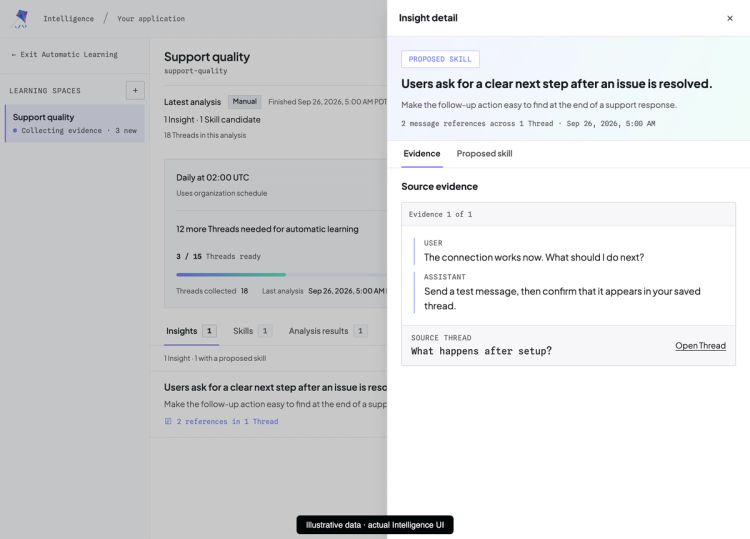
A Product Insight connects a recurring user request to the conversation that supports it.
In our example, repeated requests for sources might suggest adding citation details to the research interface. A proposed Skill could instruct the agent to include source links and publication dates with findings, and identify dates it cannot establish. These are two useful outcomes from the same pattern: a product decision and guidance the agent can apply.
Read each proposed Skill against its supporting conversations. Does it help across this workflow? Does it preserve the application's policies? Would it still make sense for a different customer? Approve and publish the Skill when the instructions fit.
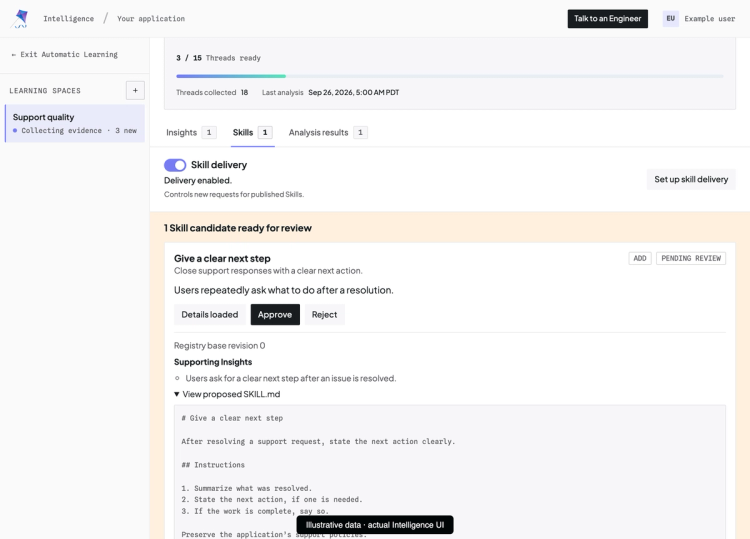
Review the proposed Skill’s instructions and supporting Insight before approving it.
A useful correction can become a reusable Skill after you review the evidence.
Some findings will inform product changes without producing a Skill. That's useful too. The Product Insights overview explains how to use conversation evidence for those decisions.
Set up Skill delivery once for your agent. In the space's Skills tab, enable Skill delivery.
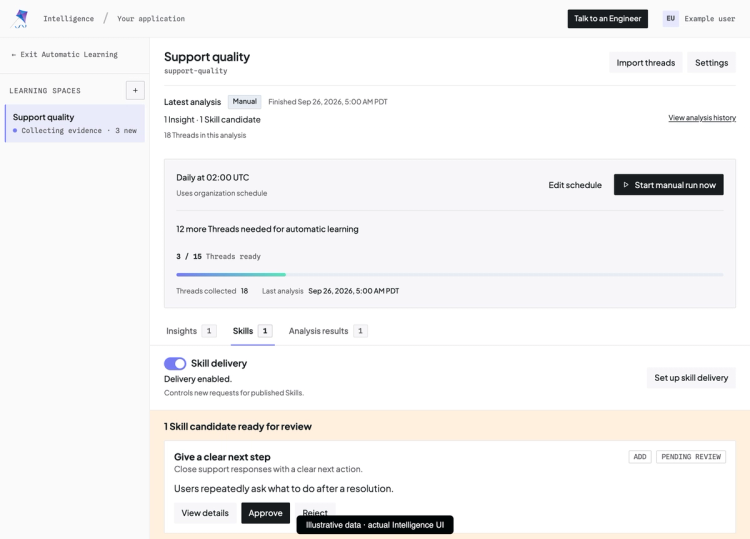
The Skills tab shows published Skills, the Skill delivery toggle, and the setup action.
Choose Set up skill delivery, then Copy setup prompt, and paste it into your coding agent. The prompt includes the space ID and asks the agent to preserve your existing instructions and tools while adding the supported adapter.
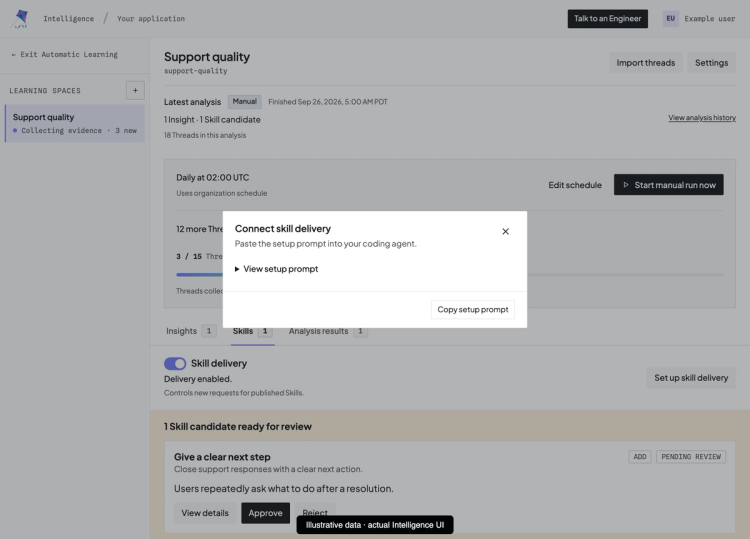
Copy the Learning space’s setup prompt to connect your agent to automatic skill delivery.
Install the Python adapter:
pip install copilotkit-intelligence-adkThe integration adds a SkillToolset to an LlmAgent and keeps a SkillRegistry alive while the application serves requests:
from contextlib import asynccontextmanager

from copilotkit_intelligence_adk import SkillRegistry, SkillToolset
from google.adk.agents import LlmAgent


@asynccontextmanager
async def agent_with_skills():
    registry = SkillRegistry(container_id="research-quality")
    try:
        await registry.initialize()
        yield LlmAgent(
            name=existing_name,
            model=existing_model,
            instruction=existing_instructions,
            tools=[*existing_tools, SkillToolset(registry)],
        )
    finally:
        await registry.aclose()
Replace the space ID and keep the application's existing values for the existing_* names. Preserve any additional agent configuration, including callbacks and subagents. Use the same server-side Intelligence endpoint and project key as onboarding. Your normal asynchronous ADK Runner continues to run the agent with its existing session service.
Have your coding agent enter async with agent_with_skills() as agent: in the application's async lifespan and keep that scope open while requests run. Finish active runners before leaving it. The finally block closes the registry, including on errors; closing the toolset alone doesn't close the registry. The complete ADK integration shows initialization and cleanup together.
For a multi-agent application, attach the toolset explicitly to each LlmAgent that should receive these Skills. Selected agents can share the registry. Adding it to a parent doesn't automatically connect every subagent.
Leave the revision unpinned to follow published updates. The adapter supplies a Skill catalog and tools for loading instructions; developer-authored instructions retain precedence. New versions become available on later invocations after refresh, without restarting the agent process.
Give the agent another task from the same workflow without repeating the correction. For the research example, ask about a different vendor and check whether findings include their sources and dates.
Check that the approved Skill appears in the catalog, the agent calls copilotkit_load_skill, and the resulting behavior follows the instructions. If the Skill includes supporting files, copilotkit_read_skill_file makes those available as well.
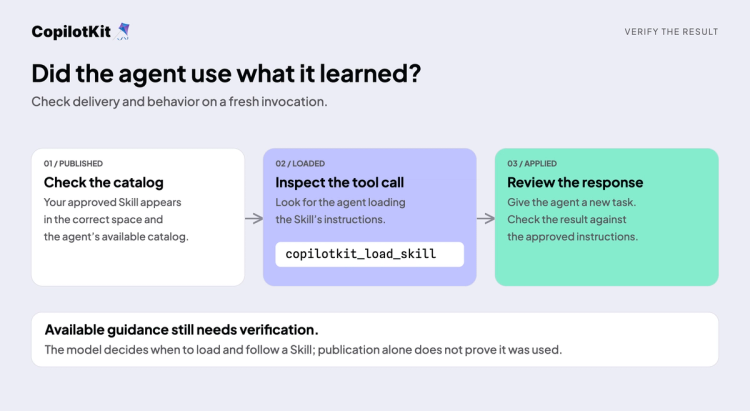
Check publication, the Skill-loading tool call, and the response to a fresh request.
The model decides when to load a Skill. Publication alone doesn't guarantee that the next response uses it. If the behavior doesn't change, check the project, space, delivery toggle, published revision, and tool calls. The default refresh window is five seconds, and each invocation keeps its own snapshot, so test a new invocation after refresh.
The learning loop now runs automatically: new conversations flow into Intelligence, and Automatic Learning analyzes the space nightly when at least 15 threads are eligible. You can change the nightly run time in the web app. Keep reviewing the proposed Skills; once approved and published, they are delivered to your agent automatically, without repeating the setup.
Choose a correction your users keep making and a few saved sessions that show it. Create an Intelligence account, run the onboarding prompt in your existing project, and follow that evidence through to a Skill you can test.
Want help connecting your ADK session store or choosing which agents should receive Skills? Contact us to arrange a session with a CopilotKit engineer. Bring your existing app and one workflow you'd like it to handle better.
Subscribe to our blog and get updates on CopilotKit in your inbox.