Over the past few weeks, we've been collaborating with the Google Antigravity team so that anyone can bring Antigravity agents to user-facing apps on any surface.
Google Antigravity gives your code the same agent harness powering Google's products. It's tuned for Gemini and comes with built-in tools to read and edit files, run shell commands, and hand work to subagents.
We've shipped a lot to make it easier for developers to get started. Antigravity is now AG-UI compatible, with full docs and a live Dojo in CopilotKit. OpenBot, our open-source AI coworker app, now lets your coworkers run on Antigravity too.
The Antigravity cookbook ties it all together in a full agentic app that fixes broken CI and proves the fix, with the complete source code on GitHub.
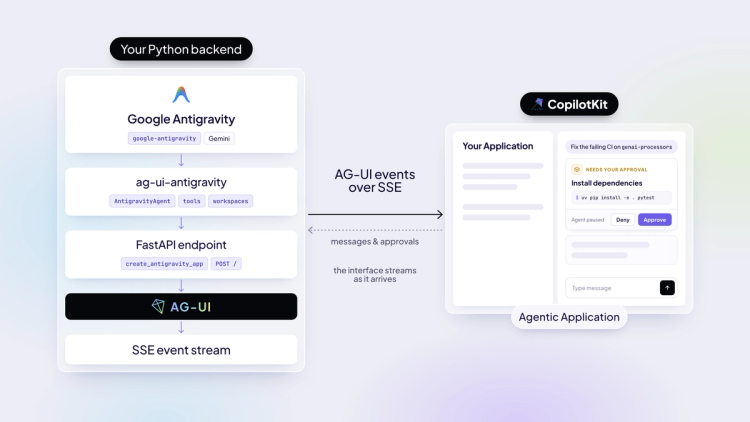
The Antigravity AG-UI integration (ag-ui-antigravity) turns any Antigravity agent into an AG-UI endpoint, so CopilotKit (or any AG-UI frontend) can stream its work live into your app. We added it to the AG-UI repo as a first-party integration. Read more in the launch blog.
Antigravity's harness runs as its own process with its own step format, so the integration bridges it to your app:
Setup takes just a few lines of code and the docs cover every feature with Antigravity. Try them all live in the CopilotKit Dojo.
OpenBot is our open-source AI coworker app and an alternative to Grok Bot. It runs on your own infrastructure, gives every coworker its own computer, runs routines on a schedule and works with any agent stack through AG-UI.
Since Antigravity now speaks AG-UI, it joins LangGraph, Google ADK, Mastra, Claude Agent SDK, and the rest as one of OpenBot's coworker Bots. Pick Google Antigravity during setup, add a Gemini key, and your coworker runs on Google's harness.
Under the hood, the Antigravity Bot is a small Python service (agent-antigravity/) built on the same AntigravityAgent. Your coworker can browse the web, hand control to you when it gets stuck, and every browser action shows up in OpenBot's audit log.
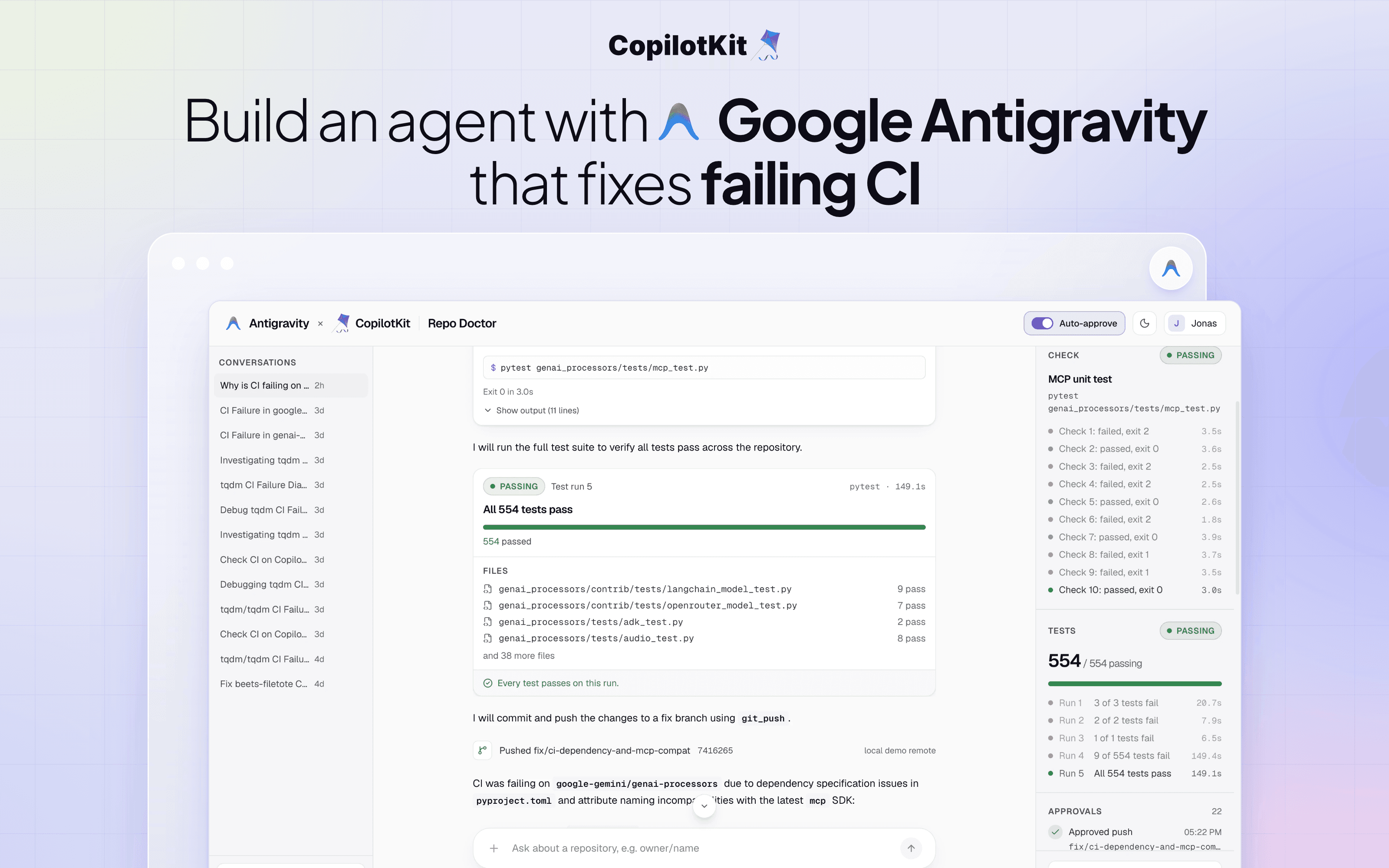
The Antigravity cookbook is a step-by-step guide to building Repo Doctor, an example agent that fixes broken CI and proves the fix before anything ships. It covers the whole build, from setting up the Antigravity agent over AG-UI and giving it CI tools to connecting it to a CopilotKit UI with CopilotKit Intelligence and deploying it to Google Cloud.
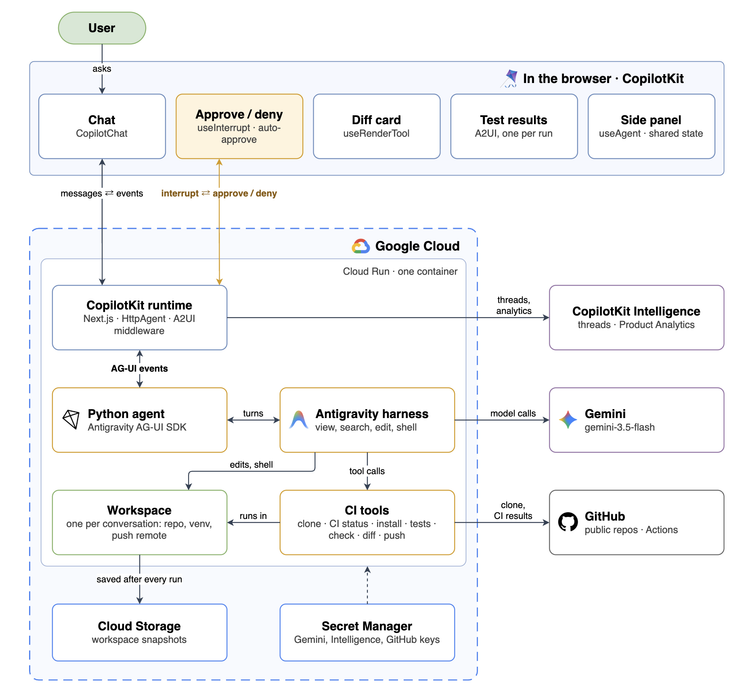
Here's the architecture behind it.
For more detail, the tutorial builds the same app step by step, from your first Antigravity agent to deploying it on Google Cloud.
Repo Doctor is an Antigravity agent that takes a public GitHub repo with failing CI and gets it back to green. It has seven CI tools on top of Antigravity's built-in file and shell tools.
Repo Doctor clones the repo, runs the tests, reproduces the failing CI step as one check, fixes the code, then reruns the check and the tests to prove the fix. Pushes stay local, so nothing reaches GitHub.
Here's what the app shows you along the way:
The whole app deploys to Google Cloud. The app and the agent run together in one Cloud Run container, the keys live in Secret Manager, and each conversation's workspace is backed up to Cloud Storage.
The full source code is in the Repo Doctor showcase.
Google's harness is now a few lines away from your users. Start with the Dojo, then pick whichever piece fits what you're building.
ag-ui-antigravity on PyPIHuge thanks to the Google Antigravity team for working with us on this.
Shipping an Antigravity agent to your users? Talk to our team.
Follow CopilotKit on Twitter for updates. If you get stuck, reach out in the CopilotKit or AG-UI communities.
Subscribe to our blog and get updates on CopilotKit in your inbox.



