We're excited to announce AG-UI 1.0, with a full specification and major new features!
AG-UI (Agent-User Interaction Protocol) is the open protocol that standardizes how AI agents connect to user-facing applications. It's adopted by Google, Microsoft, Amazon and Oracle, and supported by most agent frameworks, including LangChain, Mastra and Anthropic's Claude Managed Agents.
AG-UI 1.0 introduces a stable specification that lays out clear rules for every event, backed by a JSON Schema that defines the exact fields each event carries. The TypeScript, Python and .NET SDKs are now generated from that schema. We also incorporated feedback from the Anthropic, Pydantic AI and TanStack teams into the spec.
Beyond the spec, 1.0 brings subagent support, metadata for sending custom data to the frontend, multimodal tool results, human-in-the-loop interrupts, token usage and more.
AG-UI 1.0 is backwards compatible, so your existing agents and apps keep working.
Let's start with a quick intro to AG-UI, then get into what's new in 1.0, how the spec works, and how to upgrade.
npx create-ag-ui-app@latestAgents break the traditional request-and-response model. They stream tokens, call tools mid-response and spawn subagents. Since HTTP returns one response per request, the frontend has to parse the stream, track what the agent is doing, and map it all to the UI. Every agent framework does this differently, so you end up maintaining custom boilerplate for each one.
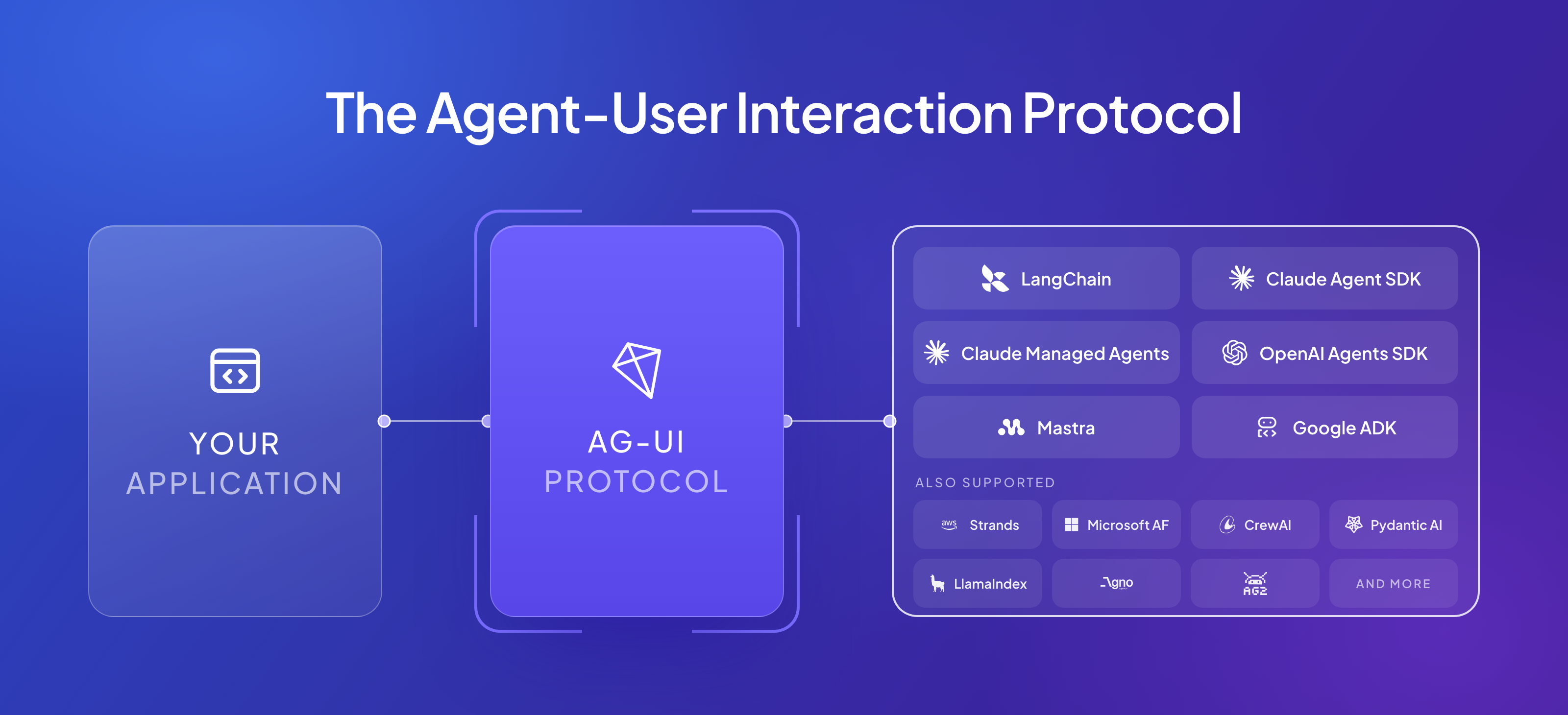
AG-UI (Agent-User Interaction Protocol) standardizes how agents communicate with user-facing applications. Instead of a custom streaming layer, it defines a shared bi-directional event stream between the agent backend and the frontend.
That event stream covers the full agent lifecycle, grouped into event categories. For example, when a user asks an agent to summarize their Notion notes, the agent:
RUN_STARTED)TOOL_CALL_START)TOOL_CALL_RESULT)STATE_DELTA)TEXT_MESSAGE_CONTENT)RUN_FINISHED)AG-UI defines the events, and any client can read them, no matter which framework built the agent. So the same agent can run in any user-facing surface like web app, mobile app, terminal or Slack.
AG-UI works with LangChain, Mastra, Google ADK, Claude Managed Agents, OpenAI Agents SDK, Strands Agents, Microsoft Agent Framework, Pydantic AI and more. Try all agentic features across 30 live integrations in the AG-UI Dojo.
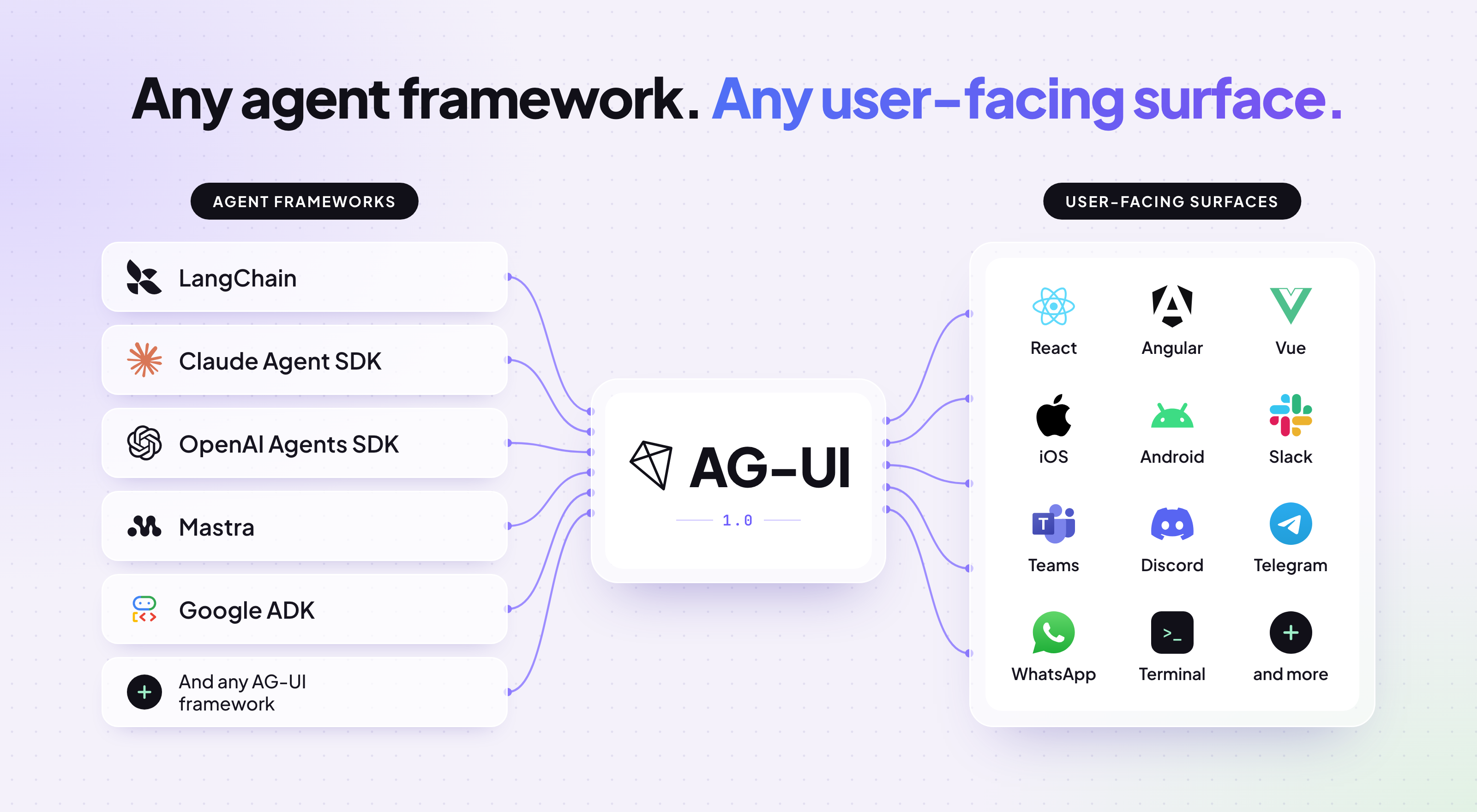
On the frontend, CopilotKit is our AG-UI client for React, Angular, Vue and React Native, and for chat apps like Slack, Teams, WhatsApp, Telegram and Discord.
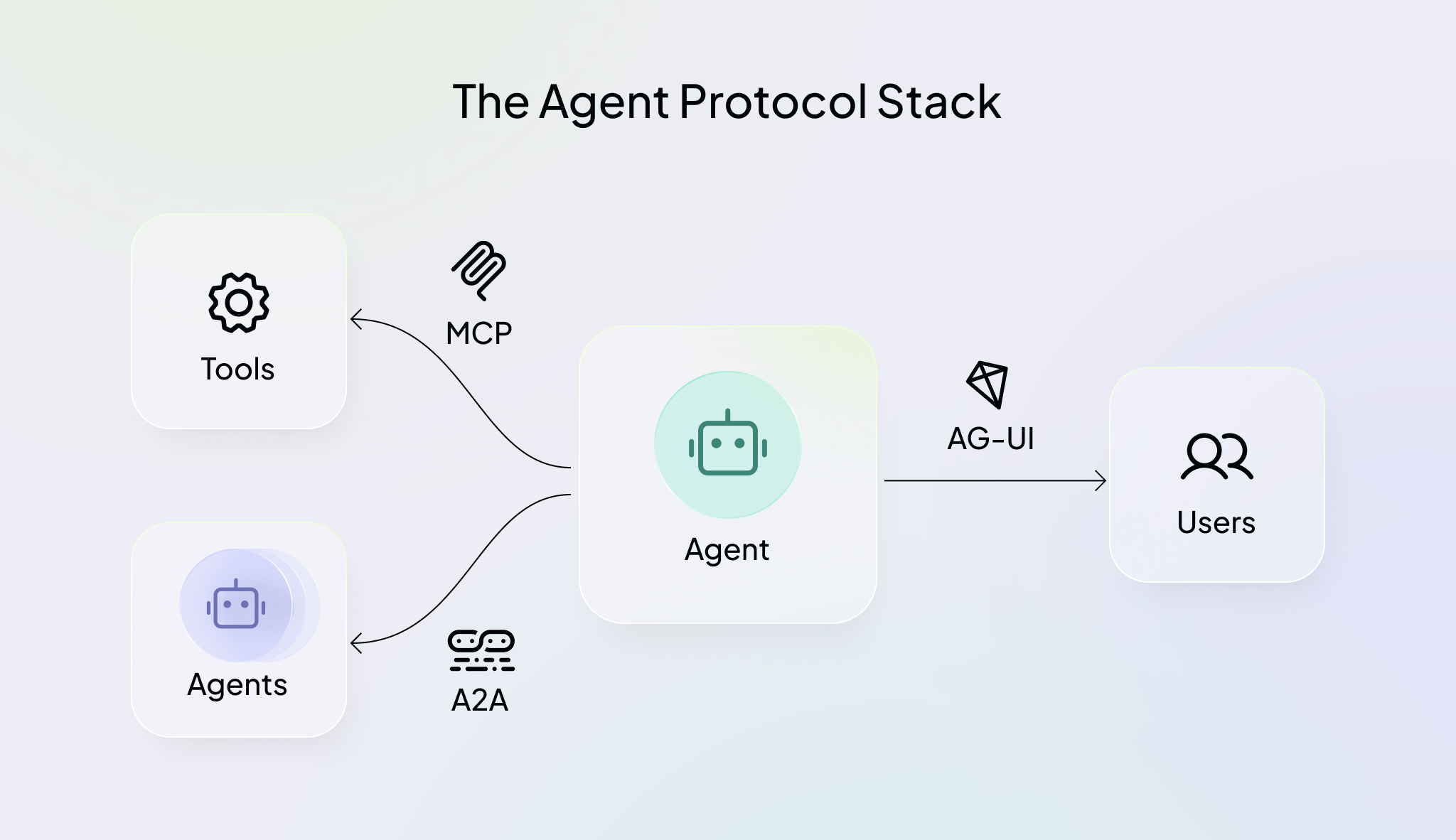
The ecosystem has evolved a lot. MCP became the standard for connecting agents to external tools, A2A lets agents coordinate with each other, and now AG-UI connects your agents to user-facing apps as shown below.
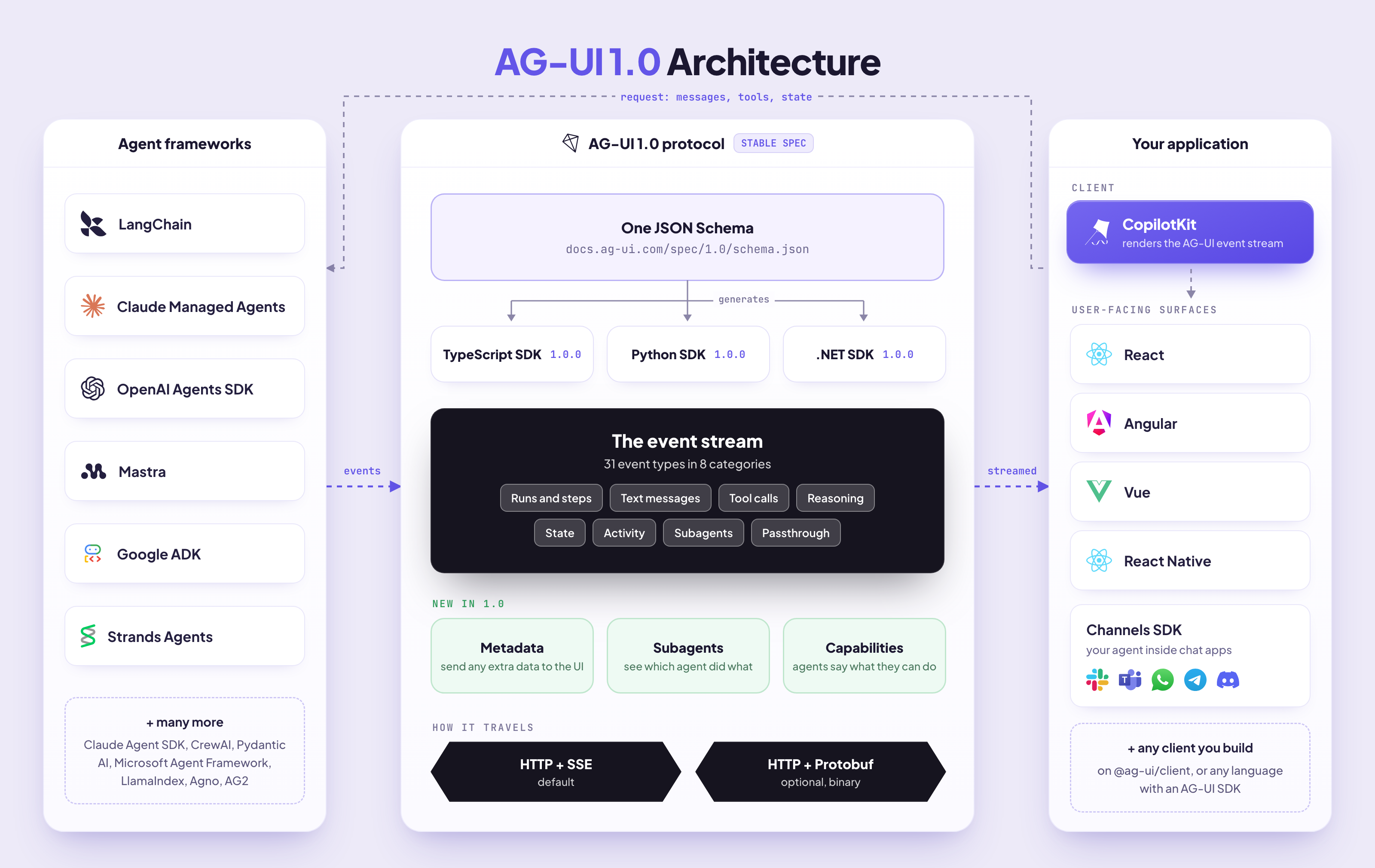
The 1.0 specification has two main parts:
Every rule says who it applies to: the producer that sends events (like your agent) or the consumer that reads them (like a client SDK or UI). If the spec and the schema disagree on a field, the schema is right. If an implementation breaks a rule, the implementation has the bug. No more guessing.
We published 1.0 as a draft first and discussed it openly on GitHub. The Anthropic, Pydantic AI and TanStack teams shared feedback, and a lot of it made it into the final spec.
The 1.0 spec won't change, so what you build on it today keeps working. Future versions will follow the same process, and you can join our AG-UI community to keep up with the updates.
Now let's get into the major changes in AG-UI 1.0!
Each feature below includes a flow diagram showing your app, the AG-UI event stream and your agent. In each diagram, solid arrows are requests your app sends and dashed arrows are events streaming back.
AG-UI 1.0 adds subagent support.
Say you ask a travel agent to plan a trip, and it starts two subagents at once: one searches flights, the other searches hotels. Before 1.0, both streamed into the same chat, and the UI had no idea whose output was whose.
Now every event a subagent sends is tagged with its own id, so your UI can show each subagent in its own card while it works:
{ "type": "SUBAGENT_STARTED", "subagentRunId": "sub-1", "name": "flight-search" }
{ "type": "TEXT_MESSAGE_CONTENT", "messageId": "msg-1", "subagentRunId": "sub-1", "delta": "Found 3 flights..." }
{ "type": "SUBAGENT_FINISHED", "subagentRunId": "sub-1" }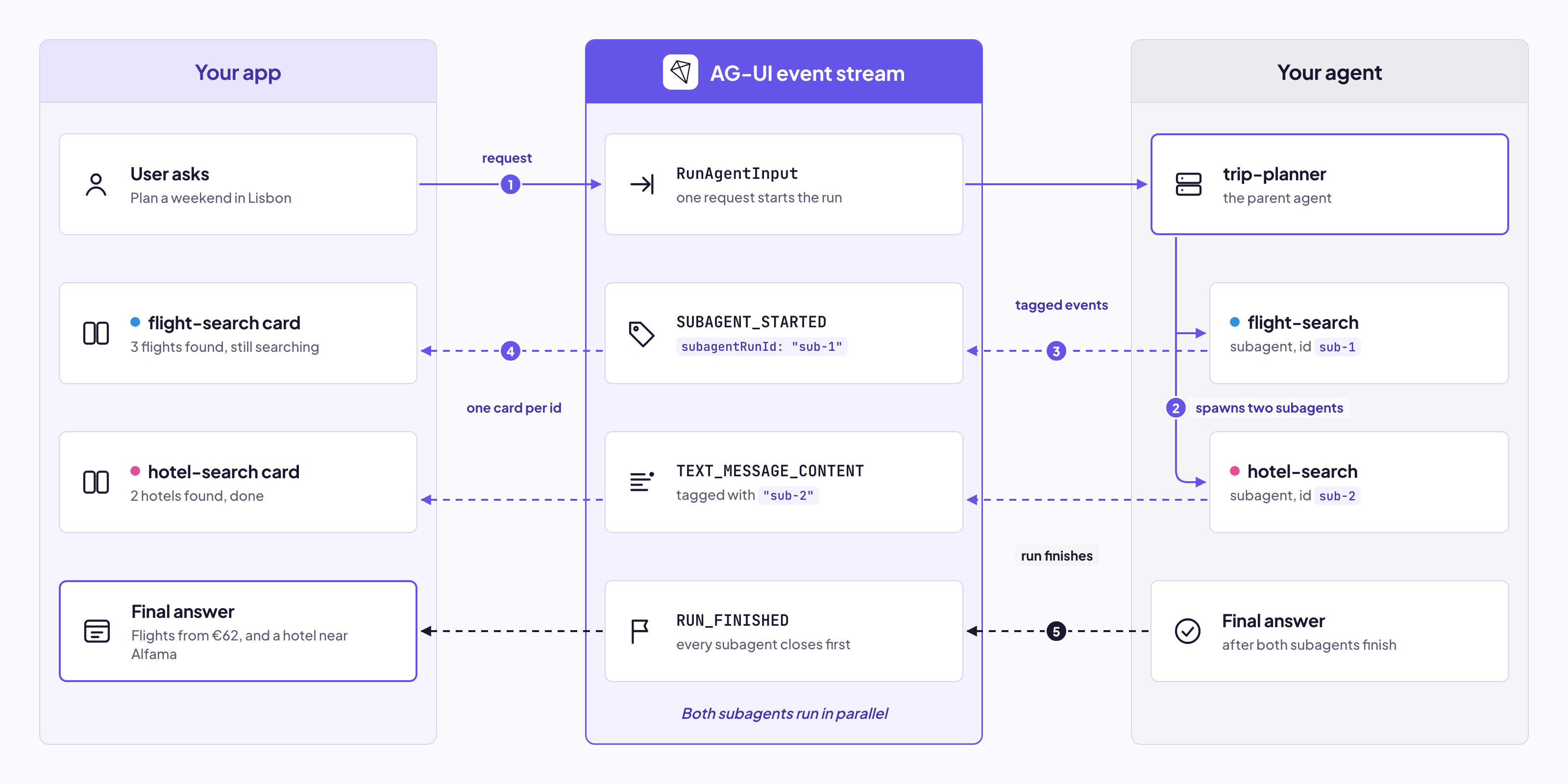
With metadata, you can send any custom data from your agent to the frontend. For example, you can show which model answered under each message, or attach a trace id that links to your logs.
Add it on the backend:
TextMessageEndEvent(
    message_id="msg-1",
    metadata={"acme.model": "gpt-5.5", "acme.trace_id": "tr_8f2a"},
)
And it shows up on the message in the browser:
agent.messages.at(-1)?.metadata;
// { "acme.model": "gpt-5.5", "acme.trace_id": "tr_8f2a" }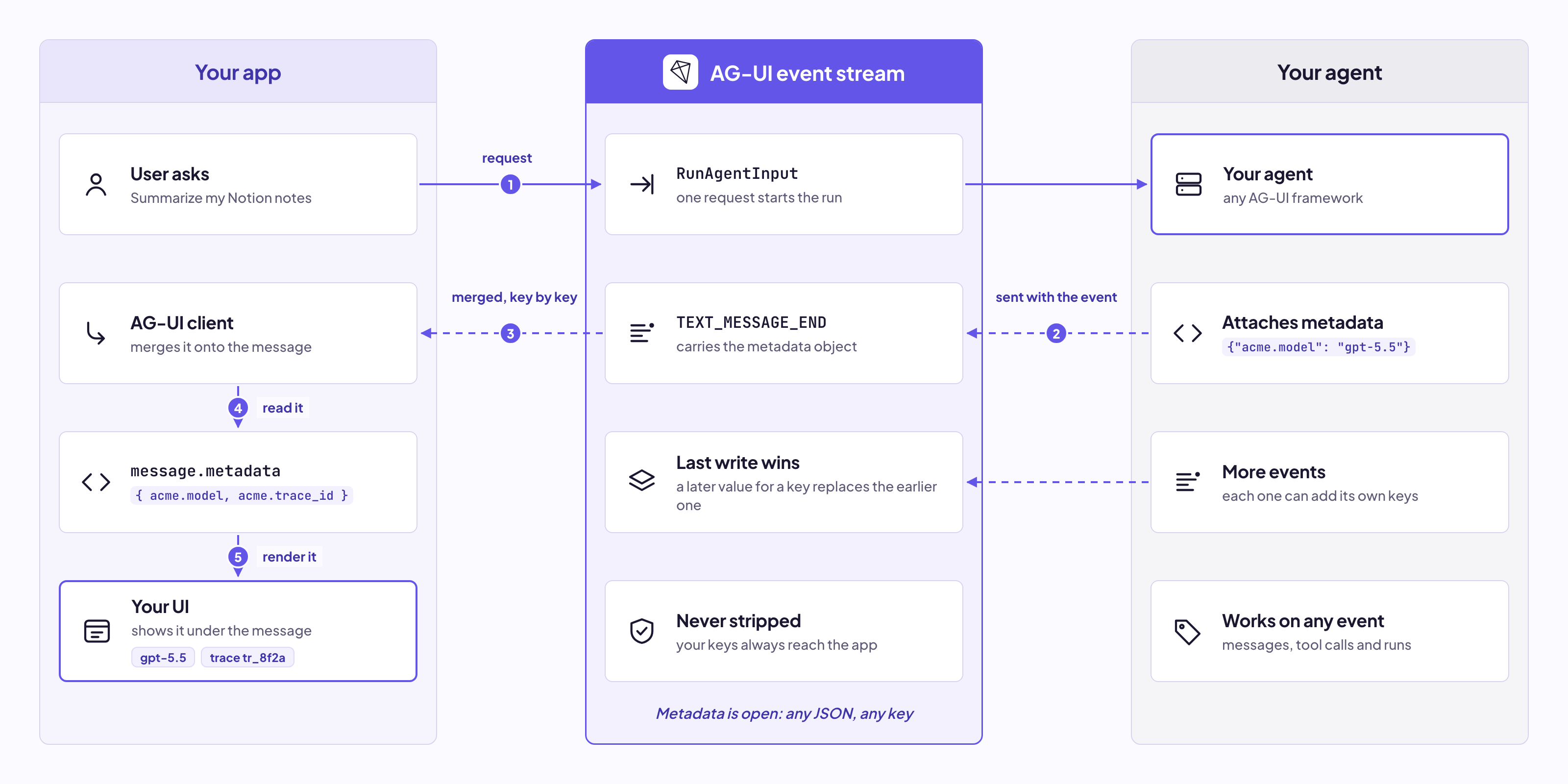
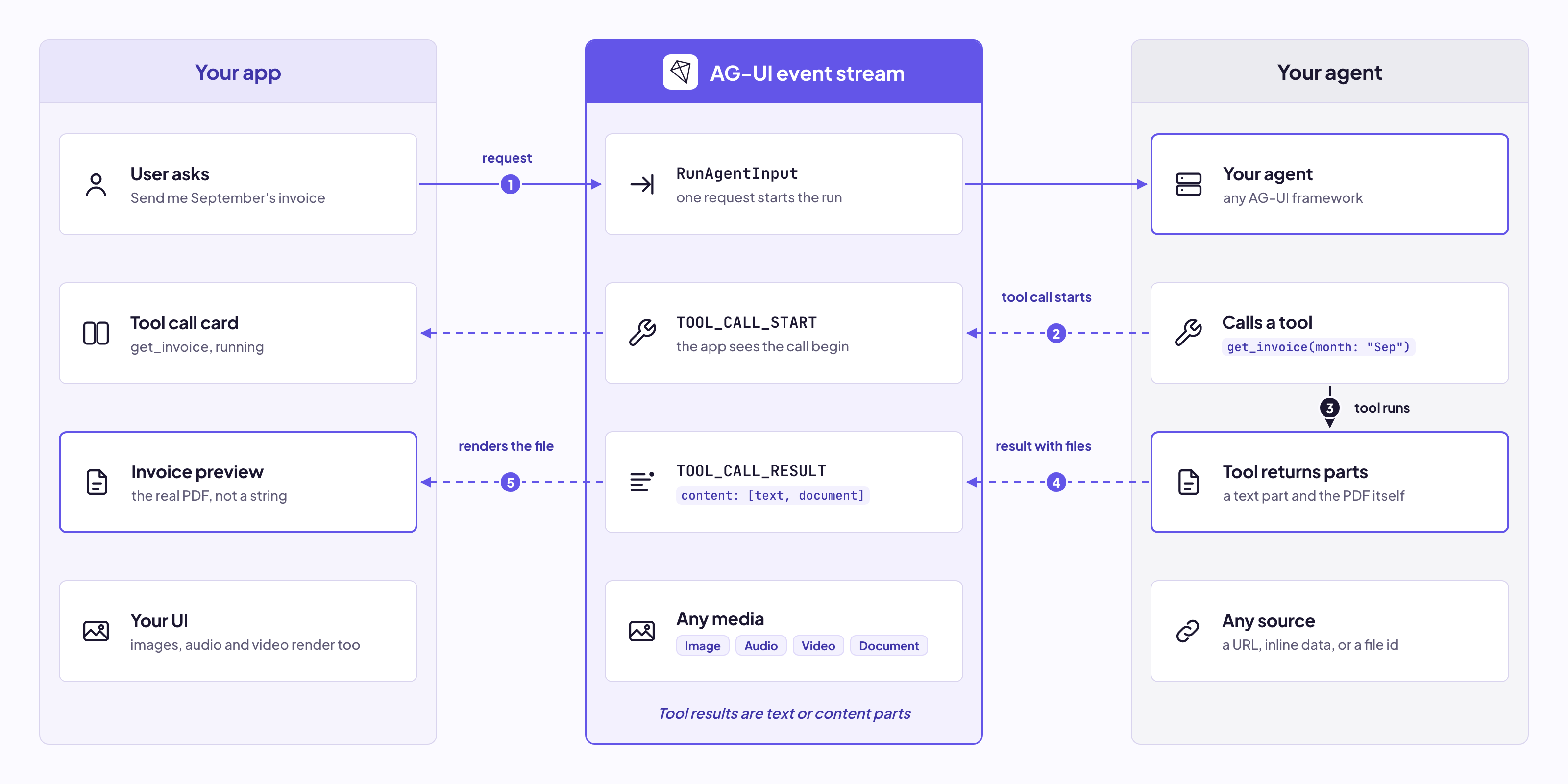
Tool results can now include images, audio, video and documents, instead of just text.
For example, an invoice tool can now return the PDF itself:
{
  "type": "TOOL_CALL_RESULT",
  "messageId": "msg-2",
  "toolCallId": "call-1",
  "content": [
    { "type": "text", "text": "Here is your invoice." },
    { "type": "document", "source": { "type": "url", "value": "https://example.com/invoice.pdf", "mimeType": "application/pdf" } }
  ]
}
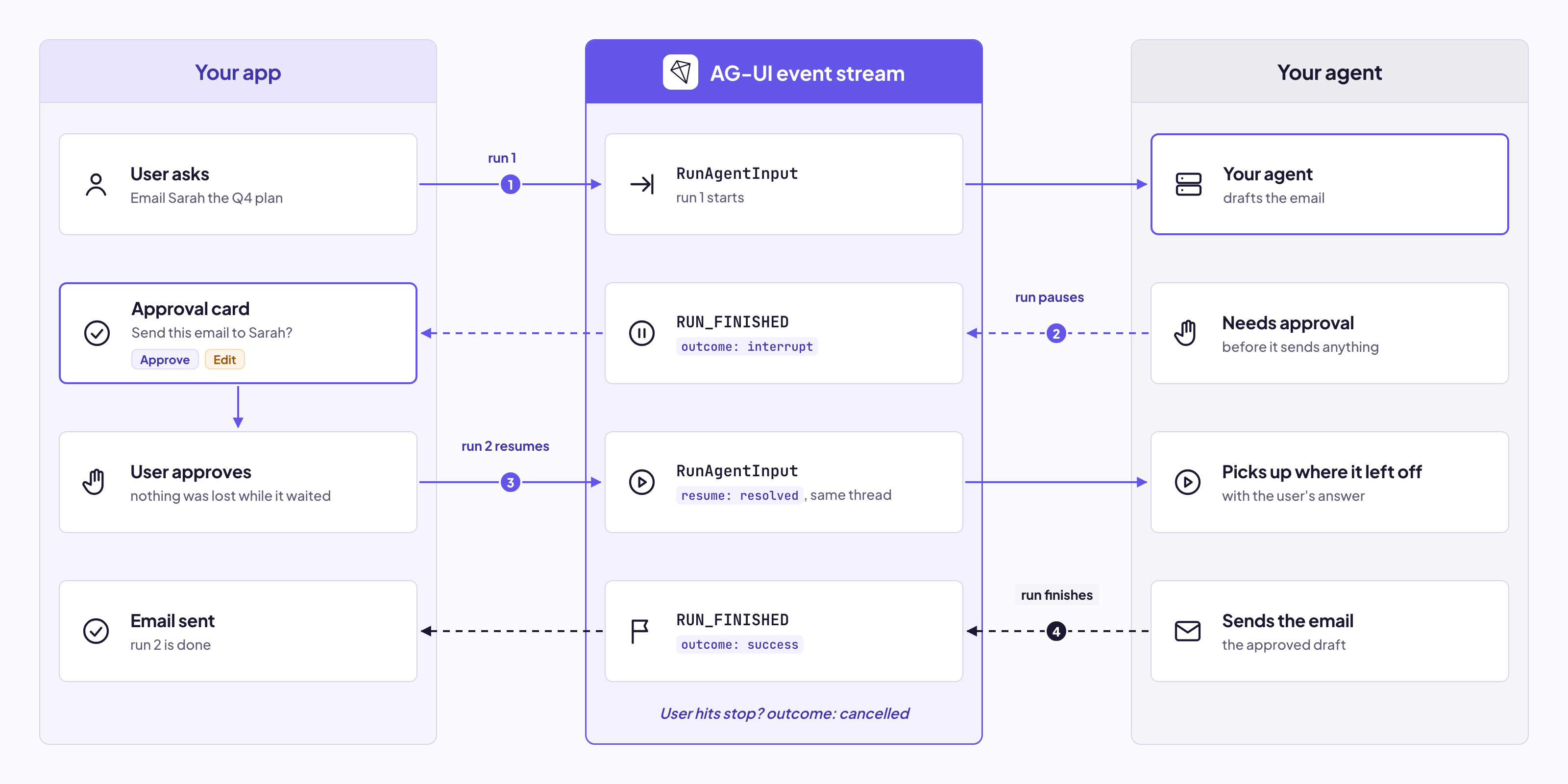
AG-UI 1.0 adds interrupts, so a run can pause when the agent needs something from the user.
Say your agent wants approval before sending an email. The run pauses, your UI shows an approve button, and the next run picks up right where it left off with the user's answer.
Runs can also end as cancelled, so a run the user stopped no longer looks like one that finished or failed.
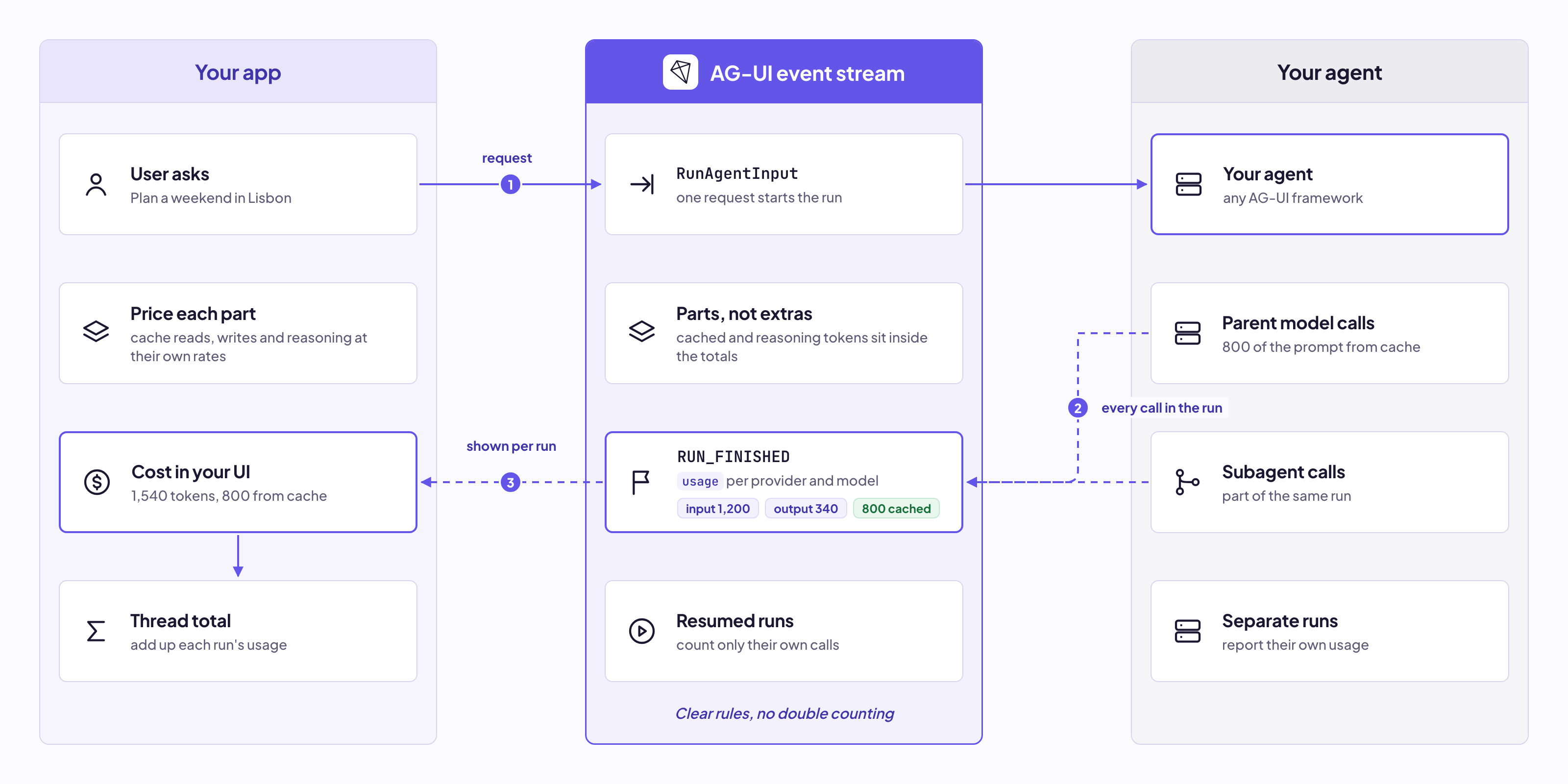
Runs can now report token usage when they finish, with clear rules for input, output, cached and reasoning tokens.
So you can show how much each run cost right in your UI. Tokens used by subagents also count toward the run that started them:
{
  "type": "RUN_FINISHED",
  "threadId": "t1",
  "runId": "r1",
  "usage": [
    { "model": "gpt-5.5", "inputTokens": 1200, "outputTokens": 340, "cachedInputTokens": 800 }
  ]
}
Those are the highlights! For the full list of changes in AG-UI 1.0, check out the changelog.
The JSON Schema is a single file: schema.json. It describes every event, the request your app sends (RunAgentInput) and every type they use.
metadata.For a readable version, see the Schema Reference.
The spec covers the rules a schema can't express, like event order and how runs start and end.
For example, while the schema rejects fields it doesn't know, a 1.0 client talking to a newer agent will run into fields and events it has never seen. The spec tells the client to skip them with a warning instead of failing, so older clients keep working as the protocol grows.
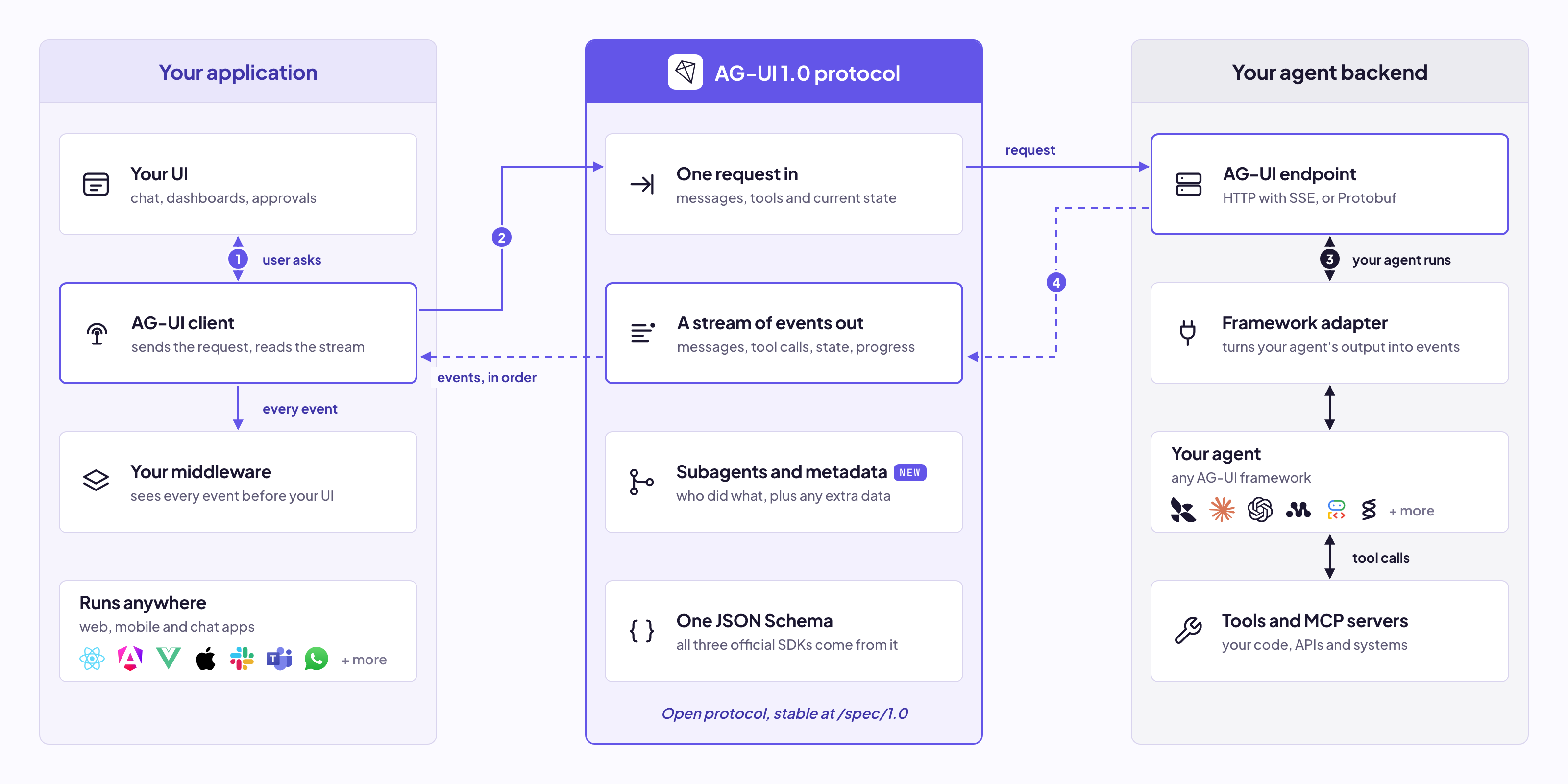
Here's how it all fits together, from the user's request to the events streaming back into your UI:
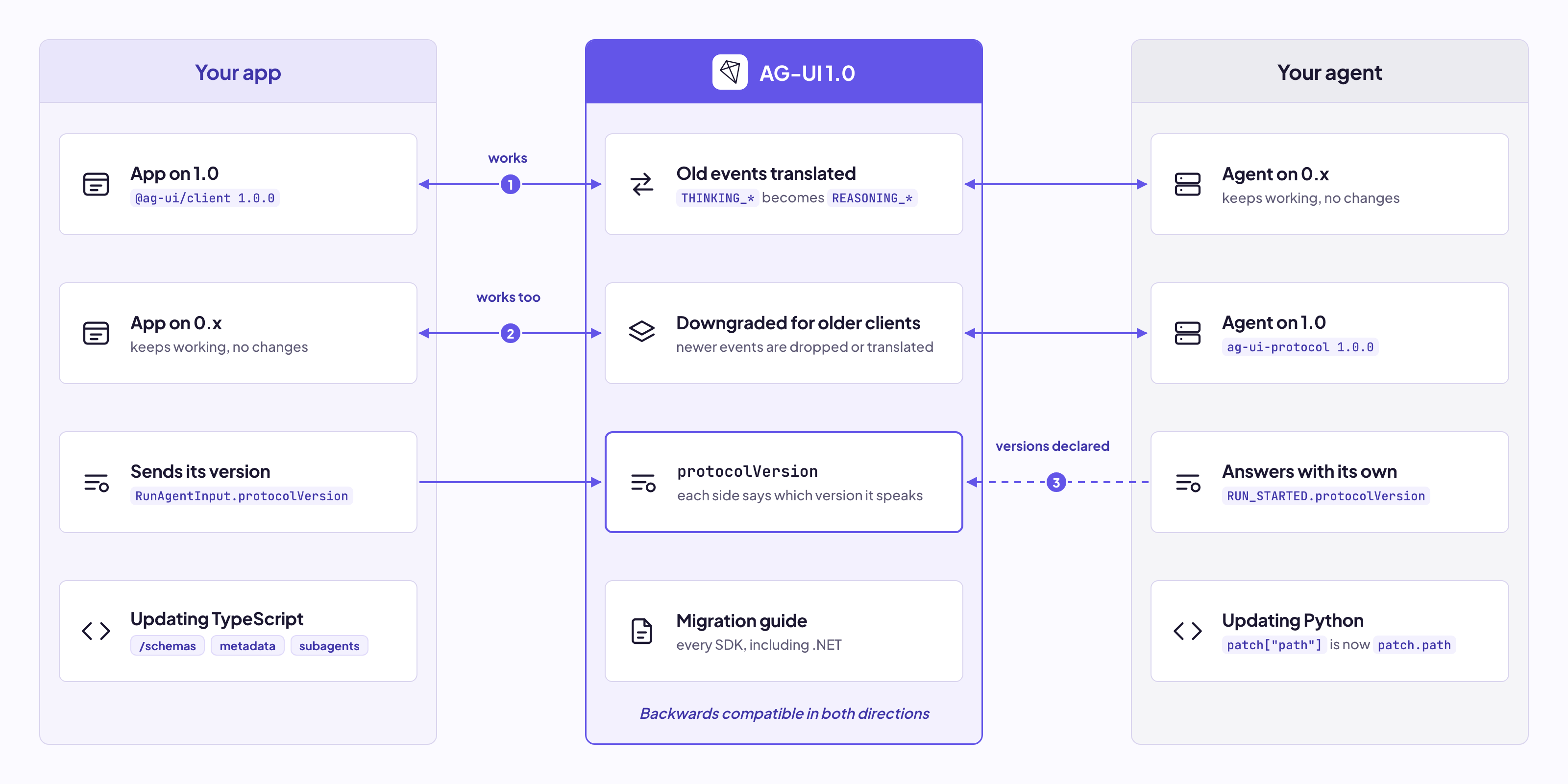
AG-UI 1.0 is backwards compatible. A 0.x agent works with a 1.0 client, and a 1.0 agent works with a 0.x client, so nothing breaks when one side upgrades first.
When you update to the 1.0 SDKs, there are a few small changes to make. In TypeScript:
@ag-ui/core/schemas.metadata instead.SubAgentInfo is now SubagentInfo, and subAgents is now subagents.ToolMessage.content can now be a string or a list of content parts.In Python, the models are now generated from the schema, and JSON Patch entries are typed objects, so patch["path"] becomes patch.path.
The migration guide walks through every SDK, including .NET.
Spin up your first AG-UI app with a single command.
npx create-ag-ui-app@latestOnce it's running, explore more:
If you have ideas for the next version, jump into GitHub Discussions and tell us what you want to see.
If you're building an agent framework or SDK and want to add AG-UI support, we'd love to work with you. Just reach out in the CopilotKit or AG-UI communities.
Want to bring CopilotKit into your stack? Talk to our engineers and we'll help you set it up.
Follow CopilotKit on Twitter for updates.

Subscribe to our blog and get updates on CopilotKit in your inbox.