Imagine your team has built an agent that can reschedule appointments. You ask it to move a meeting, it checks availability, and it comes back with a few options. Great. Now you need to figure out what happens when someone clicks a different time in the calendar, edits the appointment details, or changes their mind halfway through.
Should the agent notice that change? Does it need approval before booking? What should the screen show while it's working? What happens if the slot disappears before the user confirms?
These are familiar product questions. They're also where a lot of the work of building an agent-powered application lives.
AG-UI, short for Agent-User Interaction Protocol, gives developers a standard way to connect agents to user-facing applications. It has integrations in Microsoft Agent Framework, Google's Agent Development Kit, and a dozen other agent frameworks. Its core JavaScript package, @ag-ui/core, gets more than 2.3 million downloads per week.
I lead product at CopilotKit, the company that created AG-UI. In Why I'm Betting on Generative UI, I wrote about why this interface layer matters. Here I want to get more practical: what should you understand about AG-UI as a PM, and how does it help you build a better product?
The application needs to tell the agent which appointment the user has selected and what they're trying to accomplish. The agent needs to tell the application that it's checking availability, show the options it found, and ask for a decision. The application needs to return that decision so the agent can continue.
AG-UI defines the structure of that communication. It uses events, which are updates that describe something happening: a response is arriving, a tool is being called, shared information has changed, or an agent run has encountered an error.
The frontend can use those updates to render the experience you've designed. Your team might show a progress indicator, populate a calendar, open a review form, or update a record on the screen.
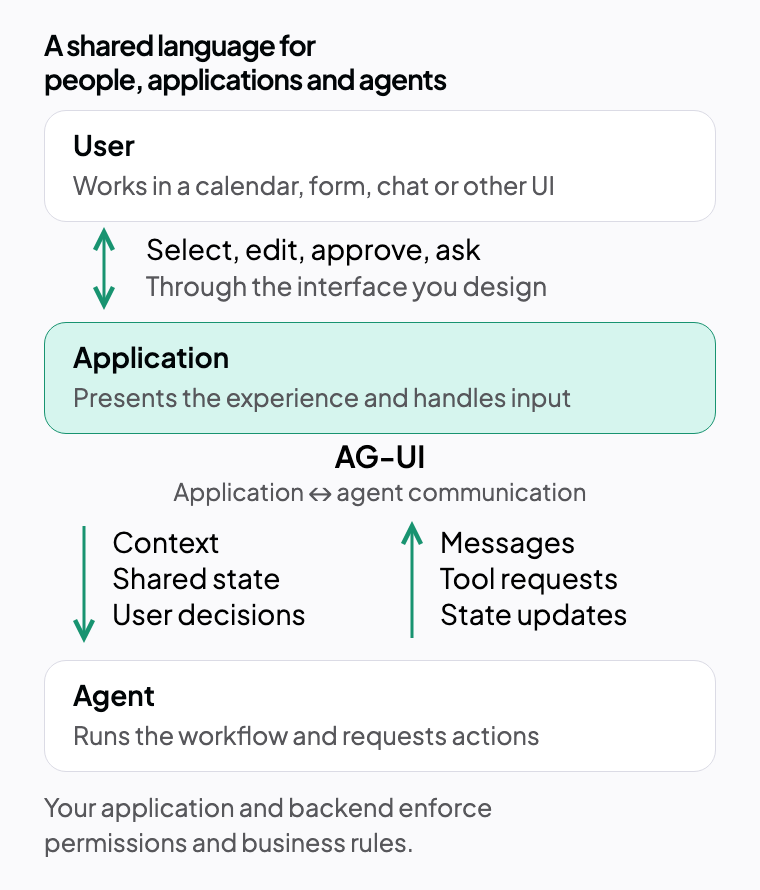
AG-UI is the communication standard. CopilotKit is the agentic product stack, with tools for building agent experiences and Intelligence for understanding and improving them. Your agent framework runs the agent, and your application implements the business rules and permissions around its actions.
MCP connects agents to tools and resources, A2A supports communication between agents, and AG-UI connects agents to the applications people use.
You don't need to memorize the event types to make good product decisions. You do need to understand the interaction patterns they support.
AG-UI gives you a concrete vocabulary for designing collaboration between a person and an agent. You can take a vague requirement like “add an assistant to scheduling” and work through the actual behavior with your designer and engineers.
Suppose I've selected a particular appointment and filtered the calendar to Thursday afternoon. If I ask for another time, I expect that context to matter. Having to type the appointment ID and repeat the filter makes the assistant feel disconnected from the product I'm using.
AG-UI supports shared state: structured information exchanged between the application and agent. Your team decides what belongs there, such as the selected appointment, proposed times, or current draft.
Which parts of the screen should influence the agent? If the user changes something while it works, how should the workflow handle that change? Sharing state gives you the mechanism; agreeing on what it means gives you the experience.
Some tasks take long enough that an empty screen becomes a problem. The user needs to know whether the agent is checking availability, waiting for their input, or unable to continue.
Streaming messages and lifecycle events give the application information it can use to show progress. Your job is to decide which updates help someone understand what is happening and what they can do next.
In our example, “Checking both calendars” followed by a set of available times is useful. If a calendar service fails, the interface should explain which part couldn't finish and offer a sensible next step. The backend and frontend need to supply and handle those signals together.
Typing “the second option, but make it thirty minutes” might be fine. Selecting a time and adjusting a duration field might be faster and clearer.
AG-UI can carry structured information and tool calls that your frontend renders as interactive components. The agent can participate in a workflow built around your calendar, forms, cards, and tables.
Start with the decision the user needs to make, then choose the interaction that makes it easiest. Sometimes that's a sentence. Sometimes it's a date picker.
Rescheduling an appointment can affect other people. Before committing the change, you may want to show the new time, attendees, and any fee, then let the user approve, edit, or reject it.
AG-UI supports tools that request human input. The application presents the decision and returns the user's response so the workflow can continue.
Define where approval belongs and exactly what it approves. If the time or price changes afterward, does the user need to approve again? What happens if they leave the page? These details determine whether people feel comfortable letting an agent act on their behalf.
Approval is a product interaction with rules your team needs to define.
Frontend tools let your application expose capabilities the agent can request, such as opening a particular view or asking the user to confirm a proposal. Backend tools can handle operations such as checking availability and saving a booking.
Work with engineering to define the actions, their prerequisites, and their failure behavior. Your application and backend still enforce authorization and business rules. A well-designed confirmation screen should correspond to an equally clear execution rule.
For scheduling, that might mean checking availability again at booking time and committing only the appointment details the user approved.
Your team may start with one agent framework and later add another. Different teams may also build agents using different stacks while sharing the same application.
A common communication contract gives frontend and backend engineers something stable to build around. It can reduce the amount of custom integration code and make interaction patterns easier to reuse across supported frameworks.
The approval experience, progress display, and calendar interactions you've designed can be connected through a common interface as the system evolves.
You'll still need to test each integration. Frameworks differ in how they handle state, tools, and long-running work. AG-UI gives the teams a shared boundary at which to check that behavior.
Let's say the user selects Thursday in the calendar, but the agent books Tuesday. Its final response says the appointment was successfully rescheduled. The booking operation itself succeeded. The user still got the wrong result.
To understand that failure, we need to connect what the user selected, what they approved, what the agent requested, and what was saved. We need the relevant product context alongside the agent's activity.
I've been researching how these product trajectories can inform evaluations. By “trajectory,” I mean the sequence of user actions, agent actions, and application changes involved in completing a task.
The practical opportunity is to help teams discover failures and turn them into useful tests. For this example, a test could check that the saved appointment matches the time the user approved. It could also check that a changed slot requires a fresh decision.
A successful tool call can still produce the wrong product outcome.
AG-UI gives us structured communication we can record and inspect. Persistence, instrumentation for relevant actions outside the agent exchange, and connections to authoritative business records make that evidence useful for analysis.
Human judgment still matters. A user changing a booking later might be correcting a mistake, or their plans might have changed. And a human taking seven steps while an agent takes two can be perfectly fine if both satisfy the same requirements.
This is why I like the approach Hamel Husain and Shreya Shankar teach: review real examples, understand the failures, and use what you learn to define evaluations. Product teams have a central role here because they understand the intent, constraints, and exceptions that make an outcome useful.
The product team needs to define what successful completion means.
Pick a task people already complete in your product. Sit down with a designer and an engineer and map out:
For our scheduling example, one acceptance criterion might be:
The saved appointment must match the time the user approved. If availability changes before booking, the application must ask the user to choose again.
That's specific enough to guide the interface, the agent workflow, and the test. You can explore the shared-state and human-in-the-loop examples in the CopilotKit Showcase to see the building blocks in action.
If you're figuring out how to bring this into your own product, check out CopilotKit, the agentic product stack. We give your team the tools to build these agent experiences, and CopilotKit Intelligence turns the AG-UI interaction streams behind them into product insights and reusable Skills. You review and approve the proposed Skills, and connected agent frameworks can automatically ingest them for future runs. Start with one workflow and use what you learn from users to improve how your agent handles it.
Want to bring CopilotKit into your stack? Talk to our team and we'll help you set it up.
Follow CopilotKit on Twitter for updates. If you get stuck, reach out in the CopilotKit or AG-UI communities.


Subscribe to our blog and get updates on CopilotKit in your inbox.