Suppose you ask an assistant to review the expenses from a team trip. One hotel bill is over the nightly limit. Before you send it back to the employee, you'd like to know whether the limit applies before or after taxes. The travel policy is in Drive, the itemized receipt is in the expense portal, and the person who booked the trip is waiting for an answer.
You could find the policy, download the receipt, paste both into a chat, and ask the question yourself. But finding the right documents and checking the details was most of the work. What would it take to hand that part over and still have the final say?
We're launching OpenBot 1.0, a composable, self-hostable workspace for AI coworkers. You can create a Bot for a job like this, connect it to the tools it needs, and work alongside it when it needs your help. For personal use, the desktop app includes everything you need to run the workspace on your Mac or Windows PC. For a team, you can deploy OpenBot for Business on infrastructure your organization owns and operates.
In OpenBot, a Bot has instructions, tools, and a conversation you can come back to. You can keep a Bot personal or share it with your team. For expense review, I'd start with a fairly narrow job: check the claim against the current policy, show me the relevant line from the receipt, and flag anything that needs a person's judgment. I wouldn't give it permission to issue a reimbursement.
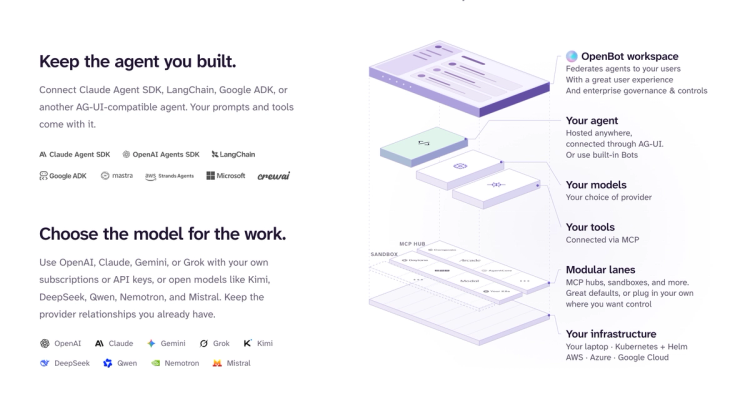
You can create that Bot in OpenBot and choose a model from providers like OpenAI, Anthropic, Google or xAI, or any OpenAI-compatible endpoint, including a local model running in Ollama or vLLM. If your engineering team already built an agent that knows how to check expenses, you have another option: bring the agent you have. OpenBot can connect to agents built with frameworks like LangGraph, Google ADK, or the Claude Agent SDK through AG-UI, the protocol that lets an agent and a user-facing application exchange updates and decisions.
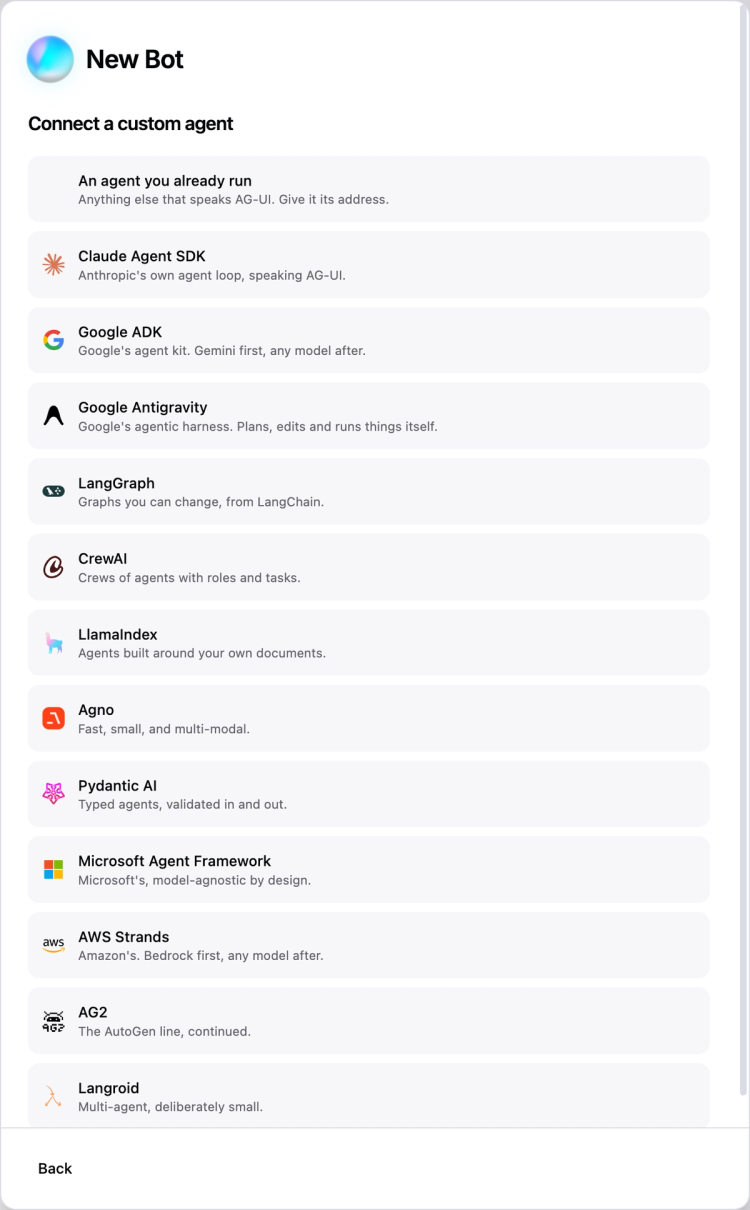
That's what composable means here. The engineers who know your expense system can maintain the agent. The finance team can define how it should conduct a review. Changing the model or adding a tool doesn't mean asking employees to move their work to another application.
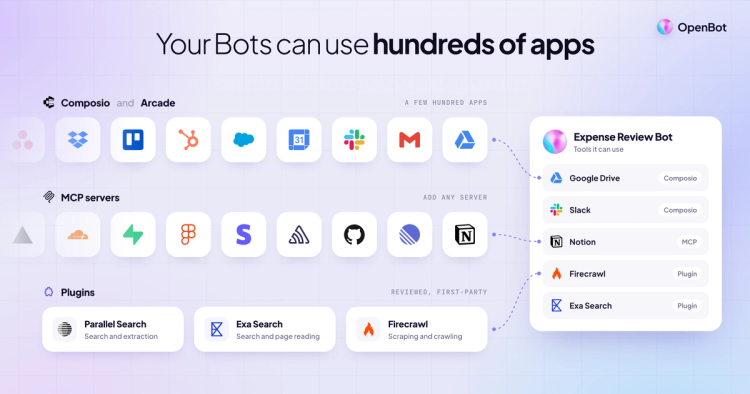
For the hotel claim, the Bot needs access to two different systems. If the policy is in Drive, you can give the Bot a connection to Drive under your account. OpenBot supports tools through MCP, a standard for connecting agents to tools and data. You can add Notion and Google Drive as plugins, plus web search through Parallel, Exa and Firecrawl. Hundreds of third-party apps are also available through Composio and Arcade. You choose which connections a particular Bot can use. Sharing a Bot with a colleague doesn't give that colleague your account.
What about the receipt in the expense portal? The portal might not have an integration, but it does have a website. OpenBot gives Bots access to a browser, files, and a shell for work that calls for one. You can watch the browser as the Bot works. If the portal asks for a second authentication factor, you can take control, sign in yourself, and hand the browser back. You don't have to paste a code into the conversation or restart the task from scratch.
Once the Bot has both pieces, how should it present the result? A paragraph might be enough. But if the room rate, tax, and total are all different, I'd rather see them side by side with the policy limit. OpenBot supports interactive components, so an agent can present a review form with the relevant amounts and ask you to resolve the exception right there. Your team can design that interaction around the decision instead of making the reviewer describe every choice in a chat message.
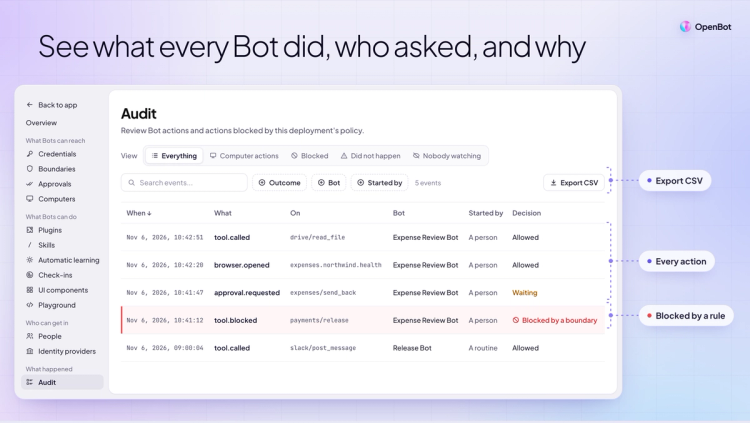
Reading a receipt and approving a reimbursement are different permissions. In OpenBot, you can allow a Bot to use some tools, require approval for particular actions, and deny others. Its activity leaves an audit trail so you can inspect what it tried to do.
For our example, I'd let the Bot look up the policy and prepare a recommendation on its own. I'd want the reviewer to see why the hotel was flagged before sending anything back to the employee. And if the team's rule is that only Finance can release a payment, I'd leave that action out of the Bot's allowed tools altogether.
This distinction matters even when the Bot gets the math right. A $240 room plus $30 in tax can be within a $250 pre-tax limit. A reviewer looking at a red flag next to a $270 total needs to see which amount the Bot compared. The useful result is an explanation the reviewer can check and act on.
Say the first review catches a problem: your Bot compares the amount on the card statement to the nightly cap, even when a hotel stay spans several nights. You explain the correction in the conversation. What happens when someone brings it another receipt next week?
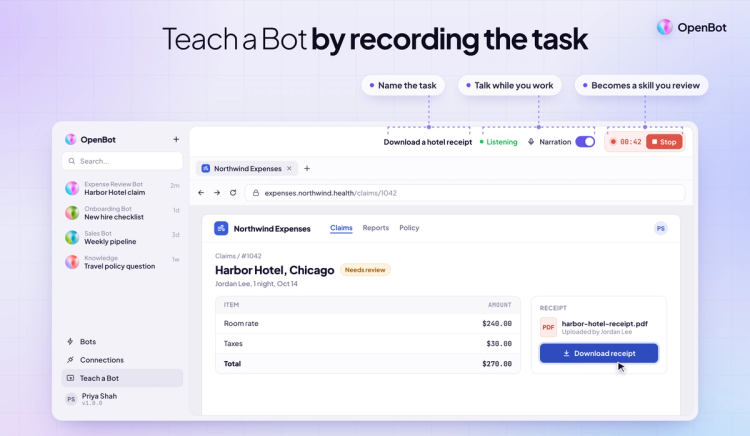
OpenBot gives you a few ways to handle that. A persistent conversation lets you pick up the particular claim where you left off. A Skill is a set of instructions you can reuse across claims, such as “check the nightly room rate before tax, and show each night separately.” With Automatic Learning connected to CopilotKit Intelligence, work like this can inform proposed Skills. You can review what the Bot would learn before publishing a Skill for future use. An exception you made for one traveler doesn't have to become the rule for everyone.
You can also give a Bot an ongoing responsibility or schedule a routine. Instead of remembering to ask about outstanding claims every Friday, you could schedule a weekly check and have the Bot notify you when a claim needs attention.
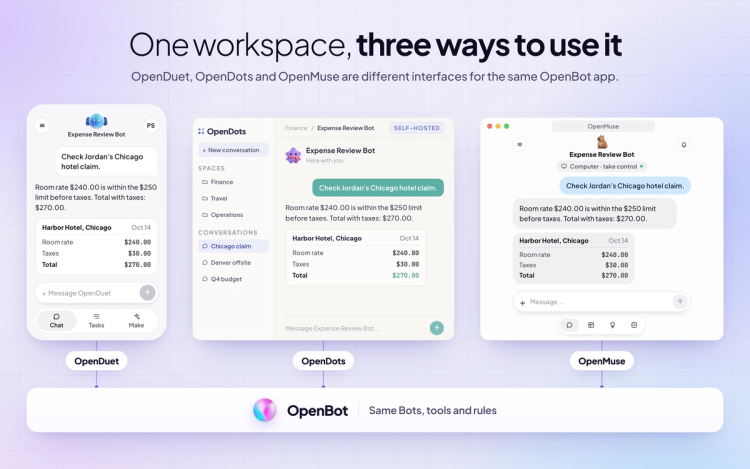
There's room to change the workspace itself, too. OpenDuet, OpenDots, and OpenMuse are different interfaces for the same OpenBot application. You can change how people experience their Bots without building another agent backend.
The desktop edition for Mac or Windows is fully self-contained: the installer includes the app and its backend, so you don’t have to set up a separate server. Prefer to manage the setup yourself? You can run OpenBot from source or use its Docker images and open the workspace in your browser. The OpenBot application source is MIT-licensed. Bring your own model credentials; usage with your model provider is separate. If your team works in Slack or Microsoft Teams, it can reach OpenBot there through OpenTag. Mobile access is in early access.
OpenBot for Business is self-hostable. Your IT team can deploy it on your own infrastructure, inside your network, and decide who can use it and which tools their Bots can access. For our expense example, Finance can share one review procedure with the team, and engineering can connect the agent that already understands the expense system.
If you run Kubernetes, you can install OpenBot for Business on your own cluster with Helm, including on AWS, Azure, or Google Cloud. If you’d rather have us host it, you can request early access to a hosted deployment. The Business license includes CopilotKit Intelligence for use with OpenBot. For organizations that need single sign-on, role-based access controls, or an offline deployment, those options are available on the annual plan. The pricing page breaks out what's included.
The expense review only shows part of what OpenBot can do. Here’s more of what 1.0 adds, and the last four come with OpenBot for Business (admin view, boundaries, audit and enterprise controls):
Download OpenBot for Mac (Apple Silicon), Mac (Intel), or Windows (x64). Pick a task you already know well enough to review. Give your first Bot just the tools it needs, work through a real example together, and decide which part you'd trust it to handle the next time.
If you're evaluating OpenBot for your team, request early access to OpenBot for Business. Want to skip the line and talk through your deployment? Book a meeting with the OpenBot team.
To learn more:
Follow CopilotKit on Twitter for updates. If you get stuck, reach out in the CopilotKit or AG-UI communities.
Subscribe to our blog and get updates on CopilotKit in your inbox.



