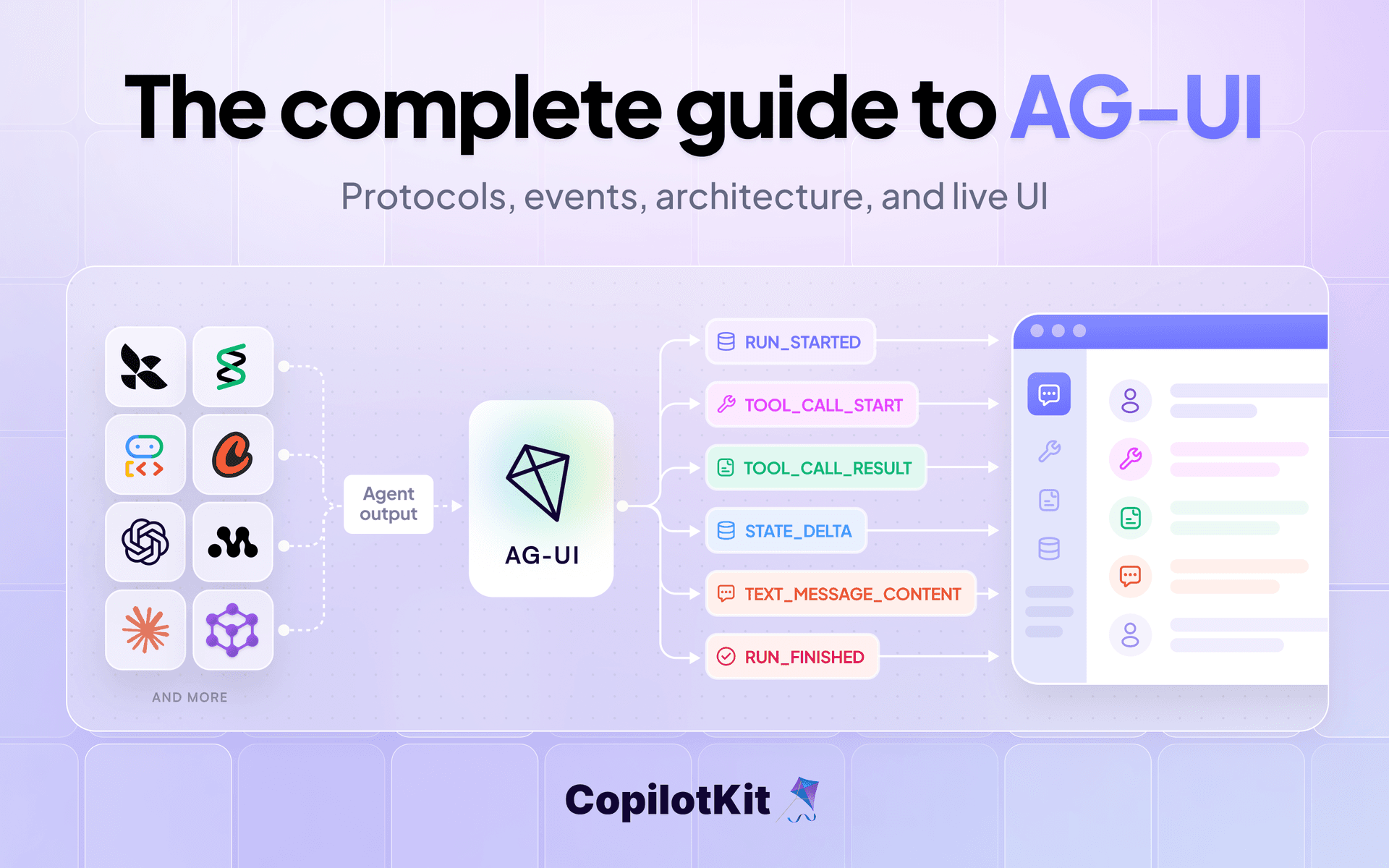
If you've built an agent lately, you know a single run can involve long chains of reasoning, many tool calls and several subagents working in parallel. But most frontends only show part of that, and rarely in real time.
It gets even messier from there. Every agent framework streams its work differently, and every surface, whether it's a web app, a terminal or Slack, needs its own custom code to show it.
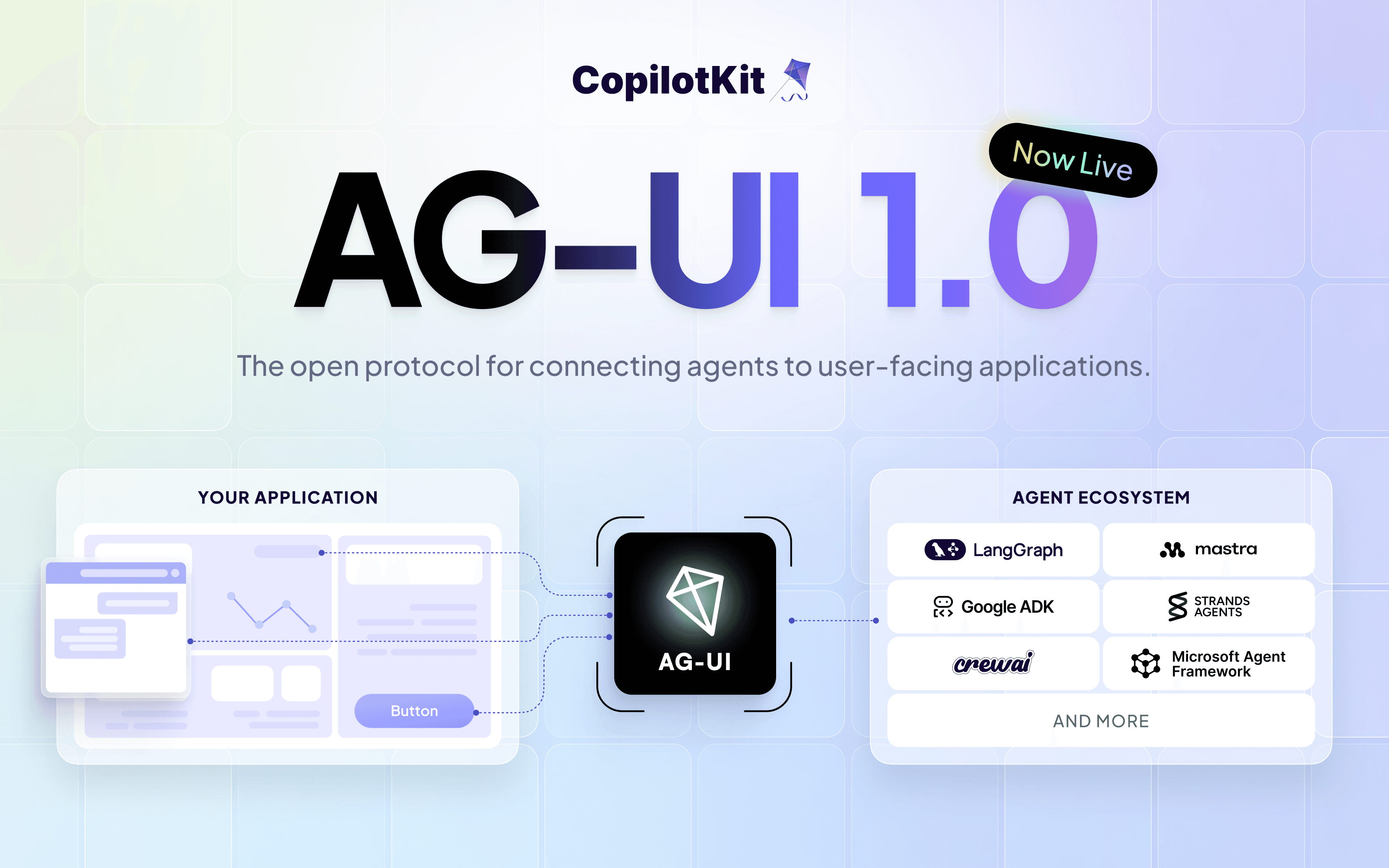
AG-UI (Agent-User Interaction Protocol) is the open protocol that connects AI agents to user-facing applications. It's the user-facing layer that was missing from the agentic ecosystem, and it just reached 1.0 with a stable specification.
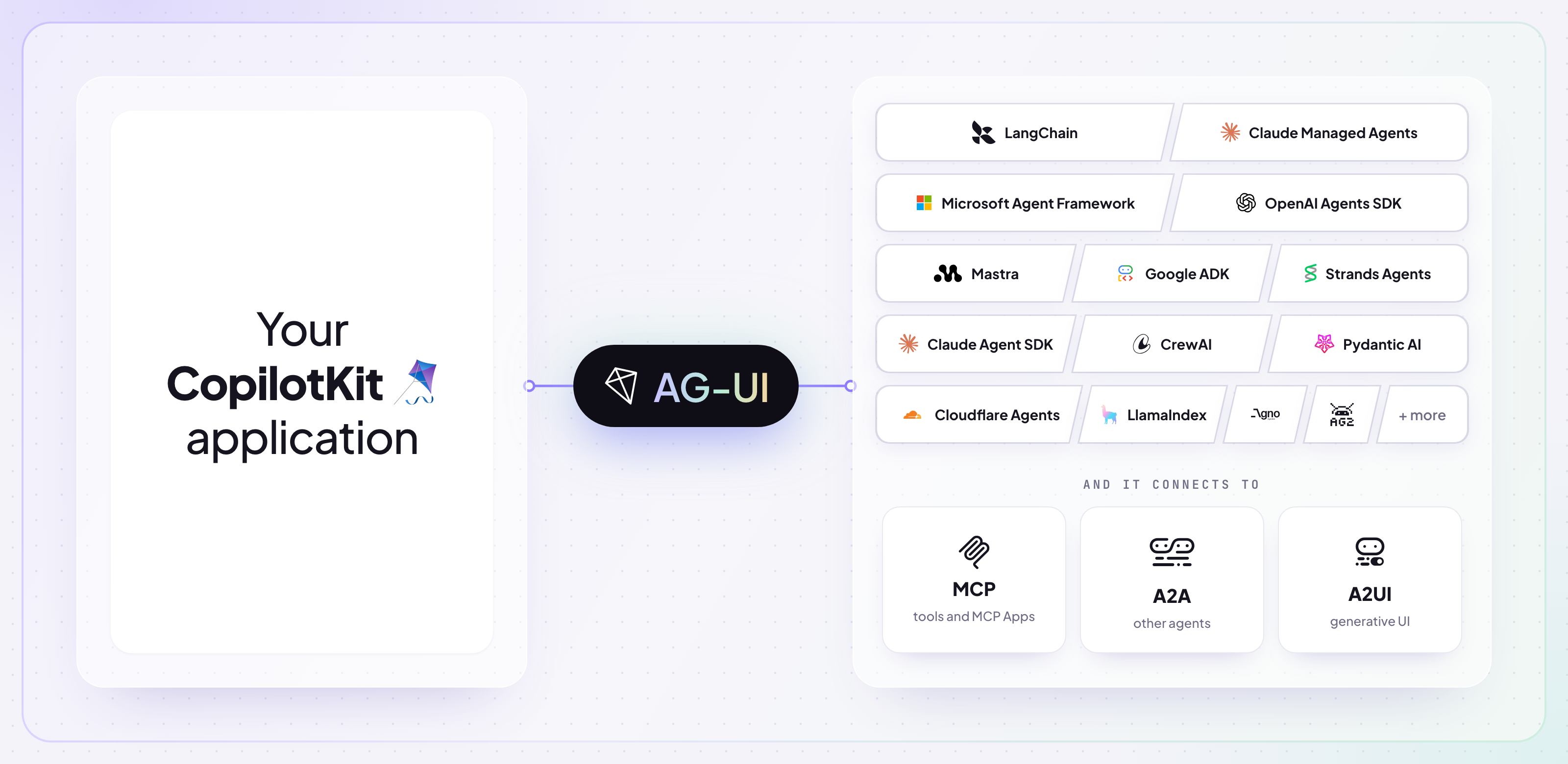
Google, Microsoft, Amazon and Oracle have adopted it, and it's supported by Anthropic's Claude Managed Agents, LangChain, Mastra, Pydantic AI and many more.
Here's the developer's guide to understanding AG-UI: what it is, how everything works under the hood and how to start building with it.
In summary, we're covering these topics in detail.
If you want to explore on your own, check out the AG-UI docs and AG-UI on GitHub.
If you've ever built a UI for an agent that actually does stuff, you know the usual pain: the agent works fine, but showing everything it's doing, live on the frontend is very messy.
Yes, we have great agent frameworks. Yes, we have great UI libraries and frontend frameworks. But connecting the two, for any agent on any surface, is where most of the work goes.
For decades, software has run on HTTP's simple rule: one request gets one complete response.
Agents don't really work that way. For instance, if you ask any agent to book a flight to Tokyo, a single agent lifecycle might involve calling a search tool, using subagents to distribute the work and streaming results to the UI as they arrive.
HTTP only defines the request and the final response. Everything that happens in between, and how your UI keeps up with it, is left for you to build.
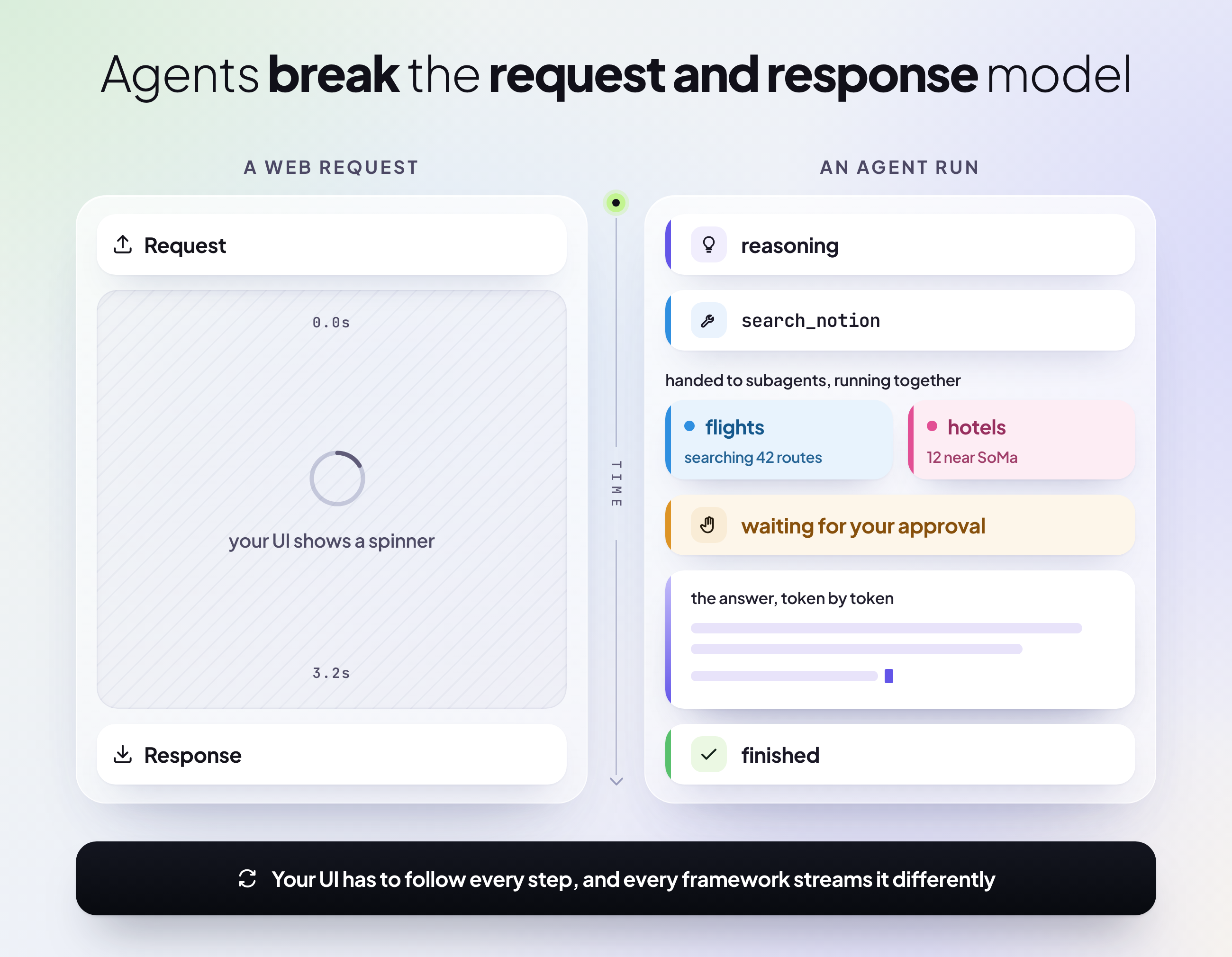
So your frontend has to do that work, piecing the stream back together and keeping the UI in step with the agent.
And it only gets harder as agents get more capable. Think of multi-agent orchestration - where several agents run with their own tools and context. Their output arrives mixed together, leaving you to figure out which one said what and how to show all of it to the user.
Every agent framework streams its updates in its own way. LangChain, Mastra and Microsoft Agent Framework can all run the same kind of agent, but each one might describe, let's say, subagents in a different way. So you end up writing a separate parser for each one.
If you switch frameworks down the line, you have to rewrite that custom code from scratch. And any breaking change in a framework update can quietly break your parser.
What if you want the same agent in Slack? Microsoft Teams? Your React app? Your Angular app? Even the thought is scary since each one needs its own custom code to read the agent's updates, and you're the one maintaining all of it.
So you end up with one integration for every framework and every surface you support.
The ecosystem needed a shared, standard protocol for agents and apps to talk to each other. That's where AG-UI comes in.
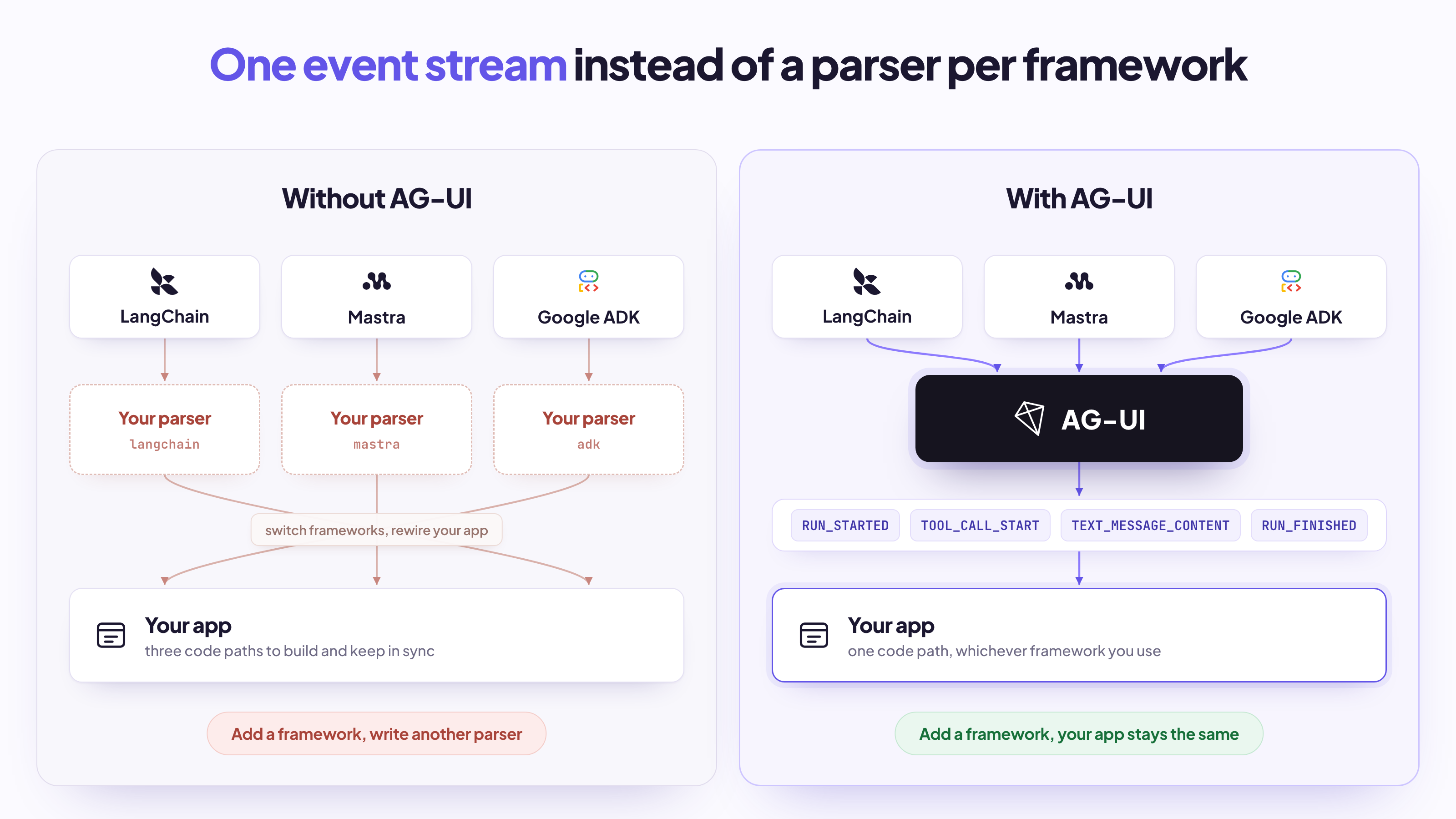
AG-UI (Agent-User Interaction Protocol) standardizes how agents communicate with user-facing applications. Put simply, it's a framework-agnostic way to connect agentic backends to agentic frontends.
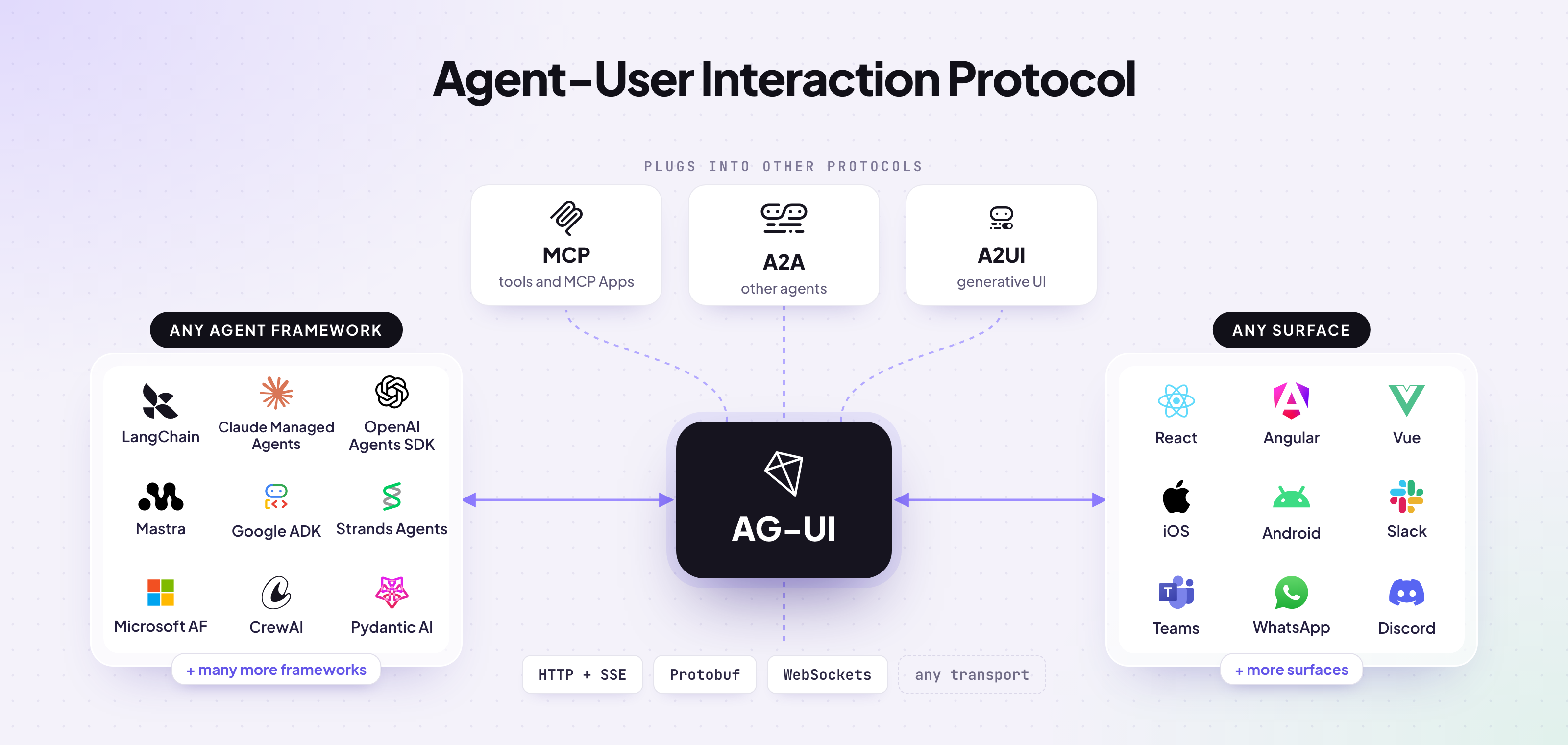
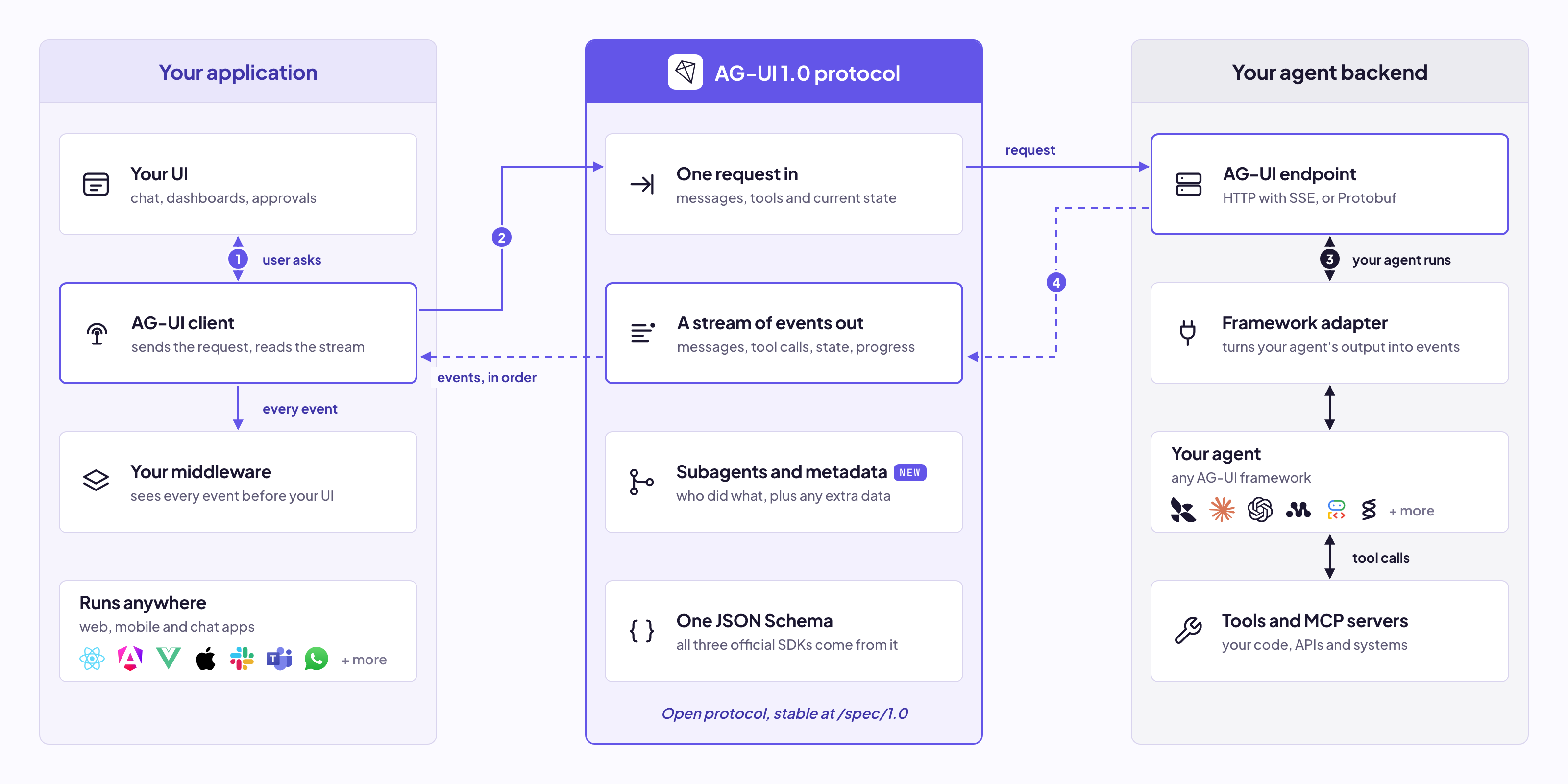
Instead of a custom streaming layer, your app sends one request and gets back a stream of events covering everything the agent does: text, tool calls, reasoning, shared state and progress. Each event is a small JSON object with a type, like this one carrying a piece of text:
{ "type": "TEXT_MESSAGE_CONTENT", "messageId": "msg-1", "delta": "Found 3 flights" }These events are grouped into 8 event categories, and we'll explore each of them in depth later in this guide.
Every AG-UI setup is built from four core components, connected by that event stream:
The protocol is also transport-agnostic, so these events can travel over HTTP, WebSockets or anything else. The docs also cover the design principles behind these components.
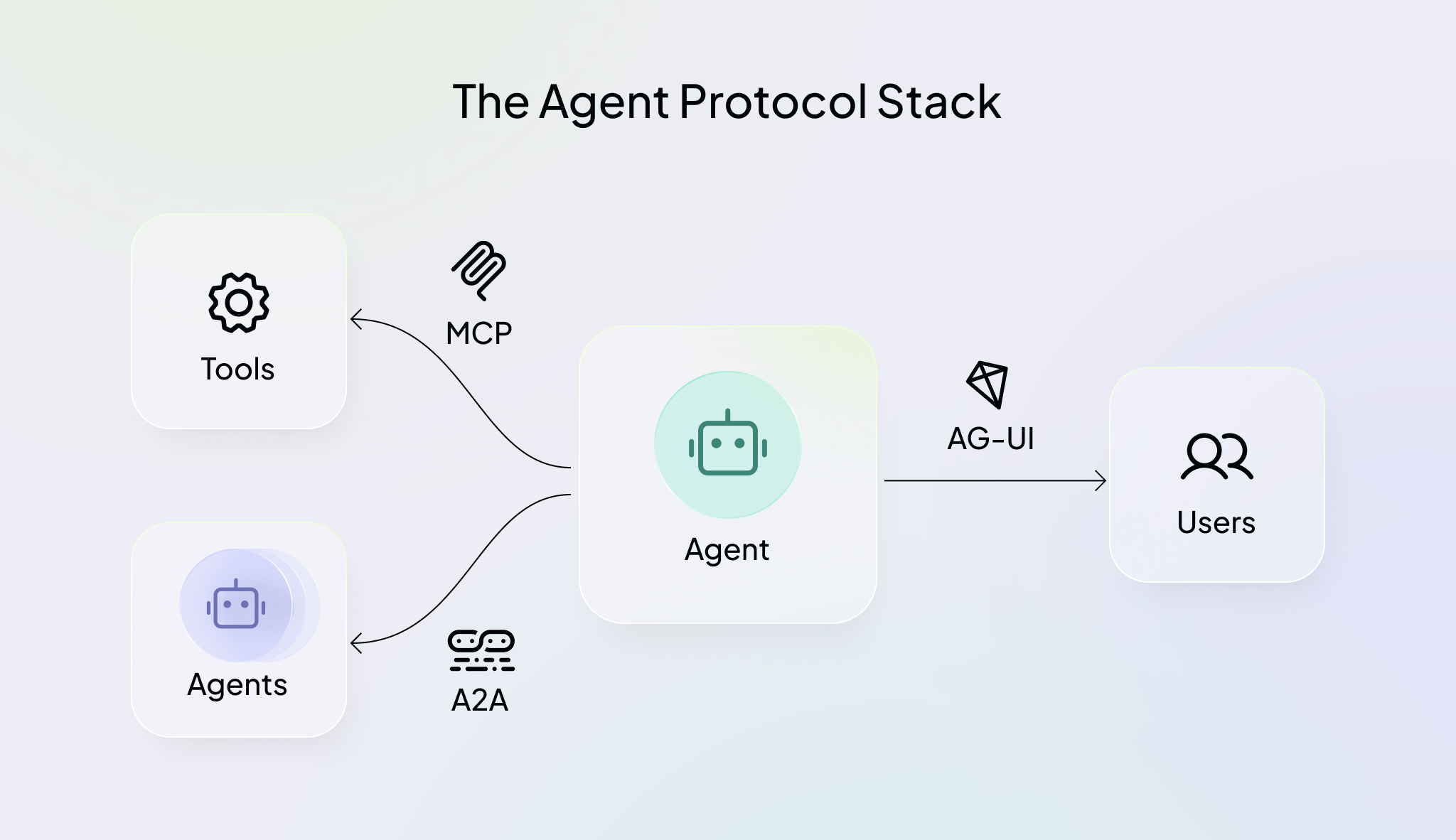
The agent ecosystem has grown fast, and three core open protocols have become the standard way to connect agents to everything around them:
These protocols work together, and a single agent often uses all three. For example, it might read your Notion notes through MCP, coordinate with a pricing agent using A2A, and show you the result through AG-UI. AG-UI can also connect to agents that speak MCP or A2A. Read more in the agentic protocols docs.
AG-UI also works natively with generative UI specs like A2UI and MCP Apps. The spec describes the UI an agent wants to show, like a form or a chart, and AG-UI carries it to your app. Read more about generative UI specs.
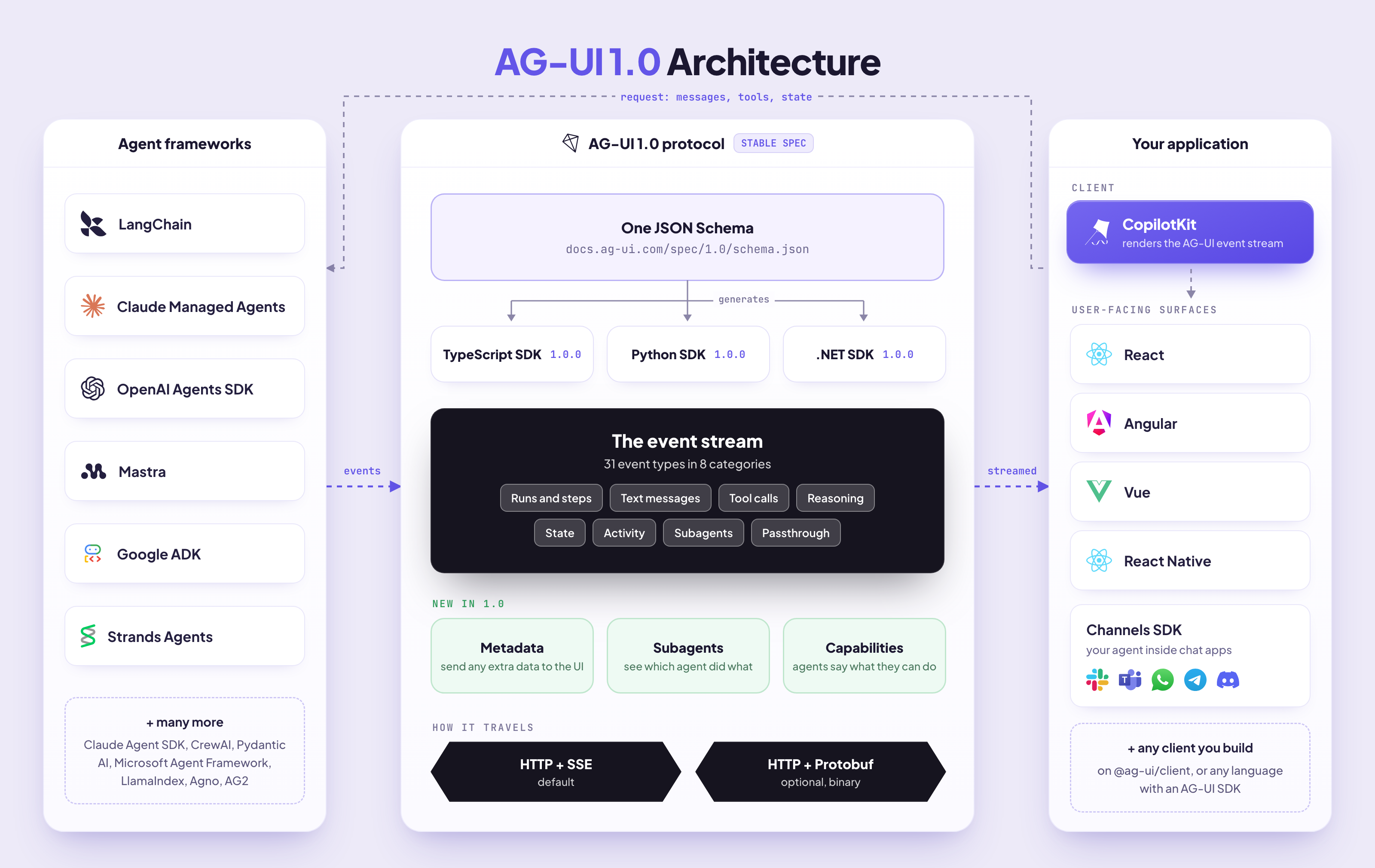
The 1.0 specification has two main parts:
Every rule says who it applies to: the producer that sends events (like your agent) or the consumer that reads them (like a client SDK or UI).
The TypeScript, Python and .NET SDKs are now generated from the schema, so every protocol change reaches all three at the same time.
The 1.0 spec won't change, so what you build on it today keeps working. Future versions will go through a public draft and discussion on GitHub first.
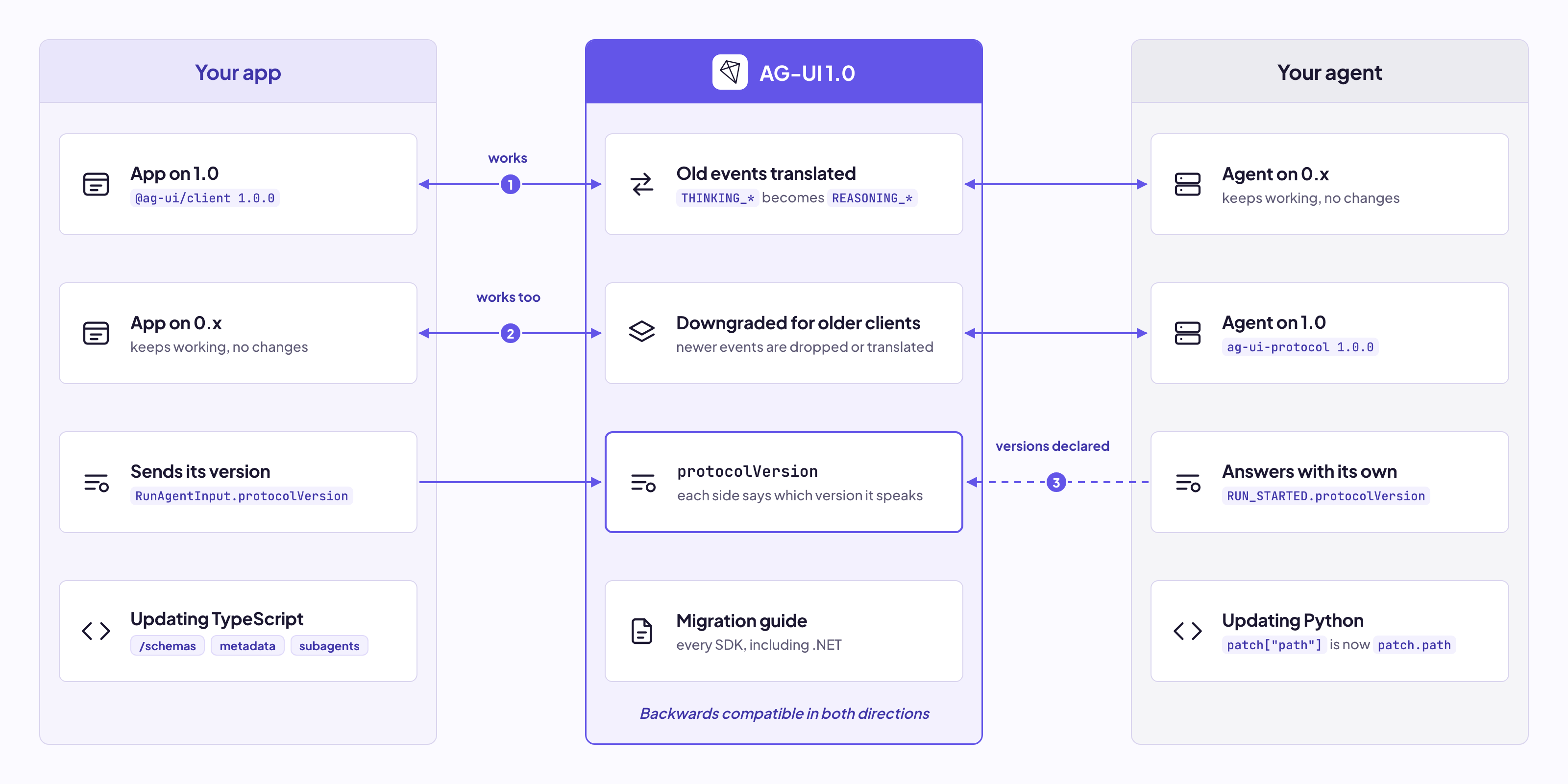
Beyond the spec, 1.0 brings subagent support, metadata for sending custom data to the frontend, multimodal tool results, human-in-the-loop interrupts, token usage and more. It's also backwards compatible, so your existing agents and apps keep working.
Read about everything new in the AG-UI 1.0 launch post, or check the changelog for all the changes and the migration guide to upgrade.
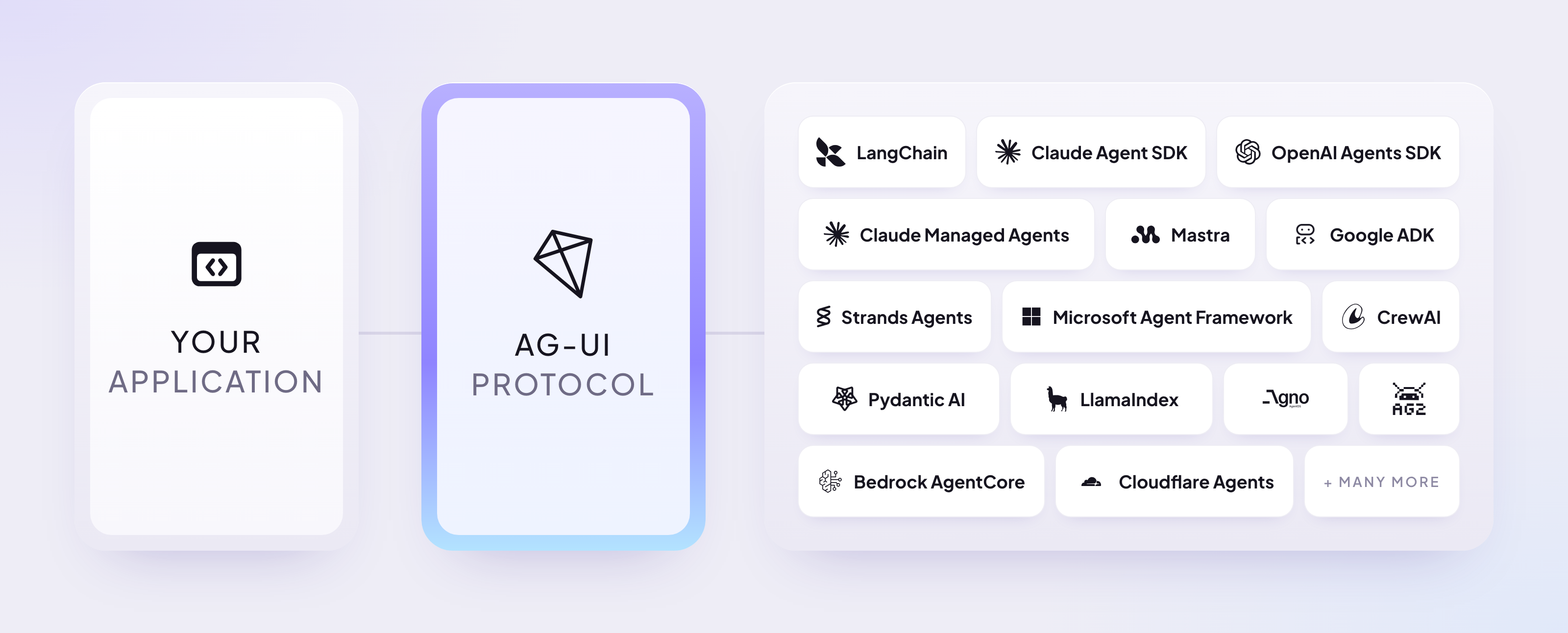
AG-UI already works across most of the agent ecosystem, so there's a good chance your stack is supported.
Most agent frameworks already speak AG-UI through official integrations, and some platforms support it natively:
AG-UI has three official SDKs, all generated from the JSON Schema and all at 1.0:
@ag-ui/client and @ag-ui/coreag-ui-protocolAGUI.Client and AGUI.ServerThe community also maintains SDKs for Go, Ruby, Rust, Dart, Kotlin, Java and C++.
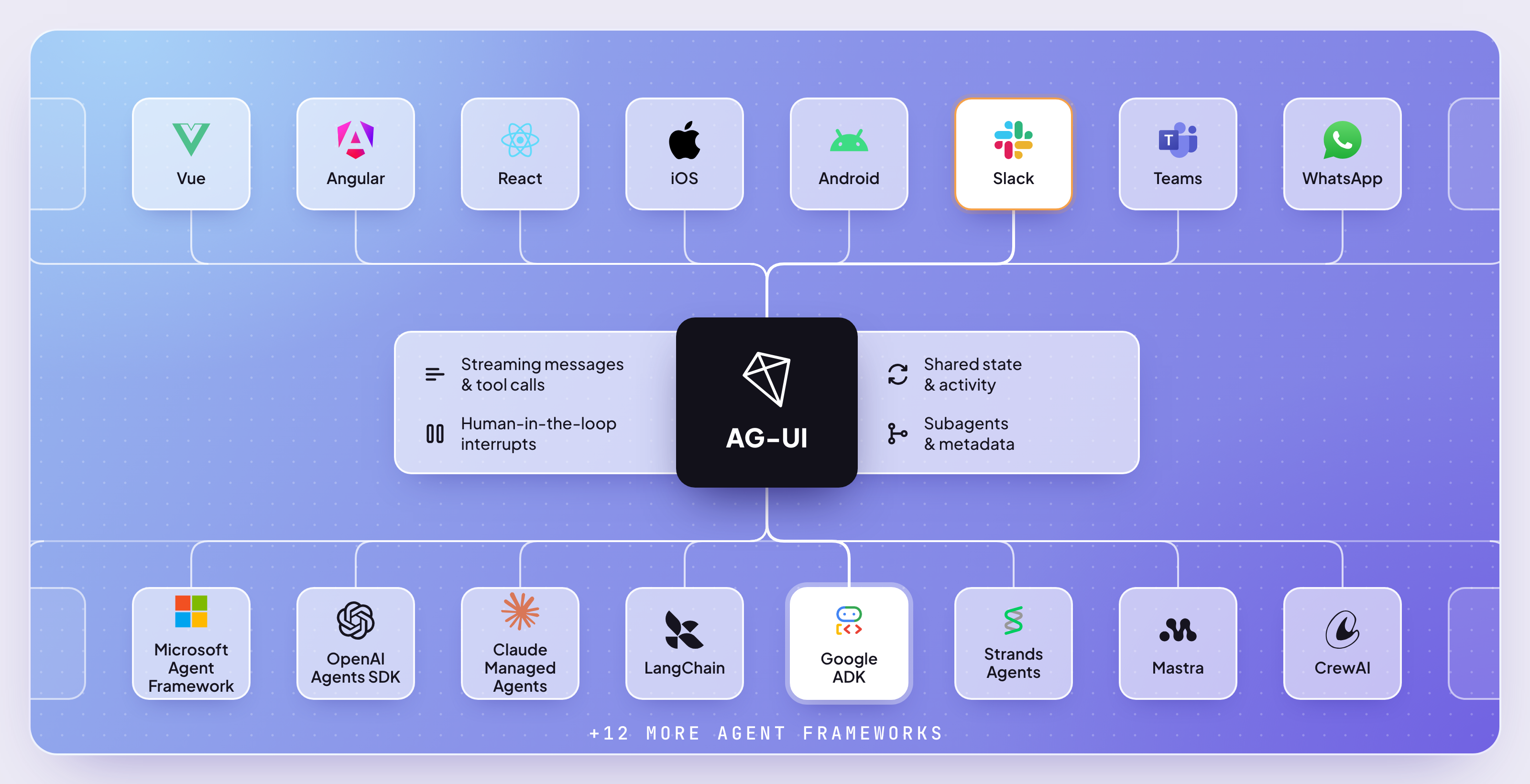
On the frontend, CopilotKit is our AG-UI client for React, Angular, Vue and React Native. With the Channels SDK, the same agent also works in chat apps like Slack, Teams, WhatsApp, Telegram and Discord.
Other clients exist too, and you can build your own on any AG-UI SDK.
The easiest way to see all of this working is the AG-UI Dojo. It has 30 live integrations, and for each one you can try features like agentic chat, human-in-the-loop, shared state, generative UI and subagents, with all the code.
Now let's see what actually happens when your app talks to an agent.
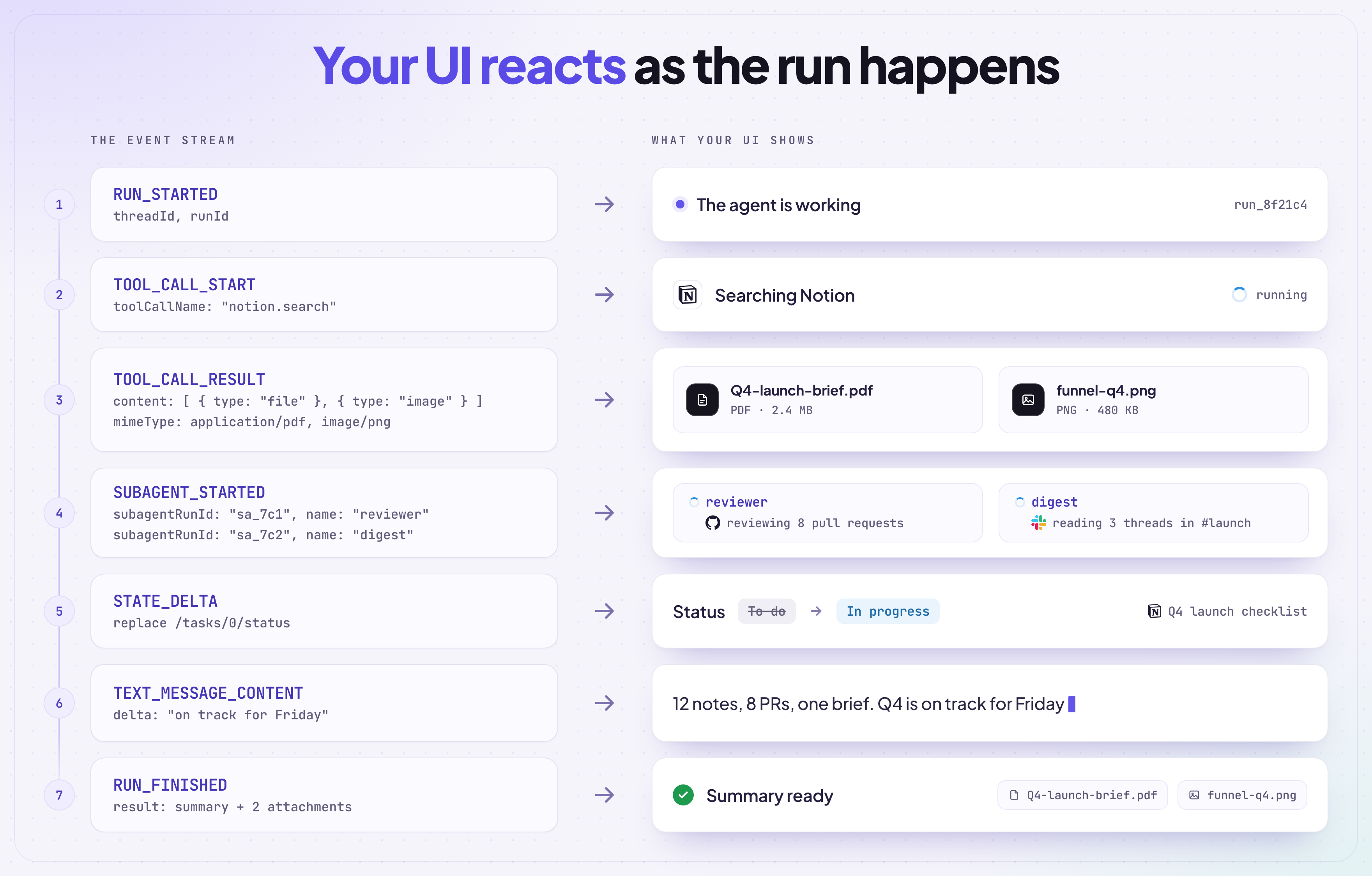
The unit of work in AG-UI is a run: one request in, one stream of events back. For example, when a user asks an agent to summarize their Notion notes, the agent:
RUN_STARTED)TOOL_CALL_START)TOOL_CALL_RESULT)STATE_DELTA)TEXT_MESSAGE_CONTENT)RUN_FINISHED)Your UI can react to each event the moment it happens, like showing "Searching Notion..." while the tool runs, instead of waiting for the whole run to finish.
Every run starts with one request called RunAgentInput. It carries a threadId for the conversation, a runId for this run and the messages so far. It can also carry the current shared state, the tools your app lets the agent call on the frontend, extra context, and resume answers when the previous run paused to ask the user something.
A conversation is a thread of runs sharing the same threadId, so each new run picks up where the last one ended.
On the agent side, the SDK's EventEncoder turns each event into the right format for the wire. Here's a minimal agent endpoint in Python with FastAPI:
from fastapi import FastAPI, Request
from fastapi.responses import StreamingResponse
from ag_ui.core import (
    RunAgentInput, RunStartedEvent, RunFinishedEvent,
    TextMessageStartEvent, TextMessageContentEvent, TextMessageEndEvent,
)
from ag_ui.encoder import EventEncoder

app = FastAPI()

@app.post("/")
async def run_agent(input: RunAgentInput, request: Request):
    encoder = EventEncoder(accept=request.headers.get("accept"))

    async def events():
        yield encoder.encode(RunStartedEvent(thread_id=input.thread_id, run_id=input.run_id))
        yield encoder.encode(TextMessageStartEvent(message_id="msg-1", role="assistant"))
        yield encoder.encode(TextMessageContentEvent(message_id="msg-1", delta="Hello!"))
        yield encoder.encode(TextMessageEndEvent(message_id="msg-1"))
        yield encoder.encode(RunFinishedEvent(thread_id=input.thread_id, run_id=input.run_id))

    return StreamingResponse(events(), media_type=encoder.get_content_type())
The endpoint receives the RunAgentInput, opens a stream and sends events one by one. We'll use the same encoder.encode(...) pattern in every example below.
By default, those events travel as Server-Sent Events over HTTP, one event per data: line:
data: {"type":"RUN_STARTED","threadId":"thr-1","runId":"run-1"}

data: {"type":"TEXT_MESSAGE_START","messageId":"msg-1","role":"assistant"}

data: {"type":"TEXT_MESSAGE_CONTENT","messageId":"msg-1","delta":"Hello!"}

data: {"type":"TEXT_MESSAGE_END","messageId":"msg-1"}

data: {"type":"RUN_FINISHED","threadId":"thr-1","runId":"run-1"}
Field names are camelCase on the wire and in the TypeScript SDK. Only the Python SDK uses snake_case, and it converts them for you.
On the app side, the AG-UI client runs every event through a short pipeline before your UI sees it:
That third step is why an older app keeps working with a newer agent. Anything the client doesn't know is skipped, while a broken value in a field it does know still fails the run.
Here's how you connect to an agent with the TypeScript client:
import { HttpAgent } from "@ag-ui/client";

const agent = new HttpAgent({ url: "http://localhost:8000/" });

agent.subscribe({
  onEvent: ({ event }) => handleEvent(event),
});

agent.addMessage({ id: "user-1", role: "user", content: "Summarize my Notion notes" });
await agent.runAgent();
The next section covers every event your handler can receive.
AG-UI 1.0 defines 31 event types, grouped into 8 categories: runs and steps, text messages, tool calls, reasoning, state, activity, subagents, and custom and raw events. The exact fields of each one are in the JSON Schema.
Every event shares a few base fields: its type, an optional timestamp, an optional rawEvent holding the original framework event, and optional metadata.
Only the run events are required. Your agent sends the rest when it needs them, and every client is ready to accept all of them.
For each category, we'll show how your agent sends those events. If you use a framework integration, it sends them for you. On the UI side, you'll usually use a client like CopilotKit, which turns these events into components and hooks, so you rarely handle them by hand.
Knowing the events still helps when you build your own integration or client, debug a run in the Inspector, or design UI around what your agent can send.
Let's cover each category with examples.
Run events tell the UI when a run starts, how it ends, and which steps it goes through along the way.
RUN_STARTED: signals the start of a run, with its threadId and runIdRUN_FINISHED: signals the run ended, with its outcome and optional token usageRUN_ERROR: signals the run failed, with an error messageSTEP_STARTED: marks the start of a step inside the run, like "search"STEP_FINISHED: marks the end of that stepExample flow:
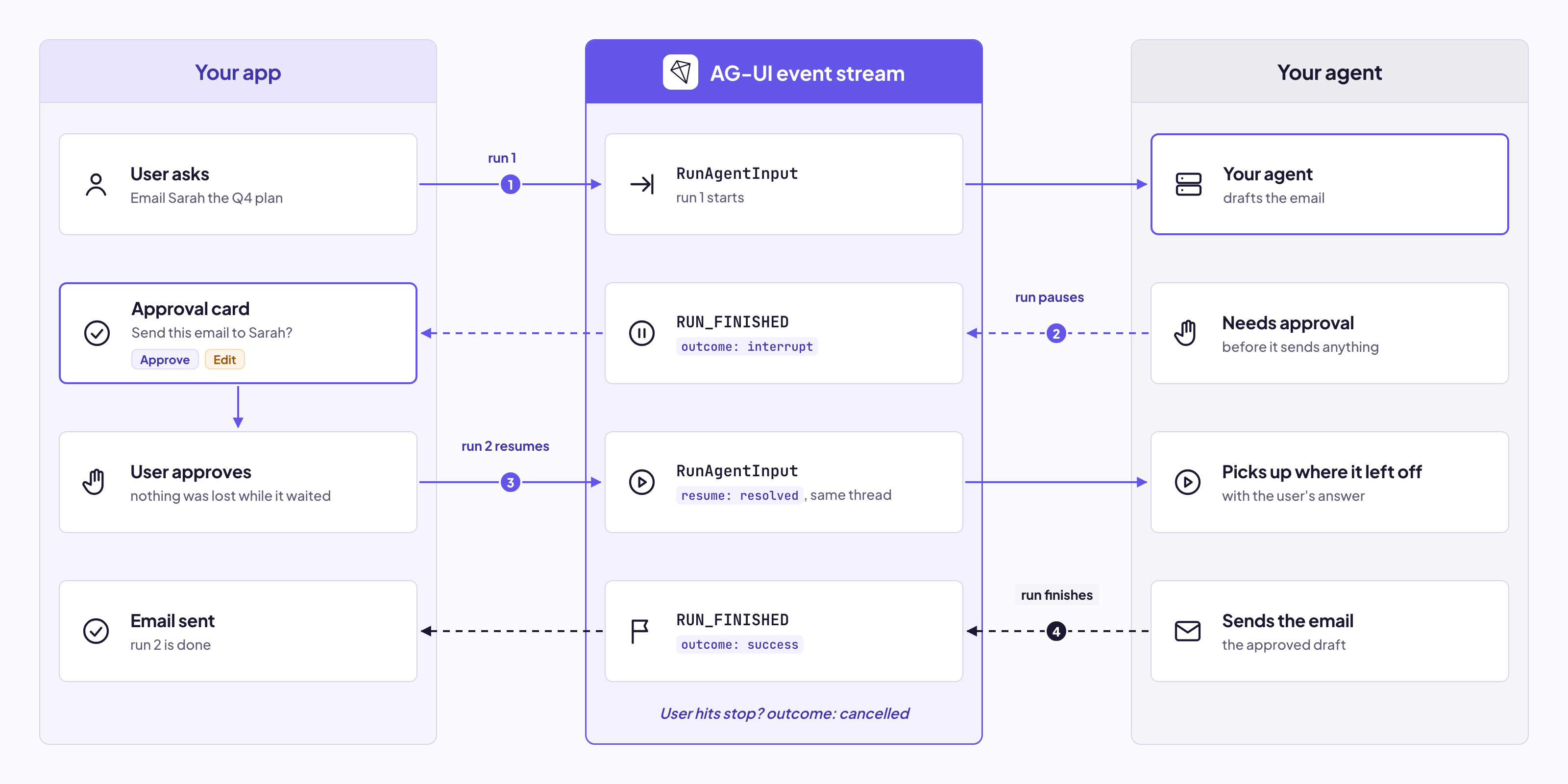
RUN_STARTED → (STEP_STARTED → STEP_FINISHED ...) → RUN_FINISHEDRUN_ERROR replaces RUN_FINISHED.In 1.0, RUN_FINISHED also says how the run ended through its outcome: success, interrupt when the agent paused to ask the user something, or cancelled when the run was stopped. The next run answers an interrupt with resume, and picks up right where the last one left off.
Here's how it looks on the agent side:
from ag_ui.core import (
    PROTOCOL_VERSION, TokenUsage,
    RunStartedEvent, StepStartedEvent, StepFinishedEvent, RunFinishedEvent,
)

yield encoder.encode(RunStartedEvent(
    thread_id=input.thread_id, run_id=input.run_id, protocol_version=PROTOCOL_VERSION,
))

yield encoder.encode(StepStartedEvent(step_name="search"))
# ... agent does the work ...
yield encoder.encode(StepFinishedEvent(step_name="search"))

yield encoder.encode(RunFinishedEvent(
    thread_id=input.thread_id, run_id=input.run_id,
    usage=[TokenUsage(provider="openai", model="gpt-5.5", input_tokens=1200, output_tokens=340, total_tokens=1540)],
))
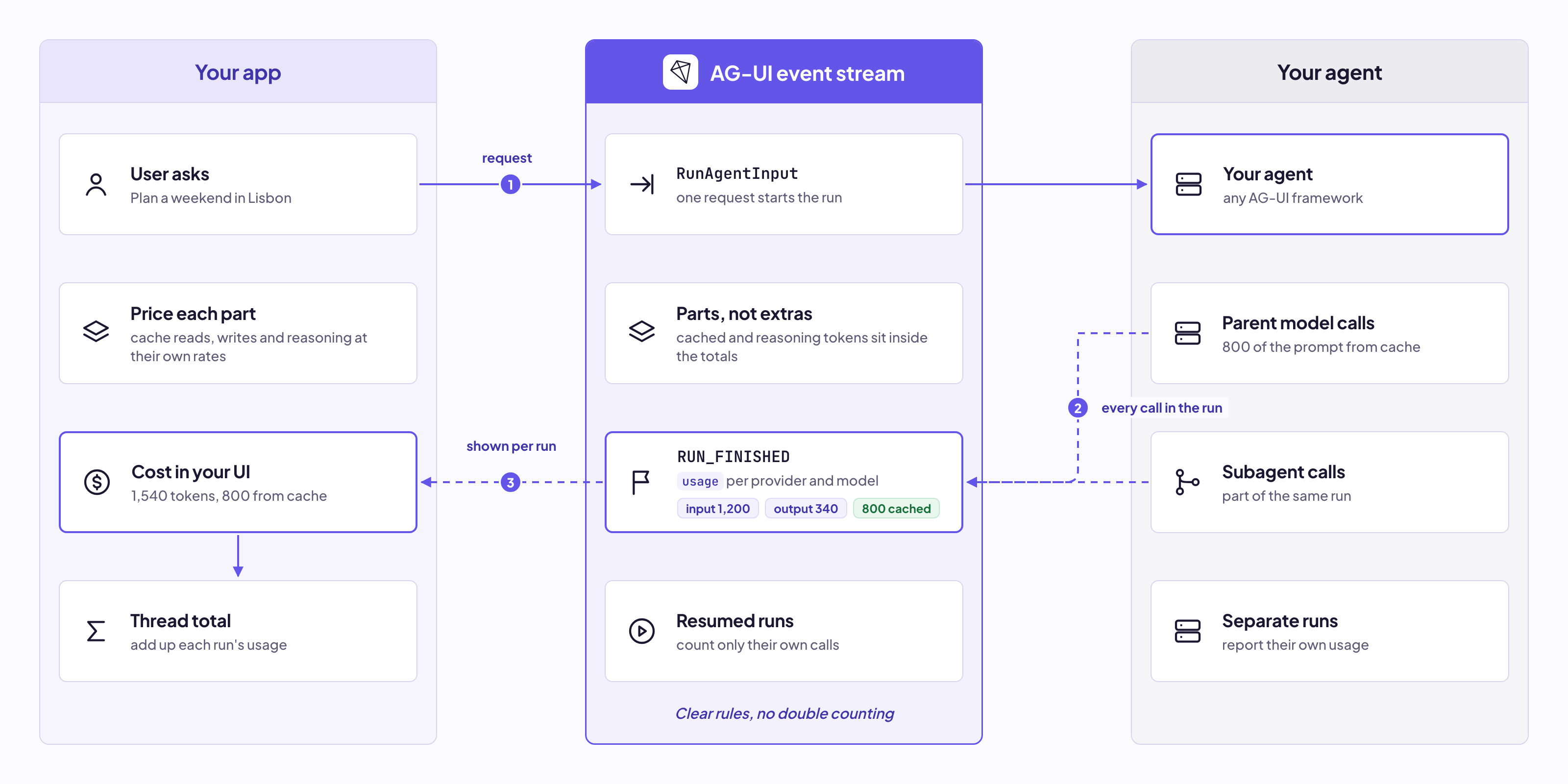
The token usage on RUN_FINISHED follows clear rules, so you can show how much each run cost. Tokens used by subagents count toward the run that started them. Read more on token usage.
Text message events carry the words the user reads, streamed as they're generated.
TEXT_MESSAGE_START: signals a new message, with its messageId and roleTEXT_MESSAGE_CONTENT: carries the next piece of text as a deltaTEXT_MESSAGE_END: signals the message is completeTEXT_MESSAGE_CHUNK: a compact version of all three, for agents that can't tell where a message startsExample flow:
TEXT_MESSAGE_START → (TEXT_MESSAGE_CONTENT → TEXT_MESSAGE_CONTENT ...) → TEXT_MESSAGE_ENDHere's how it looks on the agent side:
from ag_ui.core import TextMessageStartEvent, TextMessageContentEvent, TextMessageEndEvent

yield encoder.encode(TextMessageStartEvent(message_id=msg_id, role="assistant"))

async for token in llm.stream(prompt):
    yield encoder.encode(TextMessageContentEvent(message_id=msg_id, delta=token))

yield encoder.encode(TextMessageEndEvent(message_id=msg_id))
The client expands TEXT_MESSAGE_CHUNK into the full three events before your code sees it, so you only ever handle one shape. Tool calls and reasoning have chunk versions too.
Tool call events show the agent calling a tool, from its name and arguments to the result.
TOOL_CALL_START: signals a new tool call, with its toolCallId and toolCallNameTOOL_CALL_ARGS: carries the next piece of the arguments as a deltaTOOL_CALL_END: signals the arguments are completeTOOL_CALL_RESULT: carries what the tool returnedTOOL_CALL_CHUNK: a compact version of the first threeExample flow:
TOOL_CALL_START → (TOOL_CALL_ARGS ...) → TOOL_CALL_END → TOOL_CALL_RESULTThat's for tools the agent runs itself, like a search API. Tools your app runs, like opening a confirmation dialog, work a bit differently. The agent calls them, then finishes the run with their ids in pendingToolCallIds. Your app runs the tool and sends the result back in the next run.
Here's how it looks on the agent side:
import json
from ag_ui.core import ToolCallStartEvent, ToolCallArgsEvent, ToolCallEndEvent, ToolCallResultEvent

yield encoder.encode(ToolCallStartEvent(tool_call_id="call-1", tool_call_name="search_flights"))
yield encoder.encode(ToolCallArgsEvent(tool_call_id="call-1", delta=json.dumps({"to": "Tokyo"})))
yield encoder.encode(ToolCallEndEvent(tool_call_id="call-1"))

yield encoder.encode(ToolCallResultEvent(
    message_id="msg-2", tool_call_id="call-1", content="3 flights found, cheapest $612",
))
On the UI side, wait for TOOL_CALL_END before acting on the arguments, since until then you only have part of them.
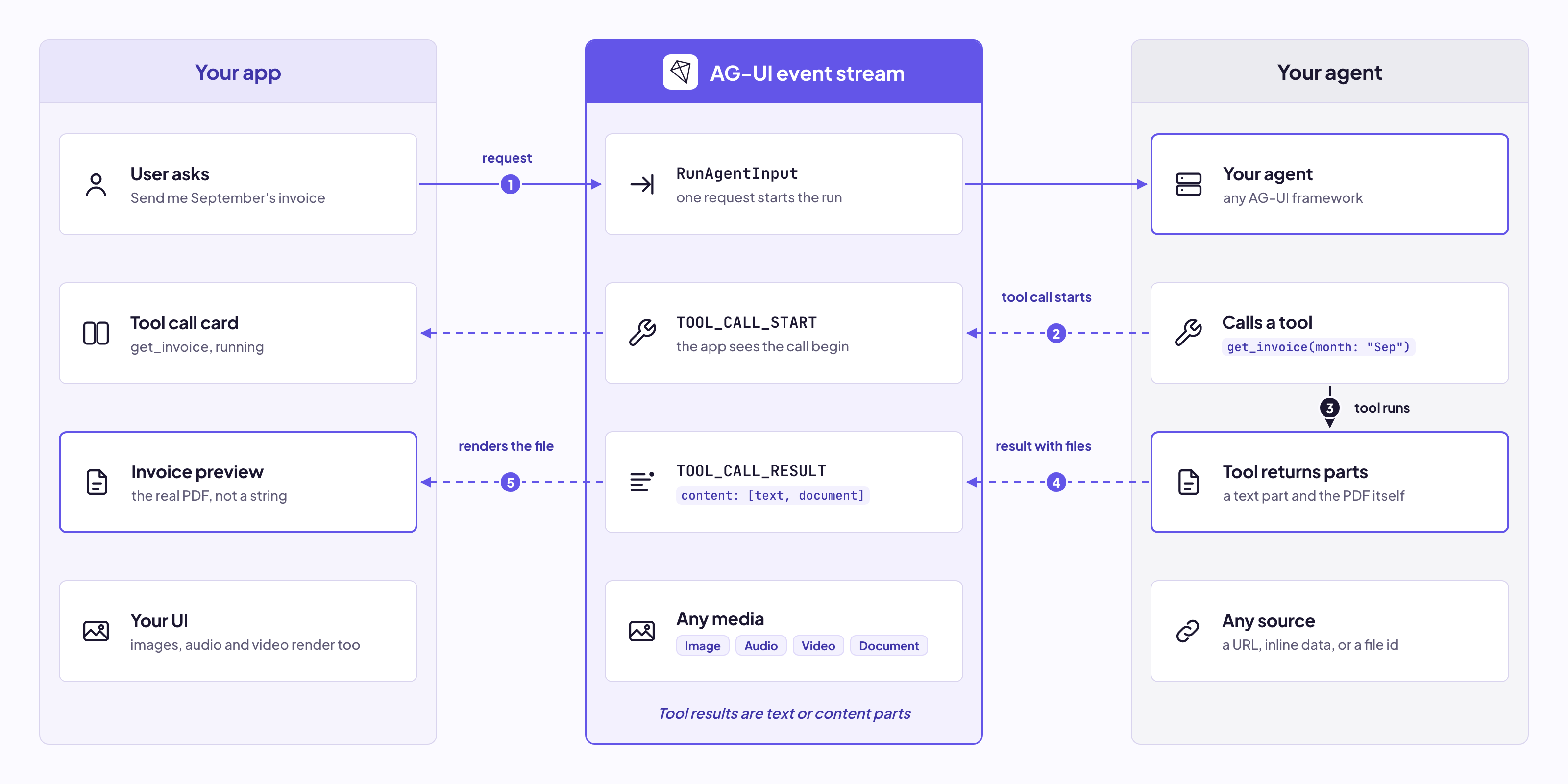
In 1.0, tool results can also include images, audio, video and documents, not just text. For example, an invoice tool can return the PDF itself:
{
  "type": "TOOL_CALL_RESULT",
  "messageId": "msg-2",
  "toolCallId": "call-1",
  "content": [
    { "type": "text", "text": "Here is your invoice." },
    { "type": "document", "source": { "type": "url", "value": "https://example.com/invoice.pdf", "mimeType": "application/pdf" } }
  ]
}
Reasoning events carry what the model thinks before it answers, so your UI can show a "Thinking..." panel while the agent works. They're new in 1.0 and replace the older THINKING_* events.
REASONING_START: signals the start of a reasoning blockREASONING_MESSAGE_START: signals a reasoning message inside the blockREASONING_MESSAGE_CONTENT: carries the next piece of reasoning textREASONING_MESSAGE_END: signals the reasoning message is completeREASONING_MESSAGE_CHUNK: a compact version of the three message eventsREASONING_END: signals the end of the reasoning blockREASONING_ENCRYPTED_VALUE: carries encrypted reasoning from the model providerExample flow:
REASONING_START → REASONING_MESSAGE_START → (REASONING_MESSAGE_CONTENT ...) → REASONING_MESSAGE_END → REASONING_ENDSome providers keep their reasoning private and send an encrypted version instead. Your app can't read it, but it stores it and sends it back on the next turn, so the model can continue its own reasoning.
Here's how it looks on the agent side:
from ag_ui.core import (
    ReasoningStartEvent, ReasoningMessageStartEvent, ReasoningMessageContentEvent,
    ReasoningMessageEndEvent, ReasoningEndEvent,
)

yield encoder.encode(ReasoningStartEvent(message_id="reasoning-1"))
yield encoder.encode(ReasoningMessageStartEvent(message_id="think-1", role="reasoning"))

async for token in llm.stream_reasoning(prompt):
    yield encoder.encode(ReasoningMessageContentEvent(message_id="think-1", delta=token))

yield encoder.encode(ReasoningMessageEndEvent(message_id="think-1"))
yield encoder.encode(ReasoningEndEvent(message_id="reasoning-1"))State events keep data in sync between your agent and your app, like a travel itinerary, a form or a document being written. Instead of resending everything on every change, the agent follows a snapshot and delta pattern.
STATE_SNAPSHOT: sends the full state, replacing what your app hadSTATE_DELTA: sends only what changed, as a JSON PatchMESSAGES_SNAPSHOT: sends the full conversation, to bring your app back in syncExample flow:
STATE_SNAPSHOT → (STATE_DELTA → STATE_DELTA ...) → STATE_SNAPSHOT → (STATE_DELTA ...)The agent starts with a snapshot, streams small deltas as things change, and sends a new snapshot whenever it needs to resync.
Here's how it looks on the agent side:
from ag_ui.core import StateSnapshotEvent, StateDeltaEvent

yield encoder.encode(StateSnapshotEvent(
    snapshot={"itinerary": {"flights": [], "budget": 2000}},
))

yield encoder.encode(StateDeltaEvent(delta=[
    {"op": "add", "path": "/itinerary/flights/-", "value": {"to": "Tokyo", "price": 612}},
    {"op": "replace", "path": "/itinerary/budget", "value": 1388},
]))
Now the itinerary next to the chat gets the new flight and a lower budget while the agent is still talking, without reloading the whole panel.
Activity events show live progress that isn't part of the conversation, like a search running or a checklist filling in. They keep their place in the chat, but your UI shows them as their own widget. Both are new in 1.0.
ACTIVITY_SNAPSHOT: creates or replaces an activity, with its activityType and contentACTIVITY_DELTA: updates part of an activity, as a JSON PatchExample flow:
ACTIVITY_SNAPSHOT → (ACTIVITY_DELTA → ACTIVITY_DELTA ...)Here's how it looks on the agent side:
from ag_ui.core import ActivitySnapshotEvent, ActivityDeltaEvent

yield encoder.encode(ActivitySnapshotEvent(
    message_id="search-1", activity_type="web_search",
    content={"query": "flights to Tokyo", "found": 0},
))

yield encoder.encode(ActivityDeltaEvent(
    message_id="search-1", activity_type="web_search",
    patch=[{"op": "replace", "path": "/found", "value": 3}],
))
Activity is only for your UI, so your app removes these messages before sending the conversation back to the agent.
Subagent events show which agent did what when work is delegated. Before 1.0, subagents running at once all streamed into the same chat, and the UI had no idea whose output was whose. All three are new in 1.0.
SUBAGENT_STARTED: signals a subagent started, with its subagentRunId and nameSUBAGENT_FINISHED: signals the subagent finished, with an optional resultSUBAGENT_ERROR: signals the subagent failed, while the rest of the run can continueEvery other event a subagent sends is tagged with its subagentRunId, so your UI can show each subagent in its own card while it works.
Example flow:
SUBAGENT_STARTED → (events tagged with its subagentRunId ...) → SUBAGENT_FINISHEDHere's how it looks on the agent side:
from ag_ui.core import (
    SubagentStartedEvent, SubagentFinishedEvent,
    TextMessageStartEvent, TextMessageContentEvent, TextMessageEndEvent,
)

yield encoder.encode(SubagentStartedEvent(subagent_run_id="sub-1", name="flight-search"))

yield encoder.encode(TextMessageStartEvent(message_id="msg-7", role="assistant", subagent_run_id="sub-1"))
yield encoder.encode(TextMessageContentEvent(message_id="msg-7", delta="Found 3 flights...", subagent_run_id="sub-1"))
yield encoder.encode(TextMessageEndEvent(message_id="msg-7", subagent_run_id="sub-1"))

yield encoder.encode(SubagentFinishedEvent(subagent_run_id="sub-1", result={"cheapest": 612}))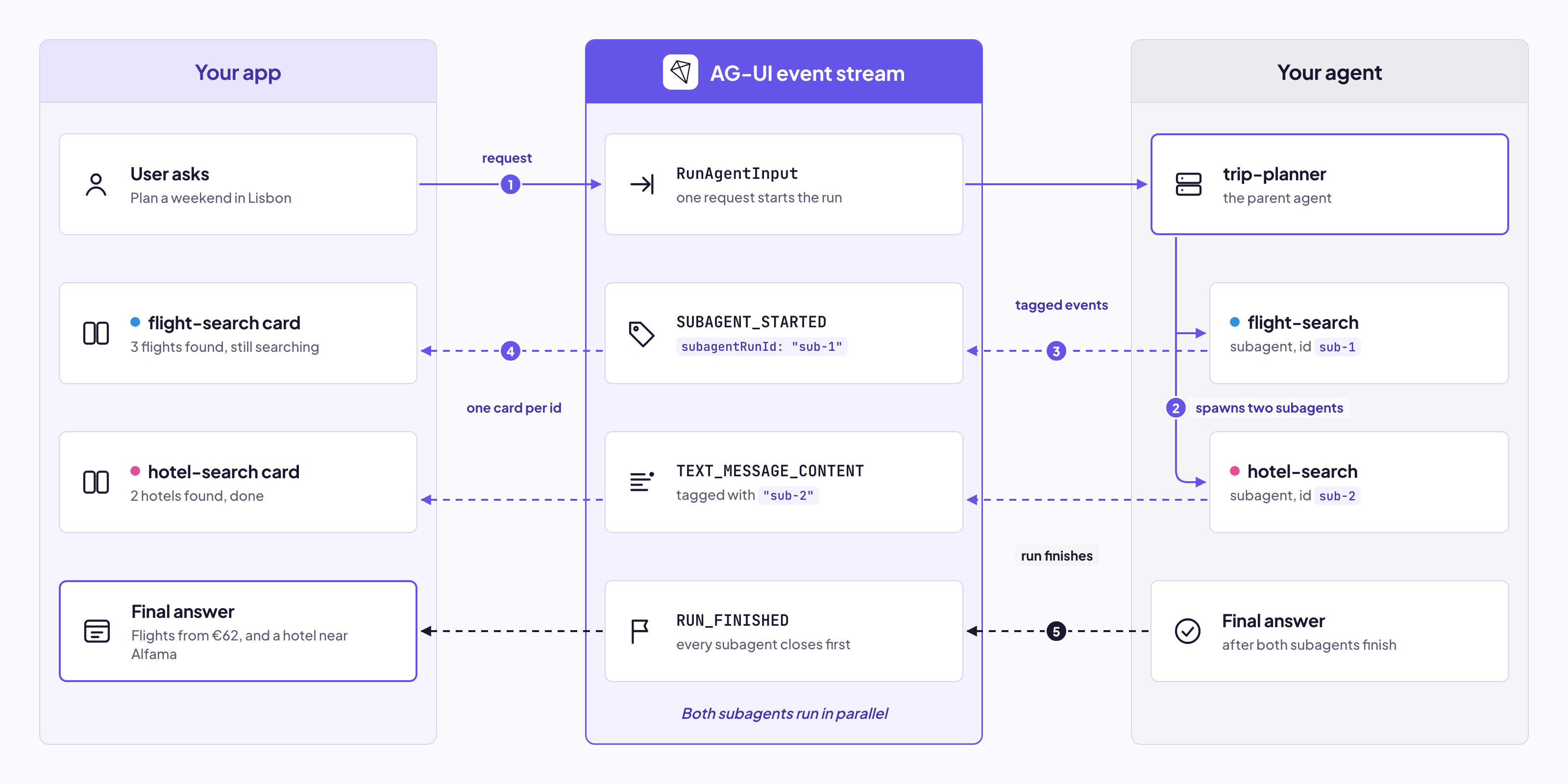
Try subagents live in the Dojo, or read more about subagents.
Custom and raw events cover anything the other categories don't. They don't follow a fixed order and can appear anywhere in a run.
CUSTOM: carries your own app-specific event, with a name and a valueRAW: passes through an event from your framework or provider, with an optional sourceSay you want to update a shopping cart badge when the agent adds an item. That's specific to your app, so you'd send a custom event:
from ag_ui.core import CustomEvent, RawEvent

yield encoder.encode(CustomEvent(name="acme.cart_updated", value={"items": 3}))

yield encoder.encode(RawEvent(source="openai", event={"id": "chatcmpl-123", "finish_reason": "stop"}))
Prefix your custom event names with your app's name, like acme.cart_updated, since names without a prefix are saved for the protocol itself.
Here's a live example that combines all the categories. The user asks a travel assistant to find a flight to Tokyo under $2,000 and book it.
Here's the complete event sequence:
RUN_STARTED → Agent starts working on the request
STATE_SNAPSHOT → Empty itinerary appears, budget $2,000
STEP_STARTED → "Plan" step appears in the progress bar
REASONING_START → "Thinking..." panel opens
REASONING_MESSAGE_CONTENT → Stream the agent's reasoning
REASONING_END → Panel collapses to "Thought for 2s"
STEP_FINISHED → "Plan" step completes
TEXT_MESSAGE_START → Begin the first message
TEXT_MESSAGE_CONTENT → Stream "Looking for flights..."
TEXT_MESSAGE_END → Complete the first message
SUBAGENT_STARTED → "flight-search" card opens
ACTIVITY_SNAPSHOT → Search widget appears in the card
TOOL_CALL_START → Begin the search_flights call
TOOL_CALL_ARGS → Show parameters: {"to": "Tokyo", "maxPrice": 2000}
TOOL_CALL_END → Arguments complete
ACTIVITY_DELTA → Search widget shows "3 results"
TOOL_CALL_RESULT → Show "Cheapest: ANA 008 at $612"
STATE_DELTA → Add the flight to the itinerary, budget drops to $1,388
SUBAGENT_FINISHED → Card collapses to a summary
TEXT_MESSAGE_START → Begin the second message
TEXT_MESSAGE_CONTENT → Stream "ANA 008 at $612. Booking it."
TEXT_MESSAGE_END → Complete the second message
TOOL_CALL_START → Begin the confirm_booking call on the frontend
TOOL_CALL_ARGS → Show parameters: {"flight": "NH008", "price": 612}
TOOL_CALL_END → Approve and Decline buttons appear
RUN_FINISHED → Run complete, waiting on the user's click
When the user clicks Approve, your app runs confirm_booking and sends the result in the next run on the same thread, and the agent confirms the booking.
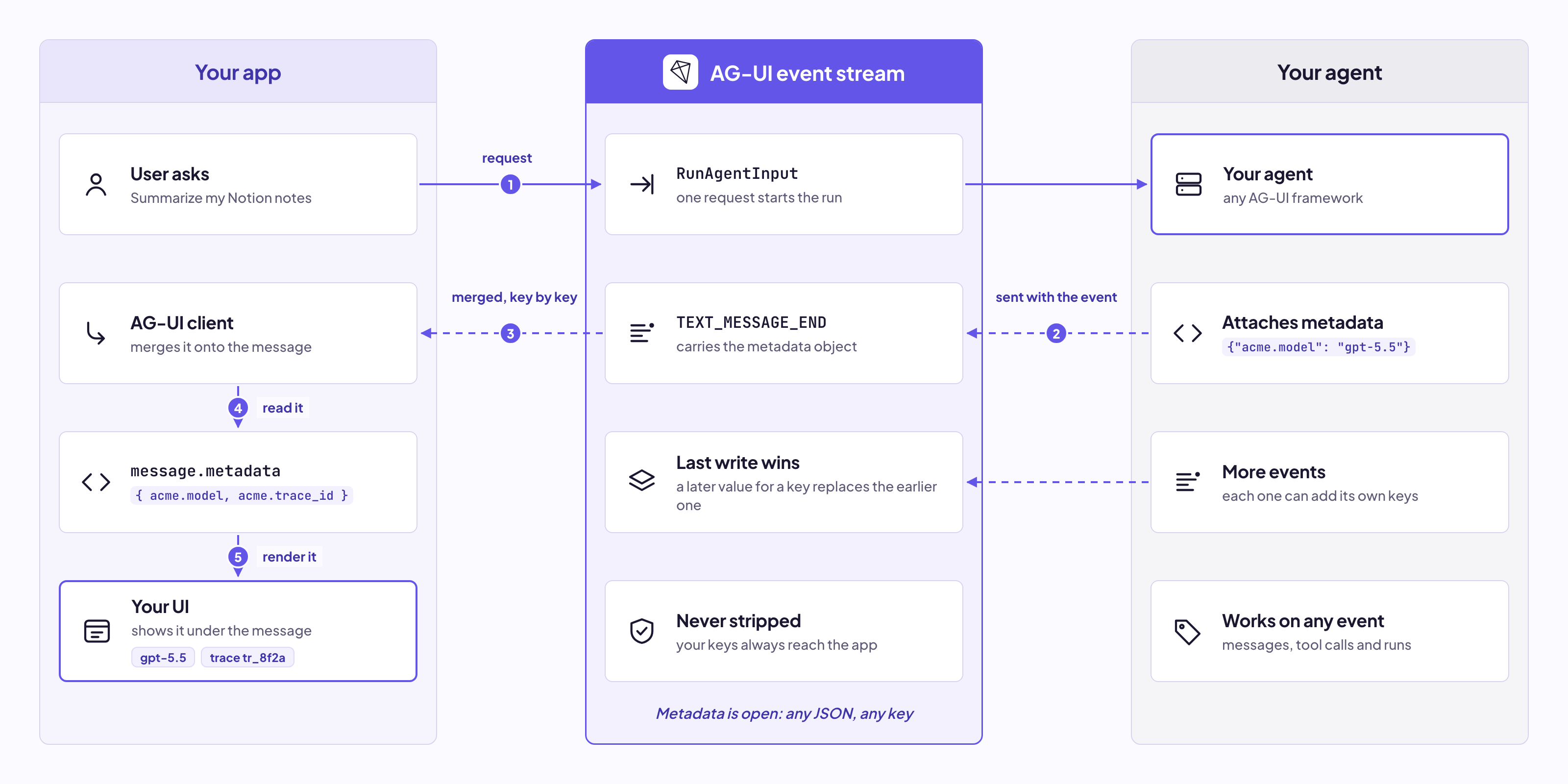
With metadata, you can send any custom data from your agent to the frontend. For example, you can show which model answered under each message, or attach a trace id that links to your logs.
Add it on the backend:
TextMessageEndEvent(
    message_id="msg-1",
    metadata={"acme.model": "gpt-5.5", "acme.trace_id": "tr_8f2a"},
)
And it shows up on the message in the browser:
agent.messages.at(-1)?.metadata;
// { "acme.model": "gpt-5.5", "acme.trace_id": "tr_8f2a" }
When several events build the same message, the client merges their metadata key by key, and the latest value for each key wins. That's useful for data that only exists at the end, like a token count.
Metadata works on events, messages, tool calls, tools and interrupts. Prefix your keys with your app's name, like acme.model, since the ag-ui key is saved for the protocol.
Capabilities let an agent describe what it can do before you ask it to do anything, like whether it streams reasoning, accepts files or pauses for approval. Your app can use them to shape its UI up front, like showing a file picker only when the agent accepts files.
If an agent leaves something out, that doesn't mean it can't do it. And if it sends an event its declaration didn't mention, your app still accepts it, since the event stream always wins.
1.0 standardizes what a declaration looks like, and each framework or platform decides how to share it with your app.
AG-UI defines what events mean, and the transport only decides how they travel. The events and rules stay the same on every transport.
HTTP with Server-Sent Events is the default, and every HTTP agent supports it. There's also an optional binary format over HTTP with Protobuf, generated from the same schema, for a more compact stream. You can carry AG-UI over your own transport too, like WebSockets, as long as it delivers every event in order.
Both sides also say which version they speak: your client in RunAgentInput, and the agent in RUN_STARTED. So when an older client talks to a newer agent, the newer events are translated or dropped for it instead of breaking the run.
Since AG-UI captures every interaction between your agent and your users, each run becomes a signal your agent can learn from. CopilotKit Intelligence uses Automatic Learning to extract insights from conversations and turn them into Skills your agent uses next time.
conversations → learning → proposed Skills → agent → better conversations...
You review and approve each Skill, and Skill delivery loads the published ones into your agent. You can also download them with the CLI for any other agent. Read more in the docs.
Spin up your first AG-UI app with a single command:
npx create-ag-ui-app@latestThe CLI asks for a project name, your client and your agent framework. Once it's done, run npm run dev and open http://localhost:3000 to see it in action.
If your framework isn't supported yet, you can build your own integration by emitting events directly from your agent, like the FastAPI example above, or with middleware that translates your existing system's output. To see every event your agent sends while you build, use the CopilotKit Inspector.
To learn more:
If you have ideas for the next version, jump into GitHub Discussions and tell us what you want to see.
If you're building an agent framework or SDK and want to add AG-UI support, we'd love to work with you. Just reach out in the AG-UI or CopilotKit communities, or on GitHub.
Want to bring CopilotKit into your stack? Talk to our engineers and we'll help you set it up.
Follow CopilotKit on Twitter for updates.
Subscribe to our blog and get updates on CopilotKit in your inbox.