Microsoft has contributed a first-class .NET SDK to AG-UI, so any .NET backend can now speak AG-UI directly!
Javier Calvarro Nelson from Microsoft's ASP.NET Core team built it. It lives in the AG-UI repository alongside the TypeScript and Python SDKs, published on NuGet and now at 1.0.
C# support for the protocol used to live only inside Microsoft Agent Framework, which now depends on these packages. Read the migration notice.
→ Microsoft's announcement on the .NET Blog
The agent lifecycle usually involves streaming tokens, calling tools mid-response, updating state, and delegating to subagents. These break the traditional request-and-response paradigm.
HTTP returns one response per request, so the frontend has to do the rest itself. It parses the stream, tracks what the agent is doing, and maps everything to the UI. Every framework does it differently, and the code breaks whenever the event format changes.
AG-UI (Agent-User Interaction Protocol) standardizes how agents communicate with user-facing applications. Instead of a custom streaming layer, it defines a shared event stream between the agent backend and the frontend.
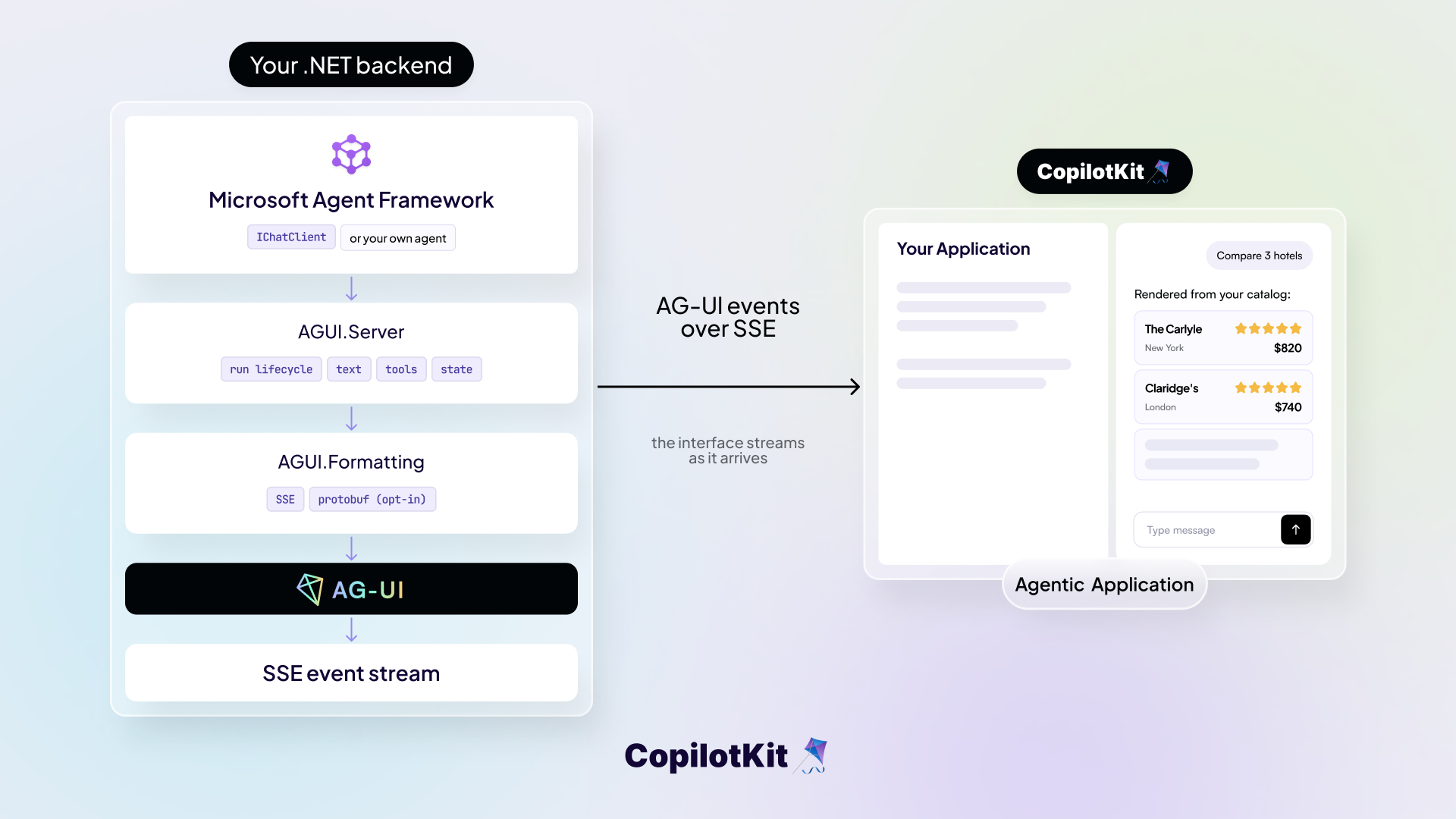
The stream covers the full agent lifecycle as several categories of typed events, like RUN_STARTED and TEXT_MESSAGE_CONTENT, and any AG-UI client can consume it without caring which framework or language produced the run.
AG-UI is transport-agnostic. It defines the events, and the client decides how to display them, so the surface can be a web app, a terminal, a mobile app, or a chat platform like Slack and Teams.
The .NET SDK brings that to C#. A backend emits those events natively, and a client consumes them from an agent written in any language. CopilotKit's Agent Framework .NET docs show how to render that stream in React.
The SDK works in both directions. AGUI.Server turns an agent into an AG-UI endpoint, and AGUI.Client lets a .NET application consume one. Exposing an endpoint is what puts a .NET backend on the protocol.
dotnet add package AGUI.ServerYour agent is an IChatClient, the standard chat abstraction from Microsoft.Extensions.AI. Assuming your app defines a CreateChatClient() method that returns a configured IChatClient, register it along with the AG-UI serializer, then two extension methods do the SDK's work inside a minimal-API route:
using AGUI.Abstractions;
using AGUI.Server;
using Microsoft.AspNetCore.Mvc;
using Microsoft.Extensions.AI;
using Microsoft.Extensions.Options;
using JsonOptions = Microsoft.AspNetCore.Http.Json.JsonOptions;

var builder = WebApplication.CreateBuilder(args);

// Register your IChatClient (OpenAI, Azure AI Foundry, or any other provider)
builder.Services.AddSingleton(CreateChatClient());

builder.Services.Configure<JsonOptions>(options =>
    options.SerializerOptions.TypeInfoResolverChain.Insert(0, AGUIJsonUtilities.DefaultTypeInfoResolver));

var app = builder.Build();

app.MapPost("/", (
    [FromBody] RunAgentInput input,
    [FromServices] IChatClient chatClient,
    [FromServices] IOptions<JsonOptions> jsonOptions,
    CancellationToken cancellationToken) =>
{
    var context = input.ToChatRequestContext(jsonOptions.Value.SerializerOptions);

    var events = chatClient
        .GetStreamingResponseAsync(context.Messages, context.ChatOptions, cancellationToken)
        .AsAGUIEventStreamAsync(context, cancellationToken);

    return TypedResults.ServerSentEvents(events);
});

await app.RunAsync();
ToChatRequestContext unpacks the incoming RunAgentInput, the protocol's request payload, into the messages and options your IChatClient expects.
AsAGUIEventStreamAsync turns the response stream back into protocol events, emitting RUN_STARTED and RUN_FINISHED around the run, closing open text and reasoning blocks before switching to a different message or tool call, and collapsing multiple interrupts into a single terminal RUN_FINISHED.
The SDK handles the protocol. The web server is yours, which is why Agent Framework's ASP.NET Core package wraps these same primitives as AddAGUIServer() and MapAGUIServer().
In Agent Framework, the same endpoint takes only a few lines. Read the full walkthrough on Microsoft Learn for the complete server and client.
dotnet add package Microsoft.Agents.AI.Hosting.AGUI.AspNetCore --prereleaseusing Microsoft.Agents.AI;
using Microsoft.Agents.AI.Hosting.AGUI.AspNetCore;
using Microsoft.Extensions.AI;
var builder = WebApplication.CreateBuilder(args);
builder.Services.AddAGUIServer();
var app = builder.Build();
IChatClient chatClient = CreateChatClient();
AIAgent agent = chatClient.AsAIAgent(
name: "AGUIAssistant",
instructions: "You are a helpful assistant.");
app.MapAGUIServer("/", agent);
await app.RunAsync();AGUI.Client handles the other direction, connecting a .NET application to any AG-UI agent.
dotnet add package AGUI.Clientusing AGUI.Client;
using var httpClient = new HttpClient();
var chatClient = new AGUIChatClient(new(httpClient, "http://localhost:5001"));AGUIChatClient is an IChatClient, so it works anywhere your code already takes an IChatClient. The agent on the other end can be written in Python, TypeScript, or C#, and your code does not change.
Once your endpoint speaks AG-UI, any AG-UI client can drive it: a .NET application through AGUI.Client, or a React frontend through CopilotKit. The Interactive Dojo has running examples against a .NET backend.
The repository has worked examples for each part of the protocol, one client and server pair per step, covering chat, backend and frontend tools, human in the loop, shared state, reasoning, multimodal input, interrupts, parallel tool calls, protobuf, and telemetry.
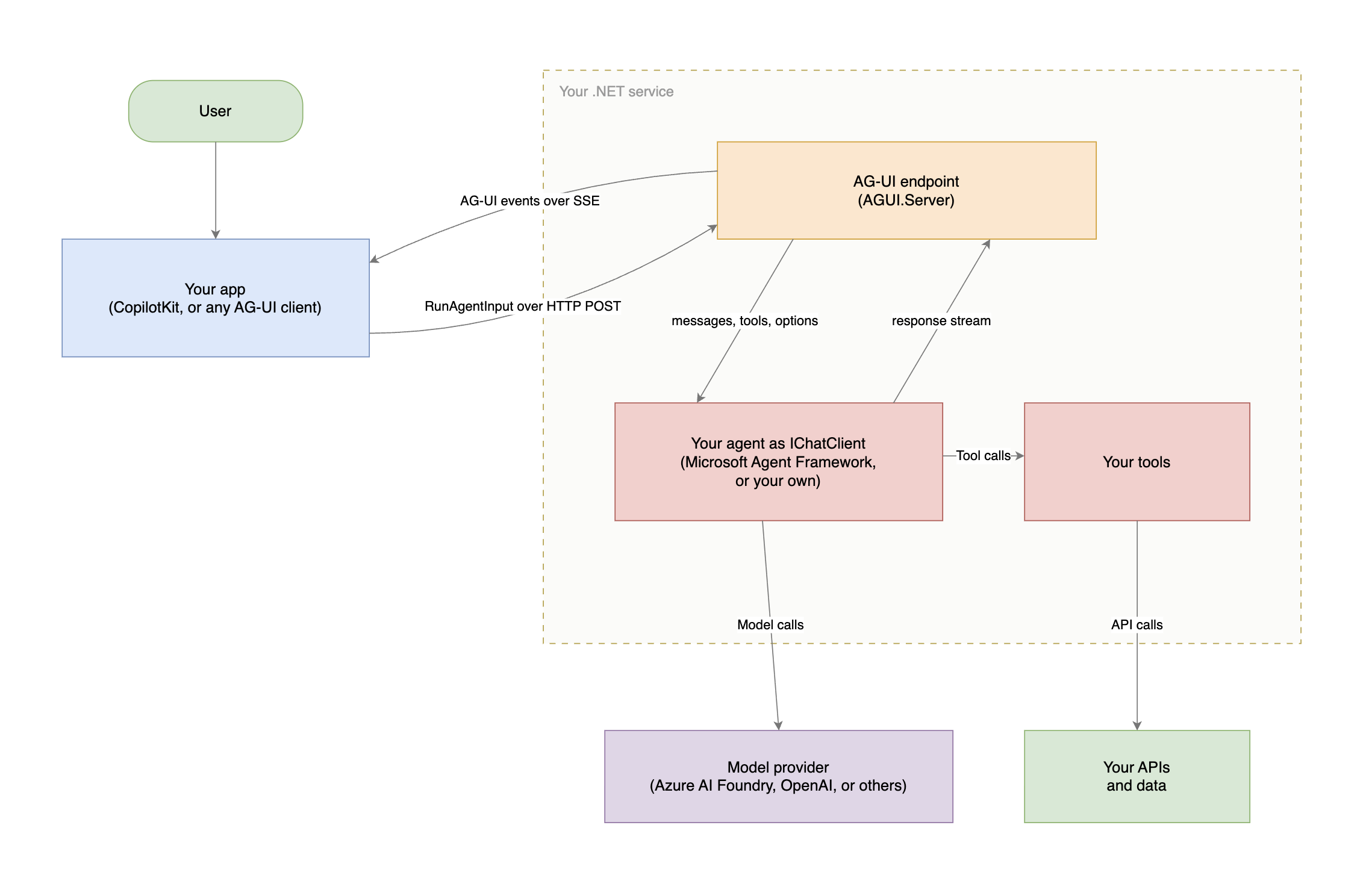
Here is how everything works together. A request arrives from any AG-UI client, the endpoint hands it to your agent in the Microsoft Agent Framework or your own agent code, and the response streams back as protocol events while the agent calls your tools and the model.
The SDK ships as five packages on NuGet: protocol types, wire formatters, protobuf support, an HTTP client, and a framework-agnostic server adapter built on Microsoft.Extensions.AI.
AGUI.Abstractions: Protocol events, messages, tools, capabilities, interrupts, state, and the source-generated serializer.AGUI.Formatting: Wire format abstraction and the default Server-Sent Events implementation.AGUI.Protobuf: Opt-in protobuf codec, generated from the TypeScript .proto definitions. Covers a subset of event types, SSE is the default and carries all of them.AGUI.Client: HTTP client and IChatClient implementation for consuming AG-UI endpoints.AGUI.Server: Framework-agnostic adapter from ChatResponseUpdate streams to AG-UI events.The client and server packages pull in the abstractions they need, so most applications reference one of them.
Agent Framework, Microsoft's SDK for building AI agents in .NET and Python, used to include its own implementation of the AG-UI protocol. It now depends on the AGUI.* packages from NuGet and keeps the ASP.NET Core integration that turns an agent into an endpoint.
The protocol is maintained in the AG-UI C# SDK, and stays wire-compatible with the TypeScript and Python SDKs. See the migration notice for the full details.
For existing Agent Framework users, the programming model is unchanged, though a few APIs were renamed:
AddAGUI() and MapAGUI() are now AddAGUIServer() and MapAGUIServer()Microsoft.Agents.AI.AGUI namespace is split across AGUI.Client, AGUI.Server, and AGUI.AbstractionsAGUIChatClient takes an options object instead of positional argumentschatOptions.TryGetRunAgentInput(out RunAgentInput? agentInput)The event format is unchanged, so existing frontends keep working against an upgraded backend without any changes of their own.
Any .NET backend can speak the protocol. A worker service, an internal API, or an existing line-of-business application can expose an agent over AG-UI on its own. No agent framework required.
One backend, many surfaces. The client decides how to render the events, so the same endpoint serves a web app, a terminal, a mobile client, or a chat platform like Slack and Teams.
Your existing code remains the same. IChatClient is the only integration point. You consume AG-UI from .NET Framework 4.7.2 and up, and expose an endpoint from current .NET.
Works across languages. The shared wire protocol keeps the C#, TypeScript, and Python SDKs compatible, so a .NET backend works with a TypeScript frontend, and the other way around.
The AG-UI .NET SDK is at 1.0 on NuGet and works from any .NET service.
CopilotKit gives you all the building blocks to put your .NET agent in front of real users, and the Channels SDK takes the same agent into Teams, Slack and other platforms.
Want to bring CopilotKit into your stack? Talk to our engineers and we'll help you set it up.
Follow CopilotKit on Twitter for updates. If you get stuck, reach out in the CopilotKit or AG-UI communities.


Subscribe to our blog and get updates on CopilotKit in your inbox.