Bots and channels are the next big form factor for AI agents. Instead of sending users to another chat application or a CLI terminal, you bring the agent to where they already work.
We hosted Slack Agents Night with WorkOS in San Francisco, where Sofía Sánchez-Zárate (Head of Partnerships and Technical Ecosystems at CopilotKit) did a live demo of the Kite and OpenTag Slack agents running on the Channels SDK, alongside Michael Grinich (WorkOS), Ido Pesok (Cognition), and a community demo.
Here's the full recording, plus a breakdown of what Sofía showed. You can also watch it on YouTube.
Sofía demoed Kite, the agent we run internally, from a fresh Slack channel. It drafted a pull request against the CopilotKit repo, pausing for confirmation before pushing and posting the PR URL back in the thread.
Kite renders native Block Kit, so replies show up as actual Slack components. Status updates, tables, bar and line charts, cards, carousels, images, inline video, and approval forms with date and duration pickers. You decide whether it replies to every message or only when you tag it.
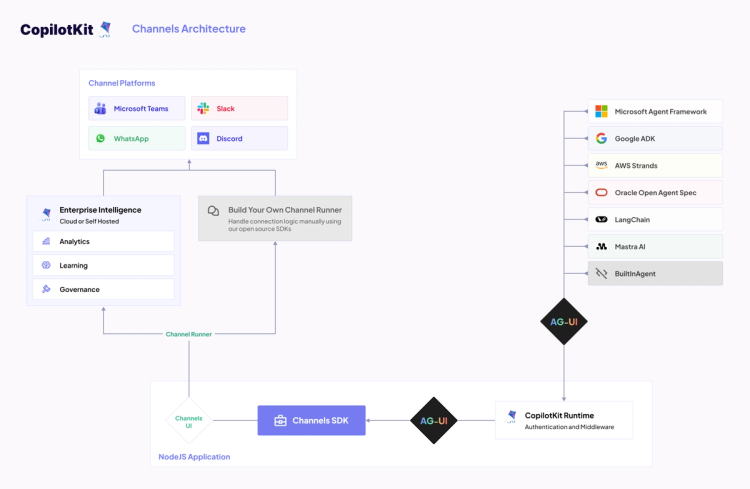
CopilotKit has integrations with 20+ agent frameworks, so your agent probably already speaks AG-UI. The runtime handles auth and middleware, then hands off to the Channels SDK. You write your components once in JSX and they render as Block Kit in Slack, Adaptive Cards in Teams and so on.
Here's the architecture of Channels SDK.
Sofía also tagged in Antigravity, a completely separate agent, and both agents worked in the same thread at once while she and her coworker edited a shared order together.
OpenTag just crossed 1.2k stars 🎉 and it's the fastest way in. It's a production-grade Slack agent built on the Channels SDK that you can clone and run today.
The channel file holds no agent logic, so you point it at your own backend and leave the rest alone. Grab it here: OpenTag repo.
The Channels SDK is open source, and Slack and Microsoft Teams are managed for you through CopilotKit Intelligence.
Want to bring CopilotKit into your stack? Talk to our engineers and we'll help you set it up.
Follow CopilotKit on Twitter for updates. If you get stuck, reach out in the CopilotKit or AG-UI communities.
Subscribe to our blog and get updates on CopilotKit in your inbox.