OpenBot vs Cursor: Self-Hosted AI Coworkers for Your Business

By Anmol Baranwal
October 22, 2026
OpenBot vs Cursor: Self-Hosted AI Coworkers for Your Business

Cursor is an AI coding tool for software teams. Companies buy Cursor Enterprise to give developers an AI editor, a CLI and cloud agents that work on their repositories and open pull requests.

OpenBot gives your company self-hosted AI coworkers that run on your own servers and connect to the tools you already use. It's fully customizable, works with any agent harness and any model, and keeps learning from how your teams work. With OpenBot for Business, our engineers set it up under your brand, with company sign-in, central controls, dedicated support and more.

For a business, the difference comes down to who the AI coworkers are built for, where the agent runs, whether you can bring your own agents and models, and how every action is checked.

What is Cursor Enterprise

Cursor, now a SpaceX company, gives engineering teams SAML SSO, SCIM, pooled usage, admin-only controls and audit logs that stream to Splunk, Sumo Logic, S3 or a webhook. Privacy Mode is on by default for Enterprise teams, so Cursor doesn't train on their code, and admins can enforce it for everyone.

Cursor runs the agent loop, the model calls and the planning in its own cloud. Companies can run the agent's tools on their own machines or deploy the CLI in their own cloud, and the repository checkout and build cache stay there. Developers can also start cloud agents from Slack and Microsoft Teams with @Cursor, and the agent replies with a pull request.

What is OpenBot for Business

Over the past few months, we open-sourced our own versions of the big AI coworker products: OpenBot (Grok Bot), OpenMuse (Meta Muse), OpenDots (OpenAI dots) and OpenTag (Claude Tag). OpenBot for Business turns that core into one business-ready product for companies that want AI coworkers on their own terms.

Your teams share AI coworkers that use your apps, finish real work and get better the more they're used. Each coworker can get its own computer and follows the rules your IT team writes. Coworkers show up in the OpenBot app on web, desktop and mobile, and in Slack and Microsoft Teams.

Our forward deployed engineers:
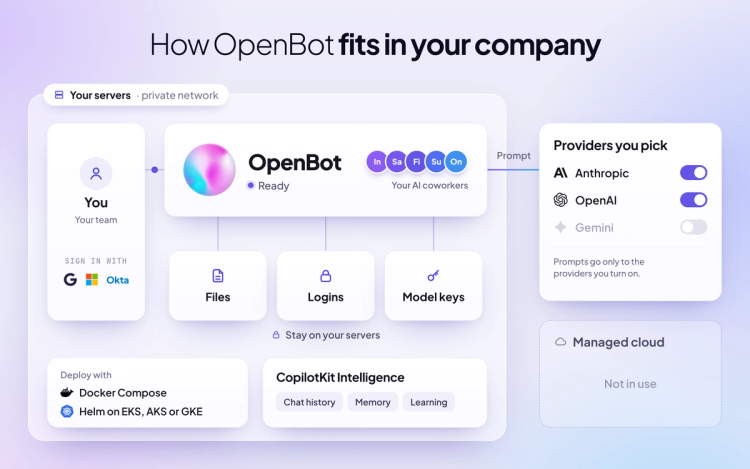
  • Deploy OpenBot on your servers, from a single machine to Kubernetes on EKS, AKS or GKE
  • Make it look like your own product, with your branding and your coworkers
  • Build your first AI coworker with you and provide dedicated support as your team grows
__wf_reserved_inherit

Cursor vs OpenBot at a glance

Both give your team AI agents that take requests in Slack and Microsoft Teams and finish work in the background. The differences show up in who they're built for, where the agent runs and how every action is checked.

  1. Who it's for
    • Cursor: software engineers, for code work that ends in a pull request
    • OpenBot: every team, from operations and finance to support and research, in the OpenBot app, Slack and Microsoft Teams
  2. Where it runs
    • Cursor: Cursor runs the agent loop, model calls and planning in its cloud. Tools can run on your machines or Kubernetes, and file contents and command output still go to Cursor. Cursor says "we don't offer on-premises deployment today"
    • OpenBot: the whole application runs on your own servers, from one machine with Docker to Kubernetes with Helm
  3. Data
    • Cursor: US-only data residency today, with EU and UK model calls on request. Cloud agents keep encrypted copies of your repositories only while they run
    • OpenBot: files and stored credentials stay on your servers. Conversations and memory live in CopilotKit Intelligence, which you can self-host or use in our cloud
  4. Agents and models
    • Cursor: Cursor's own agent, on Cursor, Grok and third-party models. Requests go through Cursor's backend, even with your own API key
    • OpenBot: any agent that speaks AG-UI (Agent-User Interaction Protocol) joins as a coworker, on OpenAI, Anthropic, Google or local models through any OpenAI-compatible server
  5. Training
    • Cursor: no training on your data with Privacy Mode on, which is the default for Enterprise teams
    • OpenBot: no model is bundled, so the providers you pick set the training terms
  6. Sign-in
    • Cursor: SAML SSO, plus SCIM 2.0 on Enterprise
    • OpenBot: Google, Microsoft, Okta, SAML and OIDC sign-in, plus SCIM 2.0
  7. Control and audit
    • Cursor: audit logs cover admin and security events and stream to Splunk, Sumo Logic, S3 or webhooks. They don't capture prompts, responses or code, and OpenTelemetry export covers agent metrics and logs
    • OpenBot: every agent action is checked against your IT team's rules before it runs, sensitive actions wait for a person, and every decision, allowed or refused, is recorded and streamed to your SIEM over OpenTelemetry
  8. Computers
    • Cursor: cloud agents run in isolated VMs in Cursor's cloud, and Grok Bot's computers run there too, one per member
    • OpenBot: each AI coworker can get its own computer on your servers, with its own browser, files and logins
  9. Apps and tools
    • Cursor: GitHub, Bitbucket, Linear and Slack, plus an app marketplace for deploys, CI, review, security and monitoring
    • OpenBot: Google Drive, Notion, a few hundred apps through Composio and any MCP server your admins approve
  10. Brand and setup
    • Cursor: Cursor's product, with its own branding
    • OpenBot: set up by our engineers to look like your own product

OpenBot's AI coworkers learn from your teams

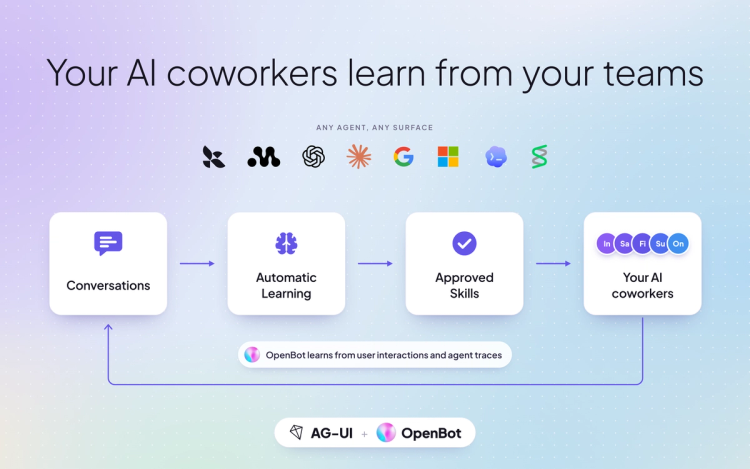
OpenBot's AI coworkers keep getting better from the work your teams already do. Everything they learn is visible and reviewable, and your company decides what sticks. All of it runs on CopilotKit Intelligence, which you can self-host or use in our cloud.

With User Memories, each coworker keeps your people's preferences and project context across conversations, for one user or shared across a project. Your team can list, update or remove any memory.

With the OpenBot Recorder, your team can show a coworker a task once in the browser, and OpenBot learns and repeats it. Admins manage learning centrally, and each coworker learns in its own container.

With Automatic Learning, OpenBot also reads your coworkers' finished threads, finds the patterns and proposes each insight as a skill. Every skill is a SKILL.md your team reviews, and it reaches your coworkers only after a person approves it.
__wf_reserved_inherit

Cursor or OpenBot: which fits your company

Cursor fits engineering teams that want an AI editor and cloud agents for their codebase, run by Cursor.

OpenBot fits companies that:

  • Want AI coworkers for every team, beyond engineering
  • Need the whole application on their own infrastructure
  • Need one set of rules that checks every action before it runs

Many companies can use both: Cursor for code, and OpenBot for the rest of the business.

OpenBot vs Cursor FAQ

1. What's the difference between OpenBot and Cursor?

Cursor is an AI coding tool for engineers, with the agent loop running in Cursor's cloud. OpenBot gives every team AI coworkers on your own servers, works with any agent and model, and is set up by our engineers under your brand.

2. Is OpenBot a Cursor replacement?

No. Cursor is built for writing code. OpenBot gives AI coworkers to every team, for work like operations, finance, support and research. Many companies can use both.

3. Can OpenBot be self-hosted?

Yes. OpenBot runs on a single machine with Docker, or on Kubernetes with Helm on EKS, AKS, GKE or your own cluster. Cursor runs the agent loop in its cloud, and its tools and CLI can run on your machines.

4. Does OpenBot have SSO and audit logs?

Yes. OpenBot includes Google, Microsoft, Okta, SAML and OIDC sign-in, SCIM 2.0 and an audit trail that streams to your SIEM. Cursor Enterprise has SAML SSO, SCIM and audit logs too. OpenBot also checks every agent action against your rules and records it before it runs.

5. Can I use my own agents and models with OpenBot?

Yes. Any agent that speaks AG-UI joins OpenBot as a coworker, and you pick OpenAI, Anthropic, Google or any OpenAI-compatible model. With Cursor, requests go through Cursor's backend, even with your own API key.

6. How do I get OpenBot?

OpenBot is free and open source on GitHub. OpenBot for Business is in early access. Book a demo at openbot.co/enterprise and our engineers will build your first AI coworker with you.

Get started

OpenBot brings self-hosted AI coworkers to every team, on your servers and under your rules. To see everything it can do, refer to the OpenBot for Business page.

To learn more:

Read more of our comparison blogs on OpenBot and other AI coworker products:

If you want to see OpenBot for Business in action, we suggest booking a demo. Our engineering team will build your first AI coworker with you and provide dedicated support as your team grows.

Stop renting your AI. Own it.

Follow CopilotKit on Twitter for updates. If you get stuck, reach out in the CopilotKit or AG-UI communities.
Top posts

See All
Ship Google Antigravity agents to your users with AG-UI, CopilotKit and OpenBot
Anmol Baranwal and Eli BermanNovember 3, 2026
Ship Google Antigravity agents to your users with AG-UI, CopilotKit and OpenBotGoogle Antigravity agents can now ship to your users. Antigravity is AG-UI compatible, with full docs and a live Dojo in CopilotKit, and OpenBot, our open-source AI coworker app, now runs coworkers on Antigravity. The Antigravity cookbook ties it all together in Repo Doctor, a full agentic app that fixes broken CI and proves the fix, with CopilotKit Intelligence, Google Cloud deployment and the complete source on GitHub. All open source.
Google Antigravity is now AG-UI Compatible
Anmol Baranwal and Eli BermanNovember 3, 2026
Google Antigravity is now AG-UI CompatibleGoogle Antigravity is now AG-UI compatible, so any Antigravity agent can run inside your app with CopilotKit. Antigravity is Google’s agent SDK, giving your code the same agent harness powering Google’s products. The ag-ui-antigravity integration streams every step the agent takes to your frontend, with generative UI including A2UI, human-in-the-loop approvals, shared state, frontend tools, attachments, and live rendering for Antigravity’s built-in file and shell tools. Try every feature in the Dojo or inside OpenBot.
How to build a Google Antigravity Agent That Fixes Failing CI with CopilotKit
Anmol Baranwal November 3, 2026
How to build a Google Antigravity Agent That Fixes Failing CI with CopilotKitGoogle Antigravity brings Google’s own agent harness to your code, with built-in tools to read files, run commands and edit code. In this tutorial, we use the new Antigravity AG-UI SDK and CopilotKit to build a debugging agent that finds why CI is failing, fixes it and proves the fix. The agent gets its own CI tools, approvals you can switch to auto-approve, and test results rendered as generative UI with A2UI. Every conversation is saved in CopilotKit Intelligence, and the whole app deploys to Google Cloud.
Are you ready?

Stay in the know

Subscribe to our blog and get updates on CopilotKit in your inbox.